Alpha | Responsive Premium Theme for Moodle
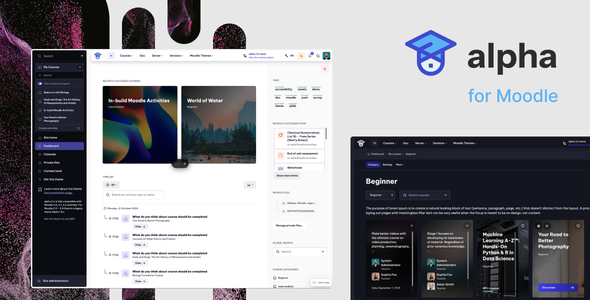
Alpha 2.5.24 is a cutting-edge Moodle theme that delivers a sleek, immersive user experience with extensive customization, broad plugin compatibility, and built-in SEO enhancements. It targets Moodle 5.0/5.1 and 4.5 LTS while providing clear security timelines to help keep installations secure and up-to-date.
Compatibility and Security Timelines
- Moodle 5.0 — Released: 14 April 2025; Security support ends: 14 April 2026
- Moodle 4.5 (LTS) — Released: 7 October 2024; Security support ends: 6 October 2027
- Moodle 4.4 — Released: 22 April 2024; Security support ends: 8 December 2025
- Moodle 4.3 — Released: 9 October 2023; Security support ends: 21 April 2025
- Moodle 4.2 — Released: 24 April 2023; Security support ends: 7 October 2024
- Moodle 4.1 (LTS) — Released: 28 November 2022; Security support ends: 8 December 2025
For the most current information on Moodle release schedules and security timelines, refer to Moodle Developer Resources.
Why Alpha 2 Moodle Theme?
Alpha 2 is more than a theme—it combines a modern dark-mode UI with deep customization, broad plugin compatibility, and SEO-conscious architecture to help you build a cohesive, high-performance learning platform.
Key Design and Format Compatibility
- Wide Plugin Compatibility
- Kickstart Format
- Tiles Format
- Collapsed Topics
- Onetopic Format
- Edwiser Course Format
- Flexible Sections Format
- And many more…
SEO-Optimized Architecture
- Custom Meta Descriptions to boost search engine visibility
- Custom Favicon and Apple Touch Icon for branding
- Theme Color Tag to enhance appearance in mobile browsers
Design & Layout Customization
- Color Customization: Tweak the theme’s palette to match your brand identity
- Top Bar: Customize height, colors, and include an optional “Edit Mode” toggle
- Sidebar & Footer: Complete control over layout, colors, and displayed content
- Custom Login Page Layouts: Choose from 5 professionally designed login layouts
- Advanced Course Page Configuration:
- Hide Course Index Navigation for a cleaner interface
- Simple Course List View for intuitive browsing
- Display Course Progress Bars and Teachers Sections globally
- Use custom course images for visual enhancement
Footer, Engagement and Front Page
- Enhanced Footer Options: social media icons, custom HTML blocks, or quick access buttons
- Engagement & Notification Tools: Custom Alert Bar for urgent announcements or promotions
- Front Page Blocks: 23 predefined layouts for maximum flexibility
Typography, RTL and Documentation
- Typography Flexibility: Supports Google Fonts; upload and use self-hosted fonts
- RTL Layout Support: Perfect for Arabic, Hebrew, and other RTL languages
- Comprehensive Documentation: Step-by-step guides to simplify customization
Final Thoughts
With Alpha 2, you gain a powerful design toolkit that blends aesthetics with functionality—providing SEO best practices, multilingual readiness, and a scalable foundation for modern online learning environments.
Changelog Summary
2.5.21 — May 20, 2025
- Fixed: Mod Lesson Missing Editor
- Fixed: Popover - Icon Color
- Fixed: Minor Bug Fixes and Improvements
2.5.18 — May 14, 2025
- Fixed: Badges
- Fixed: Grade Filter Issues
- Fixed: Minor Bug Fixes
2.5.18 — April 11, 2025
- Fixed: Minor bug fixes related to Moodle 4.5, 5.0
2.5.17 — February 9, 2024
- Fixed: Minor bug fixes related to Moodle 4.5 and Tiles Course Format
2.5.16 — January 15, 2024
- Fixed: Resolved issues with the missing Course Progress Bar
2.5.15 — December 6, 2024
- Fixed: Minor bug fixes for Moodle 4.5 and Tiles Course Format
2.5.15 — October 18, 2024
- Fixed: Minor bug fixes for Moodle 4.5
2.5.14 — October 11, 2024
- Fixed: Minor bug fixes for Moodle 4.5
2.5.13 — August 16, 2024
- Fixed: General minor bug fixes
2.5.12 — July 5, 2024
- Improvements: Enhanced WCAG compliance
- Fixed: General minor bug fixes
2.5.11 — April 5, 2024
- Fixed: General minor bug fixes
2.5.10 — February 21, 2024
- Added: Additional SEO Favicon options
- Improvements: UI enhancements for Quizzes, Lesson, and Feedback
- Fixed: General minor bug fixes
2.5.9 — February 5, 2024
- Fixed: Added support for FontAwesome 4
- Fixed: General minor bug fixes
2.5.8 — February 3, 2024
- Added: My Courses Area Position (Alpha - Sidebar - Display My Courses Area before Main Navigation)
- Fixed: General minor bug fixes
2.5.7 — January 21, 2024
- Added: Custom Alert ID (Alpha - Custom Alert - Custom Alert ID) to reset visibility
- Added: Realtime Quiz UI Support
- Improvements: Enhanced Block Timeline UI; Improved Feedback Activity UI; various UI refinements
- Fixed: Badges UI improvements; resolved remote badge image issues; etc.
2.5.6 — December 14, 2023
- Improvements: Advanced checkboxes feature; Border Radius Generator; Enhanced RWD
2.5.5 — December 13, 2023
- Added: FontAwesome 6.5.1
- Added: UI Support for QuickMail Plugin
- Improvements: Google Analytics Code moved to head; improved quiz UI and course activities
- Fixed: Competencies - Relocate Button issue; general fixes
2.5.4 — December 1, 2023
- Fixed: Course Card - Details Button issue
- Fixed: Course Index - Indentation issue (Moodle 4.3)
2.5.3 — November 28, 2023
- Fixed: Several improvements and bug fixes (Moodle 4.3)
2.5.2 — September 28, 2023
- Added: Child theme support
- Improvements: Enhanced Course Competency UI, Glossary UI, Course Index UI
- Fixed: General minor bug fixes
2.5.1 — September 12, 2023
- Improvements: Improved Course Index Drawer List Indentation
2.5 — September 7, 2023
- Added: Back To Top Button; Course Card Custom Fields; My Courses UI enhancements; Show/Hide Sidebar improvements; Admin settings UI
- Improvements: Theme settings and responsive layout enhancements
- Fixed: Multiple minor bugs across UI components
2.4.4 — June 20, 2023
- Fixed: General minor bug fixes
2.4.3 — June 6, 2023
- Fixed: Resolved missing buttons on Manage course categories and courses
2.4.2 — May 30, 2023
- Fixed: Resolved quiz bugs (Moodle 4.2)
2.4.1 — May 23, 2023
- Added: Default Course Image support
- Improvements: Enhanced Course Card usability; hover behavior; grid format UI; improved Grader UI
- Fixed: Badges UI issues; quiz and UI fixes; added support for Point of view - Feedback and OpenAI Chat
2.4 — April 21, 2023
- Added: Course Index Drawer areas and front-page block enhancements
- Improvements: Enhanced Right Sidebar; general UI improvements
- Fixed: General minor bug fixes
2.3 — March 18, 2023
- Added: New block area on the Course page (Right Sidebar); Front Page Block Areas; new course card options
- Improvements: Enhanced Dark Mode support
2.2.6 — March 8, 2023
- Fixed: General minor bug fixes (e.g., H5P Custom Styles)
2.2.5 — March 6, 2023
- Added: Hide Details Link (My Courses); Improvements: Workplace certificate UI, UI for various Moodle components
- Fixed: General minor bug fixes
2.2.4 — February 27, 2023
- Fixed: Grader Page - Select Field Issue (Moodle 4.1)
2.2.3 — February 25, 2023
- Added: Optional Admin button on the top bar
2.2.2 — February 23, 2023
- Added: Optional Dashboard Link inside the User Menu (Top Bar)
- Improvements: Frontpage admin menu; red-highlighted feature-disables in Theme Settings
- Fixed: Top Bar Logo Settings issues; Sidebar access for Guest users
2.2.1 — February 21, 2023
- Added: Settings for Call to action blocks (text size, weight, color)
- Improvements: Responsive layout; dropdown UI; improved admin front page navigation
- Fixed: Dark Mode issues; secure layout issues; general minor bug fixes
2.2 — February 18, 2023
- Added: FontAwesome 6.2.1; icons for custom modules
- Improvements: Course Index UI, navigation, debugging UI, RTL support, multiple front-page block areas
- Improvements: Advanced grading UI, Atto Editor, calendar UI, course list UI, feedback and quiz UI
- Fixed: Course progress bar issues; login language selector; general fixes
2.1.4 — September 22, 2022
- Fixed: Sign up layout issues
2.1.3 — September 21, 2022
- Added: Block #1 - Slider Interval; additional guest-class
- Fixed: H5P bug fixes
2.1.2 — September 15, 2022
- Fixed: Course Summary Image issues; improved login layouts; BigBlueButton UI Support
2.1.1 — September 12, 2022
- Fixed: Course Card Description issues; mobile login fixes
2.1 — September 12, 2022
- Added: Course Card Description max height; description toggle; teacher avatars; various login page enhancements
- Improvements: Extensive theme setting and layout refinements; multilingual readiness
2.0.0 — June 14, 2022
- Added: Initial release of the alpha Moodle Theme
1.0.0 — September 17, 2019
The information on this website is sourced from the
ThemeForest product page
.