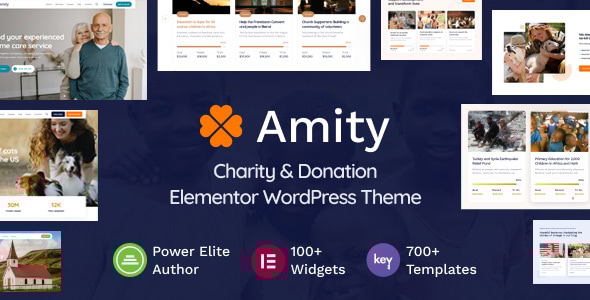
Amity - Charity & Donation Elementor WordPress Theme

Amity is a charity and nonprofit WordPress theme designed to create a strong first impression, streamline the donation process, and strengthen engagement with supporters through Elementor, GiveWP integration, and extensive customization options.
Core design, donation capabilities, and builder ecosystem
- Robust and professional design: craft a stunning, trustworthy online presence with a sleek design and intuitive layout that encourages support.
- GiveWP Plugin compatibility: easily integrate the popular GiveWP plugin to add a robust donation system with flexible options and built‑in payment solutions.
- 100+ Elementor widgets: access a broad set of widgets tailored to enhance functionality and visual appeal with a drag‑and‑drop interface.
- Exclusive Elementor Template Library: explore over 700 responsive templates to customize pages and sections across the site.
- Ready‑Made Starter Sites: start with 9 pre‑designed starter sites and use one‑click demo import to align with your branding quickly.
- Real‑time customization: preview changes instantly with Elementor’s real‑time preview across devices.
- Theme as a comprehensive solution: designed to elevate impact, streamline operations, and foster lasting community connections.
Starter sites and easy deployment
- Starter Sites: Amity includes a curated selection of professionally crafted starter sites, providing a designer‑ready starting point.
- One‑click import: import your chosen starter site quickly, avoiding complex setup.
- Ready‑to‑use content: starter sites include pre‑built inner pages; replace placeholder text and images with your own.
- Faster launch: accelerate your website launch, so you can focus on content, products, or services.
- Fully customizable: tailor the design to your brand within a user‑friendly interface.
Page Builder and live editing experience
- Page Builder – Powered by Elementor: a user‑friendly interface with extensive flexibility for building pages.
- Live drag & drop editor: design and adjust layouts in real time without coding.
- Responsive and optimized for any screen: control element visibility and positioning for pixel‑perfect design.
- Design any layout: craft layouts tailored to content, adjusting spacing, width, and height.
- Eye‑catching animations: entrance animations, hover effects, and smooth one‑page scrolling for engagement.
- Global design panel: manage global fonts and colors from a centralized location for consistency.
- Fully customizable from top to bottom: customize Header, Footer, and content areas with drag‑and‑drop ease.
Header, Footer, Mega Menu, and Popup/Off‑Canvas controls
Header Builder
- Design and modify the header on the front end with drag‑and‑drop Elementor elements.
- Create layouts freely, importing pre‑designed Header Templates to match branding.
- Incorporate images, videos, and interactive elements; responsive layouts adapt across devices.
- Use different headers for every page for maximum flexibility.
Footer Builder
- Design and customize the footer on the front end; assign multiple footers to pages.
- Import pre‑designed Footer Templates and customize them to fit the site style.
- Flexible, responsive design to match across devices and screen sizes.
Mega Menu Builder
- Craft content‑rich mega menus on the front end with drag‑and‑drop controls.
- Import pre‑designed Mega Menu Templates and customize to brand style.
- WooCommerce integration to insert shop widgets in mega menus.
- Integrate contact forms or Google Maps for quick access to information without leaving navigation.
- Mobile‑friendly with responsive design adjustments.
Popup & Off‑Canvas Builder
- Create lead generation layouts to expand subscribers and customers.
- Import professionally designed templates and customize to branding.
- Form integration for direct communication and streamlined lead capture.
- Diverse content options: images, videos, text, and widgets to suit brand messaging.
Widgets, templates, and extensibility
100+ Widgets and extensions
- Content widgets: Accordion, Advanced tabs, Blog posts, Button, FAQ, Heading, Icon box, List, Off‑canvas, Popup modal, Post list, Tabs, Text rotator.
- Business widgets: Business hours, Clients logo, Contact form 7, Google maps, Pricing compare, Pricing menu, Pricing table, Reviews, Social icons, Team, Testimonials, Toggle.
- Image & media widgets: Audio player, Gallery, Hotspot, Image accordion, Image box, Image comparison, Image hover effect, Image mask, Image swap, Video, Video gallery.
- Infographics widgets: Countdown, Counter, Pie chart, Progress bar.
- WooCommerce widgets: Category list, Product carousel, Product list.
Exclusive Template Library
- 600+ custom‑built template blocks designed for flexible layouts and broad use cases.
- Fully customizable blocks with spacing, alignment, and styling controls.
- Adaptable with global settings, ensuring seamless integration with your design system.
- Diverse background options: solid colors, images, videos, gradients.
- Color and font control with extensive options; light & dark versions available.
- Responsive, pixel‑perfect design across devices.
- Constant updates to expand the library with new blocks for various niches.
Updates, updates, and plugin compatibility
- Automatic updates: one‑click updates with simple admin panel access, including automatic downloads of the latest version.
- Update notifications: in‑dashboard alerts ensure you don’t miss important updates.
- WooCommerce integration: seamless compatibility to enhance store functionality and product display.
Content, blog, and portfolio features
- Blog: fully customizable with list and grid layouts; switchable layouts for content presentation.
- Portfolio: customizable portfolio pages with gallery and storytelling capabilities; filterable grids and masonry layouts; related items display; multiple design options.
Performance, optimization, and multilingual support
- Performance & Optimization: faster load times, regular updates, and the ability to turn features on or off to optimize speed.
- Mobile‑friendly responsive designs: advanced responsive options for device‑specific adjustments.
- Multilanguage support: compatibility with WPML, Polylang, and Loco Translate for global reach; easy content translation without coding.
Theme features, compatibility, and licensing
- Elementor Page Builder compatible; Header & Footer Builder; fixed and sticky header options; transparent header.
- Mega Menu, Popup, Off‑Canvas builders; unlimited font & color schemes; 800+ Google Fonts; Adobe Fonts integration; 1000+ Premium icons.
- Google Maps integration; coming soon & maintenance mode; social sharing buttons; conditional content; one‑page scroll and layouts; Lottie integration; sticky content; parallax sections; particles effect.
- WooCommerce integration; portfolio grid & masonry layout; portfolio filtering; multiple single portfolio and blog layouts; smooth scroll; retina ready; custom sidebars.
- Powerful admin dashboard; 100+ custom Elementor shortcodes; auto‑updates system; one‑click demo content import; WPML integration and translation ready; SEO optimized; child theme ready.
Help, support, and useful resources
- Help & Support: six months of free premium support with the regular license; business days support hours 10 AM – 6 PM (GMT +2); typical reply time around 24 hours.
- Useful links: Documentation, Customer support, Facebook community, Pre‑purchase FAQ.
Common questions and policy highlights
- Licensing: one license per public domain; additional licenses needed for additional websites.
- Development and migration: same purchase code can be used on development and live sites; migrate and delete from development after success.
- Trial and refunds: no trial version, but 7‑day refund policy.
- Updates: updates require an active license; updates delivered through the dashboard.
- Stock images: starter site images are stock‑free and usable on any site.
- Plugins: the theme provides necessary tools; advanced features can use additional plugins with support assistance for compatibility.
System requirements and technical essentials
- PHP Version: 7.4 or greater.
- MySQL version 5.7 or greater OR MariaDB version 10.4 or greater.
- HTTPS support; upload_max_filesize = 64M; memory_limit = 256M; max_input_vars = 3000; max_execution_time 120.
- allow_url_fopen ON.
Changelog
Version 1.6 – 15 December 2025
- Update KeyDesign Framework v2.3
- Update ElementsKit Pro v4.1.2
- WordPress 6.9 compatibility
Version 1.5 – 16 October 2025
- Added theme update notification in the dashboard area
- Update KeyDesign Framework v2.2
- Update ElementsKit Pro v4.1.1
- Fixed and optimized starter site and template library import
- Fixed required plugins update notifications
- Fixed icon alignment issue on Button widget when using Flip Effect
- Fixed background color style issue with Social Icons widget
- Fixed glow effect style issue with the Video Modal widget trigger button
- Fixed Elementor Pulse motion effect
- Fixed various style issues with the Elementor Optimized Markup feature
Version 1.4 – 13 May 2025
- Added option to show/hide the search bar on 404 page
- Update KeyDesign Framework v1.9.9
- Update ElementsKit Pro v3.8.6
- Fixed layout issue when overwriting page templates with Elementor Theme Builder
- Fixed sticky navigation scroll spy on Terms and Conditions and Privacy Policy pages
- Fixed layout issue with Elementor Pro Products widget on mobile and tablet devices
- Fixed dashboard area support status issue when renewing support
- Fixed issue with transparent navigation when "Show on scroll up" option is not enabled
- Fixed background color issue with Tooltip widget
- Fixed Contact Form 7 radio button style issue
- Fixed Elementor Pro textarea padding and min-height issue
- Fixed Toggle widget PHP warning message when no background color is selected
- Fixed alignment issue with anchors added inside the Stylish List on single blog post pages
- Fixed button color and background issue on single blog post pages
- Fixed spacing issue with Heading widget subtitle on mobile devices
- Fixed issue with Fancy Animated Text widget getting cut off on initial page load
- Fixed color issue with the strong HTML tag
Version 1.3 – 06 February 2025
- Update KeyDesign Framework v1.9.6
- Update ElementsKit Pro v3.8.1
- Fixed critical error when deleting the Elementor Default Kit
- Fixed script dependency warning message with the KeyDesign Framework plugin
- Fixed template overwrite issue with the 404 page
- Fixed style issue with the select field when using labels
- Fixed mobile menu style issue on 1024px screen resolutions
- Fixed mobile menu issue when enabling the "One Page Navigation" option
- Fixed icon spacing and size issue with the Button widget
- Fixed overlapping content issue on blog pages when enabling the sticky sidebar
- Fixed scroll issue on mobile with the site header area
- Fixed grid issue with the Basic Gallery widget on blog post pages
- Fixed icon display issue with the Popup Modal toggle button when Button Flip Effect is enabled
- Fixed Back top Top scroll animation
Version 1.2 – 21 November 2024
- Added filtering options with Portfolio widget
Version 1.1 – 22 August 2024
- Added option to show/hide the blog post tags
Version 1.0 – 15 April 2024
- Initial release