Appromote, Responsive Email Template for App Promo
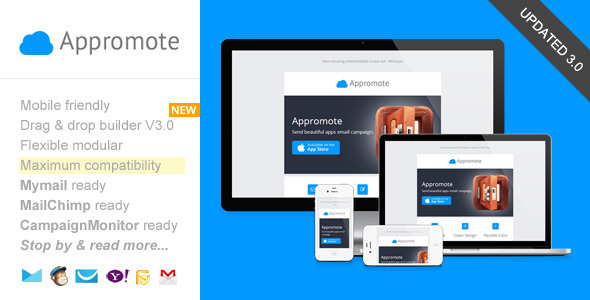
Appromote is a minimalist, mobile-friendly email template for app or product promotion featuring a new Template Builder. It includes ready-to-use templates and editor integrations for MailChimp, Campaign Monitor, and MyMail for streamlined campaigns.
Key features
- Drag & Drop Theme Builder / Editor
- MailChimp Ready
- Campaign Monitor Ready
- MyMail WP Plugin Ready
- Added free access to our new, simple, easy-to-use “Template Builder”
- Maximum clients compatibily, in all major email clients. From old Classic Yahoo! Mail, up to the most used clients like Apple iPhone.
- Mobile friendly, coded with media query CSS
- Background image that works in all major email clients including old Outlook.
- Minimum graphics elements for fast load email.
- Clean, minimalist, simple design
- Ready for Campaign Monitor, MailChimp, and MyMail plugin powerful template editor!
- 9 unique flexible modular that you can very easy to remix them to create your own layout.
- Flexible button with inline CSS (guide to create your own button, see next section). Very easy to make your own button and flexible to place it as your needs.
- On-going support along with detailed help documentation files (including the videos) – (cover how to work with PSD file, work with the HTML file, up to sending email with most popular email marketing services like MailChimp, GetResponse, Campaign Monitor, AWeber, MyMail plugin, and how to create your own button).
Editor integrations
- Appromote in MailChimp powerful editor
- Appromote in Campaign Monitor powerful editor
- Appromote in MyMail plugin powerful editor
There’s a detailed insruction from how to upload and setup template in to your MailChimp account, customize it, up to sending & testing email.
There’s also a detailed insructions (including video) from how to upload and setup template in to your Campaign Monitor account,customize it, up to sending & testing email.
There’s also a detailed insructions (including video) from how to upload and setup template in to your
Campaign Monitor account,customize it, up to sending & testing email.
MyMail WP Plugin Ready
- Add or remove modules easily with MyMail plugin editor.
- You can also set the theme color directly via the editor.
There’s also a detailed insructions (including video) from how to upload and setup template in to your WordPress website, customize it, up to sending & testing email.
What you’ll get in the download package
- Total 5 HTML files.
- 1 HTML files for MailChimp template , 1 HTML files for Campaign Monitor template , 2 HTML files for MyMail WP plugin templates , and 1 other for regular HTML template.
- 1 PSD files
- Image files, in the “images” folder in each of layout and color variations.
- Help Docs – Including videos.
Compatible Browsers
- Android
- AOL Mail Chrome
- AOL Mail Explorer
- AOL Mail Firefox
- Apple Mail
- Gmail
- Hotmail
- iPad
- iPhone 3, 4 and 5
- Lotus Notus 8
- Lotus Notus 8.5
- Mozilla Thunderbird
- Opera Mail
- Outlook 2003
- Outlook 2007
- Outlook 2010
- Outlook 2013
- Outlook.com
- Windows Live Mail
- Yahoo Mail
- And mostly all clients that render valid HTML
Updates history
- Version 3.0 – April 7 2015
- Updated theme builder. Added more useful features.
- Major template code updates in all template version
- Update 2.0 October 20:
- Updated Help docs. file. Updated to the Template Builder: Added more advanced template editing features.
- Update 1.1 June, 11, 2014:
- Added free access to our new, simple, easy-to-use "Template Customizer".
- - Customize the main color, and background.
- - Create any number of layout variations using the drag and drop editor, that very simple and easy to use.
- - Download your design in seconds.
Support requests
For support related, please send me your support request / question, or any advice via this contact form. I will respond you usually within 24 hours in Monday – Friday.
Credits
- Font awesome icons
- Images from:
- http://dribbble.com/shots/899177-Slide-Concept
- http://dribbble.com/shots/609379-App-Icon-Design-Wooden-Door
- Not included on the download package.
The information on this website is sourced from the
ThemeForest product page
.