Aquincum - Premium Responsive Admin Template
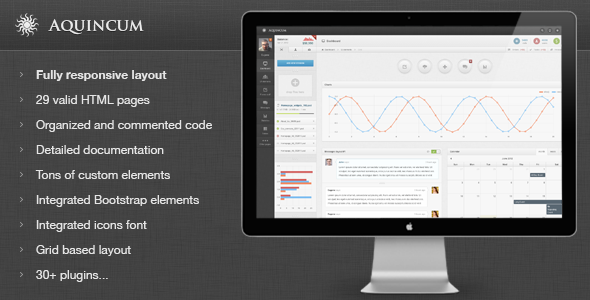
Aquincum – current version 1.2 – is a premium admin skin with 35+ plugins, a flexible 3-column liquid layout, and a 12-column content grid. It is Bootstrap 2.0.3 compatible and supports the latest jQuery versions for a responsive, highly customizable UI.
Overview
Aquincum provides a modern admin interface with a 3-column structure, 2-level sidebars, and a 3-level navigation system. It ships with 10 main backgrounds and a strong emphasis on Bootstrap integration, responsive behavior, and a rich set of components to build feature-rich dashboards and internal tools.
Key strengths include integrated Bootstrap plugins for easy UI enhancements, a broad widget ecosystem, and live preview cues that encourage exploration of the live demo. The template emphasizes usability on mobile devices and a flexible content layout suitable for varied data and content types.
Layout and navigation
- Three-column liquid layout with a 3-level main navigation and a 2-level sidebar for content organization.
- 12-column grid for main content and widgets, enabling flexible data presentation and responsive behavior.
- Responsive design compatible with mobile devices such as iPhone and iPad.
- Three-level main navigation, with the third level collapsed by default and available on click.
- Responsive top navigation that can serve as a user menu, with hidden buttons on small devices.
- User navigation accessible by clicking the user icon, with an inline block presentation on small screens.
Visuals and backgrounds
- Available 10 main backgrounds for visual customization.
- Design supported by Bootstrap 2.0.3 and latest jquery versions.
Widgets, components, and UI elements
- Custom sidebar and content widgets with 10+ widgets tailored for content areas and sidebar integration.
- CSS3 main buttons with 6 button types, all CSS-based.
- Datatables with toolbar featuring three toolbar variants: hidden by default, opened by default, and static opened.
- Animated login page with hover-based animation triggered from the login user icon.
- Messages layouts including two layouts with input field and a sidebar contact list.
- Responsive extra navigation top navigation suitable for user menus with small-device visibility controls.
Full features list: UI components and interactions
Form elements and inputs
- Default text input fields with placeholder, on-hover tooltip, read-only, disabled, maximum length, notes, and icons.
- Textarea elements with fixed height, character counter, and auto-growing behavior.
- Various input layouts with left/right floats and predefined values.
- Masked input features for restricted data formats.
- Dropdown and select lists with styling variations.
Tags, selects, and spinners
- 2 styles for tags input.
- Spinner controls supporting simple numbers, decimals, currency, and inline data.
- Styled checkboxes and radio buttons for clean UI consistency.
- Multi-select inputs with filtering and dropdown capabilities.
File upload and media
- File uploader with auto-detection of HTML version supported by the browser (HTML4/HTML5).
- HTML5 uploader features include drag-and-drop, progress bars, file size display, and multi-select; HTML4 offers a single-file uploader with a status bar.
- Styled single-file uploader for consistent aesthetics.
Rich text and editors
- WYSIWYG editor integrated for rich text content editing.
- Validation engines with popup and static validation modes.
Interactive UI components
- Multi-selects with filtering and dropdowns for efficient data selection.
- Auto tabs with row filtering for organized content switching.
- Integrated Bootstrap dropdown lists for consistent UI behavior.
- jQuery UI dialog variants: standard, modal, and with embedded forms.
- Lightbox support with mousewheel navigation.
- Color pickers and inline date pickers for quick input.
Navigation, grids, and data presentation
- Lightweight top navigation and middle navigation buttons with tooltips.
- Responsive content grid based on a 12-column framework for flexible layouts.
- Integrated source code viewer for reference and learning.
- Custom media table and data tables with pagination options.
Charts, graphs, and real-time elements
- Integrated Flot charts including lines, bars (vertical/horizontal with tooltips), pies, and auto-updating charts.
Tables and data grids
- Tables in multiple modes: dynamic, static, inside tabs, with custom pagination, with sortable speeds, resizable columns, and various visual themes.
- Dynamic table with 3 toolbar types: opened by default, closed by default, and static visible.
- Toggles and accordions for content organization.
Icons, assets, and look-and-feel
- 200+ standard icons in 2 colors and 200+ color icons.
- 500+ Icomoon font icons for scalable vector icons.
- 200+ custom error pages and 6 unique error page templates.
Widgets and widgets management
- 3 types of wizards for AJAX submit, validation, and standard submission workflows.
- Invoice template layout for finance-related dashboards.
- 2 messages layouts with integrated input and sidebar contact details.
Utilities and miscellaneous
- 4 tooltip directions: south, north, west, east.
- 3 button sizes and 5 types of middle navigation buttons with color icons.
- 6 background colors with font icons for visual variety.
- Animated progress bars with tooltips in multiple colors for content and sidebar areas.
- Growl-style notifications: sticky, basic, with header, and long live messages.
Content and file management
- Lightweight content grids for flexible data presentation.
- Live previews and testability via live demo interactions including tab and hover behaviors.
- File manager access for assets and resources within the admin UI.
Templates, layouts, and extras
- Invoice template and additional content layouts for business workflows.
- Experimental plugin for rounded progress bars to enhance visual feedback.
Support and maintenance notes
- Bug reports, visual oddities, or feature suggestions are welcome; the author commits to addressing issues as quickly as possible.
- Usual support availability: Mon – Fri, 9:00 – 20:00 CET.
The information on this website is sourced from the
ThemeForest product page
.