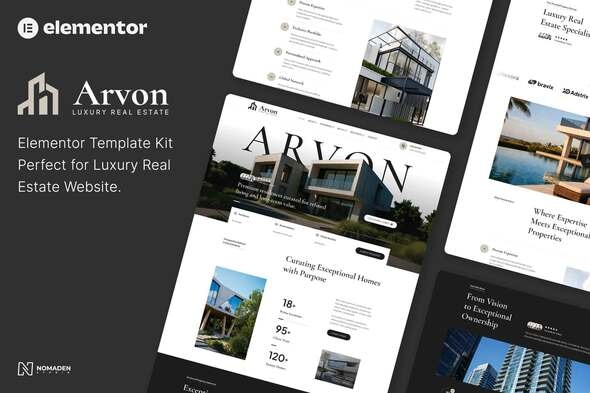
ARVON - Luxury Real Estate Elementor Template Kit
ARVON – Luxury Real Estate Elementor Template Kit is a refined, modern solution for luxury real estate agencies, developers, and consultants, featuring 16+ pre-designed templates and sections that are fully responsive and easy to customize—no coding required.
Layout Features
- Modern & professional design
- Cross-browser compatible
- Uses free plugins (no Elementor Pro required)
- 100% responsive & mobile-friendly
- 16+ pre-designed templates
- Global Kit Styles for easy fonts & colors management
Included Templates
- Home
- About Us
- Our Services
- Our Process
- Team
- Our Properties
- Single Property
- Blog
- Single Post
- Testimonials
- FAQ
- 404 Error Page
- Contact Us
- Header Rkit
- Footer Rkit
- Newsletter RForm – Block
- Request RForm – Block
- Contact RForm – Block
Plugins Used
- Elementor
- RTMKIT
- RTMForm Builder
How to Use Template Kits
This is not a WordPress Theme. Template kits contain the design data for Elementor only and are installed using the envato Template Kit Import plugin for WordPress or directly through Elementor.
Detailed Guide: How to Upload & Install Elementor Template Kits
For further support, go to Elementor > Get Help in WordPress menu.
How to Setup Forms with RTMForm
- Import the form blocks.
- Go to RTMKit Plugin > Theme Builder > Forms in the WordPress admin.
- Click “Add New”, enter a form name, then click “Save and Edit”.
- In the builder, click the gray folder icon, go to the My Templates tab, and click Insert on your form block.
- Click Publish (or Update).
- When customizing pages with forms, use the RForm widget and select the form you created.
Setup Global Header and Footer in RTMKit
- Import the Header & Footer blocks.
- Go to RTMKit > Theme Builder > Header in the WordPress admin, then click Add New.
- Enter a title, select “Header” as the type, then go to the Conditions tab, set it to “Entire Site”, and click Save.
- Click Edit with Elementor to open the builder.
- In the editor, click the gray folder icon, go to the My Templates tab, select your Header Template, and click Insert.
- Make any adjustments, then click Update to save.
- Repeat the same steps for the Footer under RTMKit > Theme Builder > Footer.
The information on this website is sourced from the
ThemeForest product page
.