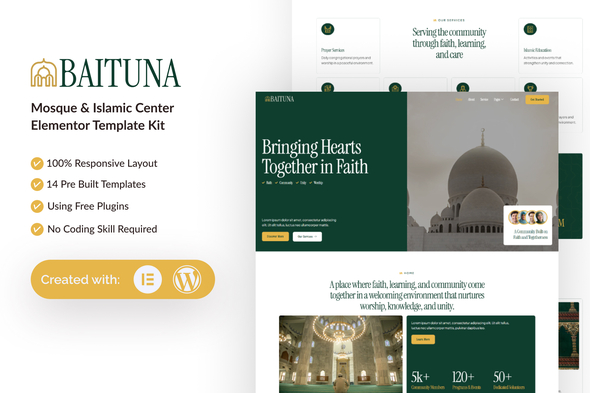
Baituna - Mosque & Islamic Center Elementor Template Kit
Baituna is a professional, modern and clean Elementor Template Kit designed for Mosque & Islamic Center. Built for WordPress, it seamlessly integrates with Elementor, enabling you to craft a professional website effortlessly—no coding skills required.
Features
- No premium upgrades required
- Unique & Modern Design
- Built with Container
- Includes 14 Ready-to-Use Pages
- Unlimited Color Options
- Access to 900+ Ready Fonts
- Fully Responsive and Customizable
- Cross-Browser Compatibility: Chrome, Firefox, Safari, Opera
Templates Included
- Global Theme Style
- Home
- About
- Service
- Event
- Charity
- FAQs
- 404 Error
- Blog
- Single Post
- Contact Us
- Header
- Footer
- Contact Form
- Newsletter Form
Required Plugins
- Elementor
- ElementsKit Lite
- MetForm
- Gum Elementor Addon
- Give – Donation Plugin
- GiveWP Donation Widgets for Elementor
- Ultimate Addons for Elementor – Lite
How to Use Template Kits
This is not a WordPress Theme. Template kits contain the design data for Elementor only and are installed using the envato Template Kit Import plugin for WordPress or directly through Elementor.
For further support
Go to Elementor > Get Help in WordPress menu.
How to Import Metforms
- If you have Elementor Pro, skip install of Metform and form blocks.
- Import the metform block templates
- Import the page template where the form appears and right-click to enable the Navigator
- Locate and select the Metform widget and click Edit Form. Choose New, then Edit Form. The builder will appear
- Click ‘Add Template’ grey folder icon.
- Click ‘My Templates’ tab.
- Choose your imported metform template, then click ‘Insert’ (click No for page settings).
- Once the template is loaded, make any desired customizations and click ‘Update & Close’ The form will appear in the template
- Click Update
Setup Global Header and Footer in UAE
- If you have Elementor Pro, headers and footers may be customized under Theme Builder.
- Go to UAE > Header Footer and click Add New button
- Give it a title and select Header, Display on Entire Website and click Publish
- Click Edit with Elementor
- Click the gray folder icon to access My Templates tab and select the header template to import and Update.
- Repeat for Footer.
GiveWP to manage campaigns and donations
You will need at least one GiveWP form created before that content appears in templates. Note the form ID, then select it in the GiveWP widgets.
Images
This Template Kit uses demo images from Envato Elements. You will need to license these images from Envato Elements to use them on your website, or you can substitute them with your own. Blog Content is not included – you will need to add a few posts to WordPress before post content will appear in templates.
Workspace: Envato Elements Workspace
The information on this website is sourced from the
ThemeForest product page
.