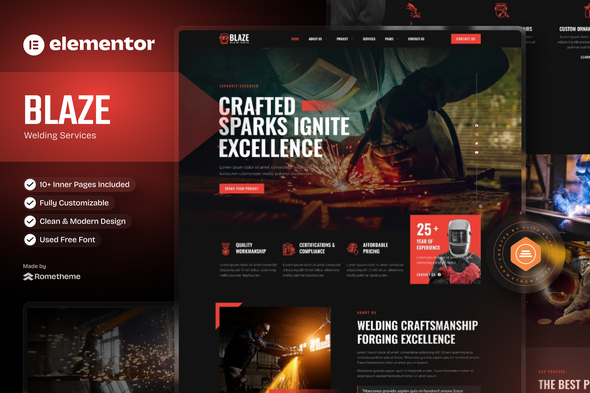
Blaze - Welding Services Elementor Template Kit
Blaze is a sleek Elementor Template Kit designed for welding and metal fabrication businesses. It delivers fast, ready-to-use pages that work with the free version of Elementor and require no heavy WordPress theme or Elementor Pro.
Why Template Kits over WordPress Themes?
- No Theme Lock-In: Template Kits give you full freedom — you’re not tied to a rigid theme framework.
- Faster Loading: Built with fewer dependencies, Template Kits are lighter and optimized for speed.
- Easy Setup: No child themes or complex configurations — just import and start customizing.
- Use with Elementor Free: Save costs — no need to upgrade to Elementor PRO.
Key Features
- Exclusive with RTMKit Addons for Elementor Plugin, developed by us.
- Unlock powerful tools like Theme Builder (Header & Footer), Premium Icons, Advanced Widgets, Extentions and Form Builder — all included for free. No need for Elementor PRO — everything works seamlessly out of the box.
- Performance-Focused — Built for speed with minimal plugin usage. Enjoy fast loading times, and a seamless browsing experience.
- 12+ Premium Pre-Designed Templates — Beautiful, modern templates crafted for various industries. Each layout is designed to look professional and convert visitors into customers.
- Free Plugin, No Elementor PRO Needed — All features work perfectly with the free version of Elementor. Save money while still getting premium-level functionality.
- Responsive Design — Your website will look stunning on any device — from desktops to tablets and smartphones.
- Easy to Customize — User-friendly structure with global kit styles and modify every section using Elementor’s intuitive drag-and-drop builder — no coding required.
- Lifetime Regular Updates — Stay up-to-date with ongoing improvements, and compatibility updates — all for free.
- Dedicated World-Class Support — Get expert help whenever you need it. Our friendly support team is available 24/7 to assist you.
Suitable For
- Welding service providers offering professional metalwork solutions.
- Metal fabrication workshops needing a clean and modern website.
- Industrial welding contractors wanting to showcase services and projects.
- Businesses looking for a high-quality, elegant way to present welding and steelwork services.
Templates Included
This kit provides everything you need:
Pages
- Homepage
- About Us
- Our Team
- Services
- Project
- Project Details
- FAQ
- Testimonials
- Gallery
- Blog
- Single Post
- 404 Error Page
- Contact Us
Bonus Blocks
- Block – Header
- Block – Footer
- Block – Newsletter Form
- Block – Contact Form
Plugins installed with kit
How to Use Template Kits
This is not a WordPress Theme. Template kits contain the design data for Elementor only and are installed using the envato Template Kit Import plugin for WordPress or directly through Elementor.
Detailed Guide: How to Upload-Install Elementor Template Kits from Themeforest to WordPress
For further support, go to Elementor > Get Help in WordPress menu.
Setup Global Header and Footer in RTMKit
- Import the Header & Footer blocks.
- Go to RTMKit > Theme Builder > Header in the WordPress admin, then click Add New.
- Enter a title, select “Header” as the type, then go to the Conditions tab, set it to “Entire Site”, and click Save.
- Click Edit with Elementor to open the builder.
- In the editor, click the gray folder icon, go to the My Templates tab, select your Header Template, and click Insert.
- Make any adjustments, then click Update to save.
- Repeat the same steps for the Footer under RTMKit > Theme Builder > Footer.
How to Setup Forms with RTMForm
- Import the form blocks.
- Go to RTMKit Plugin > Theme Builder > Forms in the WordPress admin.
- Click “Add New”, enter a form name, then click “Save and Edit”.
- In the builder, click the gray folder icon, go to the My Templates tab, and click Insert on your form block.
- Click Publish (or Update).
- When customizing pages with forms, use the RForm widget and select the form you created.
Images
This Template Kit uses demo images from Envato Elements. You will need to license these images from Envato Elements to use them on your website, or you can substitute them with your own. Blog Content is not included – you will need to add a few posts to WordPress before post content will appear in templates. Envato Elements collection.
The information on this website is sourced from the
ThemeForest product page
.