Buildlux - Construction Elementor Pro Template Kit
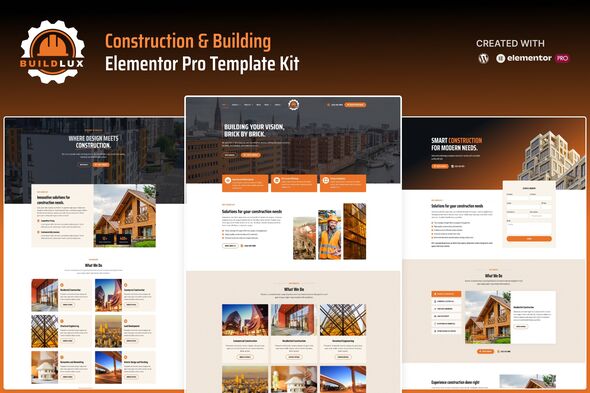
Buildlux is a professionally designed template kit built with the Elementor Pro WordPress page builder, crafted for construction companies and related services with fully customizable, responsive templates to showcase services and portfolios.
What Buildlux offers
Target industries and use cases
- construction companies and related services
- contractors
- engineering firms
- architecture studios
- real estate developers
- interior designers
- home decor specialists
- home maintenance providers
Design and customization capabilities
- Designed with Elementor
- Flexbox container
- 20+ fully ready-made templates
- Built with Elementor Pro
- True no-code customization with drag and drop visual builder
- 100% Fully Responsive & mobile-friendly
- Customize fonts and colors in one place or fine-tune on individual elements
- SEO-friendly design and fast-loading
- Works with most Elementor themes
- Lifetime free updates
Templates Included
- Home
- Home 2
- Home 3
- Services 1
- Services 2
- Single Service
- Projects
- Single Project 1
- Single Project 2
- About Us
- Book Appointment
- Pricing
- Our Team
- Our Clients
- Testimonials
- FAQs
- Blog
- Single Blog Post
- Contact Us
- 404 Page
- Main CTA Banner (Global)
- Sidebar Block (Global)
- Header
- Footer
- Global Style Kit
Installation, usage and dependencies
This is not a WordPress Theme. Template kits contain the design data for Elementor only and are installed using the Envato Elements plugin for WordPress. Elementor Template Kits use the Envato Elements plugin to install. Elementor Pro upgrade (purchase separately) is required for most templates and features (not included).
Theme Builder parts such as Blog Posts, Blog Archive, Header, Footer, Single Post Layout, Popup and Post Loop are managed through Templates > Theme Builder.
Detailed Guide:
How to Upload- Install Elementor Template Kits from Themeforest to WordPress
Setup CTA or Sidebar
- Import the Main CTA and Sidebar blocks and customize it from Templates > Saved Templates.
- Create / open the page where the CTA or Sidebar should appear in Elementor.
- Locate the Template element in the navigator and select the block from the dropdown.
- Alternatively, set the CTA and Sidebar Block templates to Global and insert the block directly into your pages from the My Templates library. For more information on Globals, see Elementor > Get Help in your admin menu.
Blog content and licenses
Blog Posts
Blog content is not included – you will need to add a few posts to WordPress before post content will appear in templates.
Images License
This Template Kit uses demo images from Envato Elements. You will need to license these images from Envato Elements to use them on your website, or you can substitute them with your own.
https://elements.envato.com/collections/RG7LMUAS6X
The information on this website is sourced from the
ThemeForest product page
.