CarLane - Car Rental Elementor Template Kit
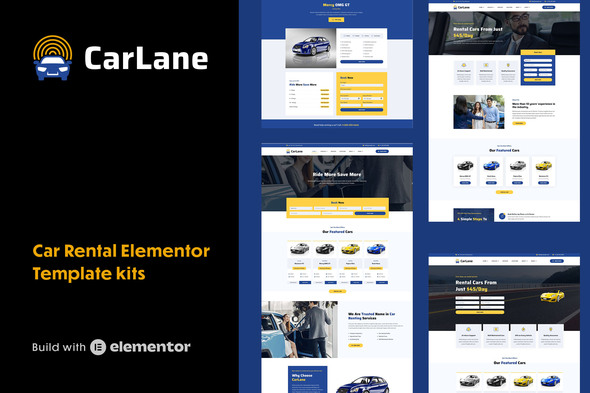
CarLane Elementor Template Kit provides a distraction-free booking experience with quick-proof mini forms and a full suite of pages to build contemporary car rental and vehicle listing websites using Elementor.
Key features of the CarLane Template Kit
- 23 Full page templates – ready to use immediately.
- 42 block templates designed to build any layout easily.
- Distraction-free multi-step booking form.
- Full-ready to use blog layout system.
- Global Styles included.
- Total color and typography customization.
- SEO-friendly design.
- No coding knowledge is required.
- Easily workable form builder.
- Header and Footer builder.
- 100% responsive layout.
- Cross-Browser Compatible.
- Built with Elementor Pro.
Included Full Page Elementor Templates
- Home Page 1
- Home Page 2
- Home Page 3
- Home Page 4
- Vehicle Grid Layout
- Vehicle List Layout
- Single Vehicle Details Page
- Single Vehicle Details Page 2
- Services
- About
- Locations
- Team
- Clients
- Testimonials
- Gallery
- Booking Page
- Pricing Page
- FAQs
- Contact
- Blog Page
- Blog Archive Page
- Single Blog Post
- 404 Page
- + 42 block templates
Required plugins and compatibility
- Elementor
- Qi Addons For Elementor
- Elementor Pro upgrade (purchase separately) is required for most templates and features (not included).
How to install and use Template Kits
This is not a WordPress Theme. Template kits contain the design data for Elementor only and are installed using the envato Elements plugin for WordPress or directly through Elementor.
Elementor Template Kits use the Envato Elements plugin to install.
Elementor Pro upgrade (purchase separately) is required for most templates and features (not included).
Detailed Guide: How to Upload & Install Elementor Template Kits
For further support, go to Elementor > Get Help in WordPress menu.
How to setup Call to Action (CTA) blocks
- Import the CTA blocks and customize them.
- Edit the template where the CTA blocks appear (such as Home Page, Service page, etc.)
- Click on the Template element in the bottom CTA area and make sure your CTA block is selected.
Assets and licensing
This Template Kit uses demo images from Envato Elements. You will need to license these images from Envato Elements to use them on your website, or you can substitute them with your own. Blog Content is not included – you will need to add a few posts to WordPress before post content will appear in templates.
Envato Elements collection: 94PLVU23Y6
The information on this website is sourced from the
ThemeForest product page
.