CoffeeBean - Portfolio and Blogging WordPress Theme
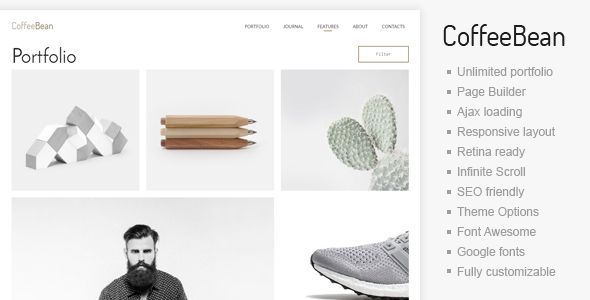
CoffeeBean is a minimal WordPress template designed for portfolios, blogs, and contact pages, featuring responsive masonry layouts in 3, 4 columns or full width. It emphasizes easy setup, extensive portfolio options, and a clean, modern design for freelancers, photographers, videographers, agencies, or studios.
Key capabilities
- Fully responsive layout with masonry and grid options for a flexible portfolio presentation.
- Masonry portfolio with 3, 4 columns and full-width variations for diverse visual storytelling.
- Infinite AJAX-driven portfolio scrolling for seamless browsing of projects.
- Three column style – 3, 4 and full width with infinite loading, filtering and lot of useful features.
- Page builder integration and no shortcodes required; “No shortcodes! Just page options and Page Builder.”
- Video Portfolio and video options including autoplay and captions for video popup.
- Blog pages that leverage the same Page Builder tooling and custom backgrounds.
- Custom widgets with social services icons, contacts, and latest portfolio works.
- Instagram and Twitter widget ready for social content integration.
- Change logo and links color (main color), favicon, and grid style for full customization.
- Google Fonts support for header text, body text, and other elements.
- Font Awesome retina icons and CSS3 content animations for a polished user experience.
- All widget areas in Header and Footer are customizable for flexible layouts.
- Cross-browser compatibility and translation-ready strings for international use.
- WordPress 6 ready and PHP 8.3 support, with ongoing theme updates and documentation.
- Demo content included to quickly import a ready-to-use site; free theme updates provided.
- Localization and translation features to support multilingual sites.
Design, typography and customization
- Clean, modern, multi-purpose design suitable for any type of website.
- New version 1.23 introduces new video options, autoplay and captions for video popup.
- Google Fonts support across elements such as headers, menus, logos, links, and body text.
- All text strings are translation ready for easy localization.
Portfolio capabilities
- Infinite loading and filtering for an expansive, easily navigable portfolio.
- Dedicated video portfolio options, including header video features and video gallery templates.
- Portfolio templates include Masonry 3 columns and later enhancements for 3 and 4 column layouts.
- No shortcode reliance—portfolio content is created via Page Builder/page options.
- Summary pages and individual portfolio items designed for high-impact presentation.
Page builder and content creation
- CoffeeBean provides a simple page builder to generate any content with creative layouts.
- Example content blocks include: Page with custom background, Portfolio item with Page Builder, Slider gallery in header, Tiled gallery in header, and Masonry gallery in header.
- Blog page with Page Builder; Blog with Video and custom background examples.
- Import free demo content for a fast start and easy customization.
Who can use CoffeeBean
- Designer
- Architect
- Photographer
- Videographer
- Freelancer
- Blogger
Typography, icons and technical compatibility
- Google Fonts support across the theme for flexible typography choices.
- Font Awesome retina icons for crisp visuals on high-density displays.
- CSS3 content animations for engaging interactions.
- Cross-Browser Compatibility to ensure consistent rendering.
- Good PDF documentation to help with setup and customization.
- All text strings are translation ready for localization.
Support, updates and documentation
- WordPress theme support available via email from the author.
- Demo content included and free theme updates provided.
- Localization and translation-ready features to support multilingual sites.
Version history
Version milestones and notable changes reflect ongoing improvements and new capabilities.
- VERSION 1.0: release
- VERSION 1.1:
- new Navigation Arrows for Projects and Post turn off option
- bug fixes
- VERSION 1.2:
- new option Video in Portfolio Page header, linked from Vimeo/Youtube or selfhosted instead of picture
- VERSION 1.3:
- new dropdown menu for mobile versions
- VERSION 1.4:
- new page template with fulscreen image
- VERSION 1.4.1:
- Page builder available in portfolio templates now
- VERSION 1.5:
- New Portfolio template - Masonry 3 columns
- VERSION 1.6:
- masonry portfolio 3 and 4 columns with header
- switcher between masonry ans classic relates projects
- video portfolio support
- VERSION 1.7:
- autoplay for Youtube and Vimeo, captions for popup video
- google map bug fixes
- VERSION 1.8:
- stability improve and PHP bug fixes
- new option for portfolio images - show original image
- VERSION 1.9:
- new lightbox gallery
- Google Maps API key added
- latitude and longitude for maps
- VERSION 1.10:
- new full width video template
- new page builder gallery Grid 3 and 4 columns
- new option to hide a project header image
- VERSION 1.11:
- new page preloader image option
- VERSION 1.12:
- new video portfolio info button option
- packery portfolio bug fixed
- masonry java script plugin bug fixed
- google map bug fixed
- video portfolio bug fixed
- VERSION 1.13:
- new gallery options
- option for hiding recent portfolio filters
- VERSION 1.14:
- Google fonts API key settings
- VERSION 1.15:
- bug fixes
- stability improvements
- wordpress 5.3 support
- VERSION 1.16:
- wordpress 5.4 support
- bug fixes
- Gutenberg editor support for Portfolio projects
The information on this website is sourced from the
ThemeForest product page
.