Datta Able Bootstrap 5 Admin Template
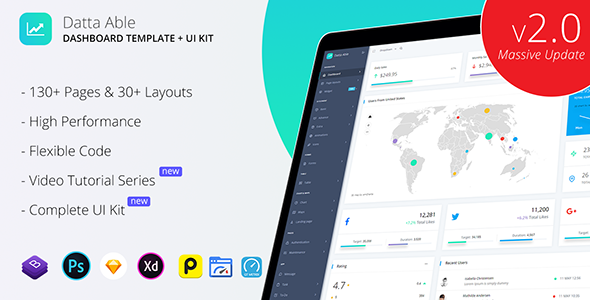
Datta Able Admin Template, built on Bootstrap 4, offers flexible dashboards suitable for both simple and complex projects, with live customization, rich components, and comprehensive documentation to accelerate UI development.
Features
- 20+ Page layouts (+counting)
- Live customizer to choose what setting your project desire
- Well structured code styles
- Fully responsive and browser tested design
- Eye catchy color styles
- Made for performance and high aesthetic code
- Detailed video tutorial series with online documentation
Detailed
- Detailed video tutorial series with online documentation
About Design
Pure eye catchy and vibrant colors are used in Datta Able Dashboard Template. More than 30+ preset color combinations come up with templates. You can also apply your custom color combination via a single change in the SCSS file with the help of a Documentation OR video helper guide.
Layouts
- Combine of Menu and page layouts with 20+ variants (still counting) comeup with package. Each layout have tons of options higlighted in Live customizer. Please check demos first.
Available layout color presets
- Default (i.e. Dark Light)
- Dark
- Light Dark
- Fill color
- Color icon
- Background image
- Material style
- Gmail style
Layout setting presets
- Vertical
- Horizontal
- RTL
- Box
- Header fixed
- Menu fixed
- Collapse
- Smart Menu
Smart Menu
We called Datta Able sidebar menu as a SMART MENU because we’ve applied all the possible options with one click live customizer. Check the detail setup tutorial about how its working – video
- Smart menu have various settings like
- Fill Color
- Active color
- Horizontal/Vertical
- Collapse
- RTL
- Icon color
- Open/Close icon
- Material Inspired Design
- Gmail Inspired Design
- Image Background
Colors
We’ve choosen cool eye catchy colors for entire Datta Able Admin Template. 30+ light color combination available which makes Datta Able completely differ to other dashboard templates.
- Light Blue
- Light Red
- Light Purple
- Light Gray
- Dark
- Gradient Colors
Chart
Dashboard needs chart to highlight statistics data in your project. We’ve implemented more than 40+ charts with tons of variety options. For your flexibility Datta Able come with extra helper page for chart.
Chart types
- amChart 4
- chartJS
- eChart
- Google chart
- Highchart
- knob
- Morris
- nvd3
- peity
- redial
Maps
- Google maps
- Vector
- Gmap search API
- Location
Responsive
Datta Able design fully support each responsive device sizes even it is retina screens and tested in major devices like iPad, tablets, mobiles. We’ve improve Datta Able design in various aspects like smooth rendering, easy scroll, reduce design glitch etc… Design passed by Google Mobile Friendly Test.
Widgets
150+ ready to use widget collection like statistics, analytics, user cards, charts, tables, chats, data widgets, slider widgets.
Components
Datta Able Admin Template comes with all Bootstrap basic components and we’ve also implemented extra 3’rd party tons of components which are listed below. All components are in the latest version too.
Advance components
- Sweet alert
- Date Picker
- Grid Helper
- LightBox
- Modal
- Notification
- Nestable
- pNotify
- Rating
- Range Slider
- Syntax Highlighter
- Tour
- Tree view
- Toolbar
Form Components
- Switches, Radio, Checkbox, Tags input, max length
- Validation forms
- Form Masking
- Form Wizard
- Form pickers – Datepicker, color picker
- Select 2
Tables
Extra
- Session timout
- Offline
- Animations
- Icons
- Feather
- Font Awesome5
- Flag
- Material
- Simple Line icon
- Themify
Performance
Datta Able Admin Theme is made for performance and we’ve achieve it in terms of design testing or code testing. The design passed with a good score in Google Page Speed, Pingdom, GT Metrix and code passed via w3 validators.
notes – live demos have tons of features active, due to server location score may differ in Google Page Speed, Pingdom, GT Metrix.
App & Extensions
Datta Able comes with variety of 3’rd party app & extensions which directly usable in your project. We’re continously working on next app & extensions for future release version update.
App
- Message
- Task
- To-do
- Gallery
Extensions
- Editor – ckEditor, Tinymce
- Invoice
- Full Calendar
- File upload
Flexibility
Design and code are fully flexible to use directly in your project setup via Documentation helper, video helper tutorial, and separate page for direct copy/paste(components, charts, widgets, form elements).
Our newly lanched video series helps you in every steps in your development 24×7 without contacting further in our support desk. Request new feature/video tutorial – contact us.
Support
Separate support desk for quick resolution of your query. Our previous support ratio result is – 90% query resolution in 1’st response.
Purchased Package Includes
- Theme Package without Live Customizer & Page Builder (i.e. Demo Purpose only)
- Live demo preview image is included in package as all are under in free license
- Documentation included in template directory with docs.html file name
Resources & Credits
- Bootstrap 4
- Open Sans – Google Font
- Free Images – Icon Finder
- Plugins References – See our Documentation
Important
- For amChart commercial use without watermark of amChart. Visit – amCharts
- Get 15% Off on amCharts licences. Use coupon code “codedthemes”
- This is Bootstrap HTML version and do not compare demos with Datta Able Angular version, React, Vue JS, etc…subsequent version.
Note
This is Bootstrap HTML version and do not compare demos with Datta Able Angular version, React, Vue JS, etc…subsequent version.
The information on this website is sourced from the
ThemeForest product page
.