Enso - Minimal Photography and Portfolio WordPress Theme
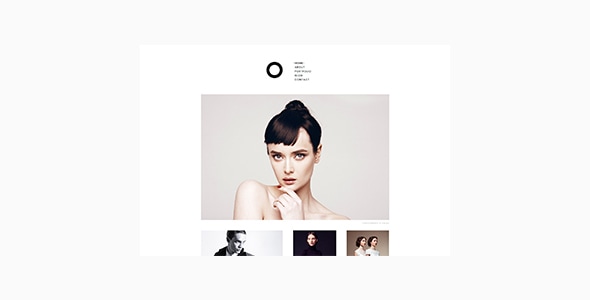
Enso is a simple, elegant, and content-focused WordPress theme designed to showcase portfolios with a responsive, lightweight, and highly customizable experience. It includes extensive options for typography, layouts, and portfolio presentation.
Key features
- 100% responsive design
- Minimal, elegant, clean and content-focused design
- Lightweight, fast and very easy to use
- Two types of the menu display: vertically or horizontally
- Portfolio feature for publishing your works
- Image, Video, or Mixed format for portfolio items
- Page templates for portfolio listing
- Page content can also be displayed with portfolio listing
- (Added in v1.0.2)
- Portfolio styles and options in the Customizer to configure the output.
- Compatible with Contact Form 7
- Customizer feature for adjusting styles and theme options. For examples:
- Typography combination
- Font attributes in various areas (font size, weight, letter spacing, and color)
- Show/hide next/previous post navigation
- Blog excerpt length
- Enable/disable lightbox on portfolio single pages
- and more!
- Social media icons
- Compatible with Google Fonts in Typography section
- WordPress Block Editor optimized
- Compatible with WPML plugin
- Compatible with Polylang plugin
- Translation-ready
- Well-organized code and file structure
- Fully support WordPress Child Theme
- XML data file included
- Extensive documentation
Design, customization & typography
- Typography customization options in the Customizer
- Font attributes in various areas (font size, weight, letter spacing, and color)
- Show/hide next/previous post navigation
- Blog excerpt length
- Enable/disable lightbox on portfolio single pages
Compatibility, support & requirements
This theme is for self-hosted WordPress sites only (wordpress.org). It is not compatible with “wordpress.com” sites. Here are the differences between the two:
https://uxbarn.com/go/wordpress-org-vs-wordpress-com/
Most photos in the live preview are not included in the package. However, we have instead created all image placeholders for you so you can quickly apply your own images to the areas.
Connect with Us
Let’s get in touch for the latest news and updates!
Support
We fully support operational components such as features usage, issue, bug, or the fix that are mainly related to the theme and to make the theme working properly. Please go to
http://uxbarn.ticksy.com/ for our support site.
Thank You
Thank you so much for your interests. Your comments and ratings would be much appreciated.
Changelog
Version 2.1.0 (Apr 18, 2021)
- New: Fancybox 3 option for the lightbox (Customize > General Options)
- New: Custom social networks (Customize > Site Identity)
- New: Polylang plugin support
- New: Customizer options: blog meta info display (Customize > General Options)
- Fix: Word wrap issue in the comment section
- Fix: Missing footer widget area bg color option
- Fix: Submenu width problem on tablet views
- Update: WP Block Editor optimized
- Update: Fast preview (no reload) when adjusting colors and some other styles in the customizer
- Update: Google Fonts parameter loading
- Update: ACF Pro to 5.9.5
- Update: Envato Market to 2.0.6
- Update: POT file
Version 2.0.0 (Jan 16, 2019)
- IMPORTANT: OptionTree is deprecated in this version. ACF will be used from now on (v2.0.0+). Users will see a notice for data migration button and announcement.
- New: Advanced Custom Fields PRO 5.7.9
- Update: Disable the default loading logo of the Kirki plugin
- Update: UXBARN Portfolio to 1.2.5.1
Version 1.0.5 (Nov 14, 2018)
- Fix: OptionTree pre-packaged
Version 1.0.4 (Sep 22, 2018)
- Update: Unminified some JS files that probably are the cause of the false-positive alert by Windows Defender
Version 1.0.3 (Dec 19, 2017)
- New: RSS & Email Icons
- Fix: Remove unwanted "p" tag in the author bio
- Fix: Kirki "alpha" in color controls issue
- Fix: Create $custom_logo to use with "empty()" in "enso_is_site_title_h1_allowed()"
- Fix: Missing loading@2x image of Fancybox in jquery.fancybox.css
- Fix: Adjust the bottom of the Fancybox thumbnail to fix the unusable bottom scrollbar
- Update: Make Fancybox text translatable
Version 1.0.2 (May 25, 2017)
- New: Option for changing the "Type and hit enter" text via the theme customizer (General Options section)
- New: Option for showing page content on portfolio templates via the theme customizer (Portfolio Styles section)
- Fix: "paged" parameter of WP_Query to make pagination works on the homepage
- Fix: Blurry close button of mobile menu
- Fix: "main" tag display problem on IE11
- Update: HTML tags revision
- Update: UXBARN Portfolio & Author plugins to 1.2.2.2 and 1.0.1.1
- Update: Documentation
- Update: POT file
Version 1.0.1 (Mar 10, 2017)
- New: Mixed format for portfolio
- Fix: Restored "Attachment Details" panel that will be visible when adding portfolio images
- Fix: Submenu display issue when using horizontal menu
- Fix: Widget description that point to the wrong Customizer section
- Update: POT file
The information on this website is sourced from the
ThemeForest product page
.