Estatia – Real Estate & Property Listing Elementor Pro Pro Template Kit

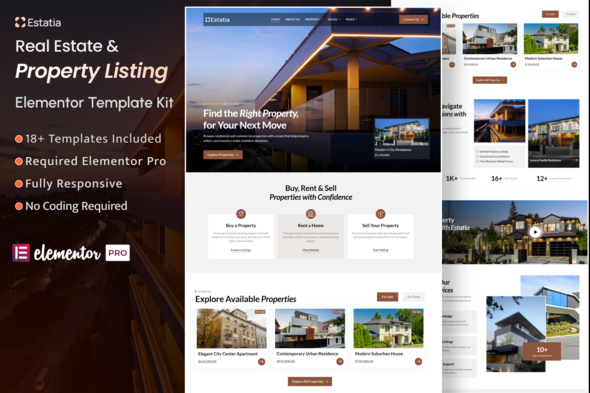
Estatia is an Elementor Pro Template Kit designed for real estate agencies, property listing platforms, and realtors who want a clean, structured website. It includes 18+ pre-built templates with drag-and-drop customization to speed up site creation.
About Estatia Template Kit
Estatia is an Elementor Pro Template Kit built for real estate businesses, property agents, apartment listings, property management companies, and architecture-related services. The kit features a modern layout, well-organized sections, and ready-to-use pages to showcase property listings, services, and agent profiles in a clear, easy-to-navigate format. It is optimized to work with Elementor Pro and is designed to save time during site construction.
Core Features
- Built with Elementor Pro
- Clean, modern, and real estate-focused layout
- 12+ Ready-to-use Templates
- Property listing, buying & selling layouts
- Global Colors & Typography
- Fully Responsive Layout
- Easy Drag & Drop Customization
- SEO-friendly structure
- Fast loading and lightweight design
- Cross-browser compatibility (Chrome, Firefox, Safari, Opera)
Templates Included
- Global Theme Style
- Home
- About Us
- Property Listing
- Property Details
- Blog Archive
- Single Post
- Our Agents
- Agents Single
- Services
- FAQ
- Testimonials
- 404 Error
- Contact
- Header
- Footer
- Contact Form
- Booking Form
- Search Form
- Category Rent & Sell
- Loop Rent & Sell
Required Plugins (included)
- Elementor Pro
- Woocommerce
- Jeg Kit for Elementor
- MetForm
How to Use Template Kit
This is not a WordPress theme. It is an Elementor Pro Template Kit. Install it using the Envato Template Kit Import plugin or by importing the templates directly into Elementor Pro.
Detailed Guide
For step-by-step guidance, refer to Envato’s Help article: How to Upload & Install Elementor Pro Template Kits from ThemeForest to WordPress.
Additional support is available from Elementor Pro via its WordPress menu.
MetForm Custom Form: Import Steps
- Open the page where a MetForm should appear, then open the Elementor Pro navigator to locate the MetForm widget.
- Click Edit Form in the builder panel.
- Select New, leave blank selected, then click Edit Form.
- Click Add Template (grey folder button).
- Click My Templates tab.
- Choose your imported MetForm template, then click Insert.
- Once loaded, click Update.
Demo Property Import
- Navigate to Dashboard > Tools > Import.
- Choose WordPress and run the importer.
- Upload the file and import, ensuring you check the option “Download and import file attachments”.
- Submit to complete the import process.
Setup Global Header and Footer in Jeg Elementor Kit Template
If you have Elementor Pro, set up headers and footers in Theme Builder. Pages created with Elementor Pro should use the Page Layout set to Elementor Pro Full width for the global header and footer to appear.
- Go to Jeg Elementor Kit > Header Template.
- Click Add New Header.
- Set Add condition to All Site and click Create.
- Click the pencil icon to edit; Elementor will open.
- Click the gray folder icon to access My Templates tab.
- Insert the header template.
- Customize and Save.
- Repeat the steps for the Footer template.
Important: Demo Images Licensing
This Template Kit uses demo images from Envato. You will need to license these images from Envato to use them on your website, or substitute them with your own images.
Collection
Collection link: https://elements.envato.com/workspaces/6f6ab8bb-510d-4d73-b882-806ae0086edb