Fitova - Fitness & Workout Tracker — PWA Mobile Nextjs Template

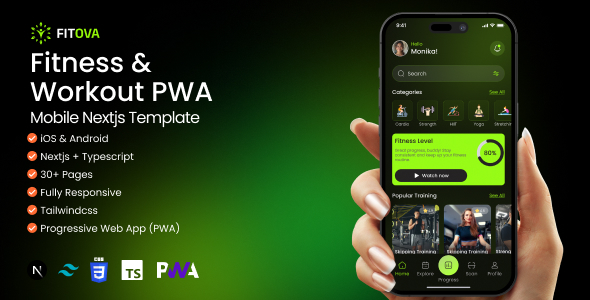
Fitova is a premium fitness PWA template built with Next.js 16, TypeScript, Tailwind CSS v4, and Framer Motion. It delivers a pixel-perfect dark UI with lime-green accents and a production-ready architecture with zero backend required.
Core Features
- Next.js 16 App Router — File-based routing, server components, layouts, and streaming — no pages directory.
- PWA Ready — Installable on iOS & Android with manifest, service worker, and offline fallback page.
- Tailwind CSS v4 — Latest Tailwind with CSS-first config, custom design tokens, and dark theme throughout.
- Context + localStorage — Auth, user profile, language, and favorites persisted via React Context + localStorage. No Redux needed.
- TypeScript — Fully typed codebase with interfaces for all data models, props, and context values.
- Form Validation — React Hook Form + Zod schema validation on all auth, onboarding, and profile forms.
- Charts & Statistics — Chart.js 4 + react-chartjs-2 for workout statistics, heart rate sparklines, and progress rings.
- Toast Notifications — Sonner for success, error, and info feedback. Custom dark theme matching the app palette.
- Auth Middleware — Next.js middleware guards all protected routes using a cookie token. Auth routes redirect when logged in.
- Framer Motion — Page transitions, staggered list animations, and micro-interactions throughout.
- Date Utilities — date-fns 4 for workout scheduling, DOB formatting, and relative time display.
- Developer Friendly — Well-commented code, clean folder structure, ESLint, Prettier, and path aliases configured.
Tech Stack
| Package | Version | Purpose |
|---|---|---|
| next | 16.1.6 | App framework — App Router, middleware, SSR |
| react / react-dom | 19.2.3 | UI library |
| typescript | 5 | Type safety throughout |
| tailwindcss | 4 | Utility-first CSS — CSS-first config, no tailwind.config.js |
| framer-motion | 12 | Page transitions and animations |
| chart.js + react-chartjs-2 | 4 | Statistics charts and sparklines |
| react-hook-form | 7 | Form state management |
| @hookform/resolvers | — | Zod schema resolver for forms |
| zod | 4 | Schema validation |
| sonner | 2 | Toast notifications |
| date-fns | 4 | Date formatting and utilities |
| lucide-react | latest | Icon library |
Pages
35+ App Screens
- Splash & Onboarding
- Splash Screen
- Onboarding Slides (1–3)
- Authentication
- Sign In
- Sign Up
- Forgot Password
- Reset Password
- New Password
- Reset Success
- Setup Flow
- Gender Selection
- Date of Birth
- Weight
- Sport Preferences
- Plan Selection
- Core App
- Home Dashboard
- Notifications
- Favorites
- Scan Food
- Workouts
- Workout List
- Workout Detail
- Trainer Profile
- Today’s Best
- Statistics
- Statistics Dashboard
- Heart Rate Chart
- Progress Rings
- Weekly Summary
- User Profile
- Profile / Settings
- Edit Profile
- Language Picker
- Log Out
- Utility
- Payment / Upgrade
- 404 Error Page
- Offline Fallback
- PWA Install Banner
Getting Started
- Install dependencies —
npm install - Run development server —
npm run dev - Build for production —
npm run build&npm start - Node.js requirement — Requires Node.js 18.18 or later. Tested on Node 20 LTS.