FoodBakery | Delivery Restaurant Directory WordPress Theme
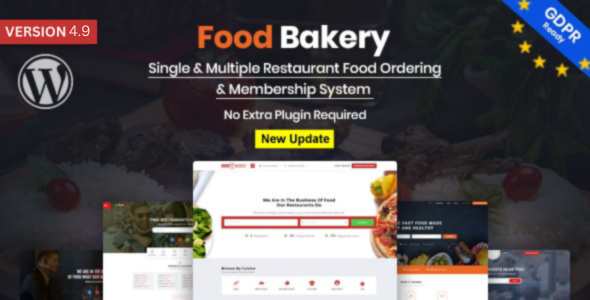
FoodBakery is a multi-restaurant management system theme that enables online ordering, delivery, bookings, and comprehensive admin tools for single or multiple restaurants on a single site. It includes merchant dashboards, separate admin/restaurant panels, multiple payment gateways, and a drag-and-drop menu builder to run food service businesses efficiently.
Key features for single and multi-restaurant sites
Merchant and Restaurant Dashboards
- Easy to Manage Merchant Dashboard (Restaurant Owner) FoodBakery Multiple Restaurant system have simple and easy to handle Merchant / Restaurants dashboard where restaurant can easily signup via social logins and can manage his restaurants, build menus, manage orders and bookings, handle memberships, manage teams, earnings, withdrawals, statements and handle account settings like password change etc. A complete online restaurant management system.
- Separate Panel for Restaurant Owner / User FoodBakery Multiple Restaurants system has separate dashboards for admin and restaurants with user booking and online ordering.
- Email alert for orders Online order is all about ease. Users ordering through FoodBakery Restaurants System have built-in email alert system which keep user updated about the orders made.
Payments and Gateways
- Payment Gateway for online payment FoodBakery Multiple Restaurants system comes with four default payment gateways, Paypal, Skrill, Authorize.net and bank transfer for merchant listing websites to charge their users against membership, restaurants can charge users for book a table online or placing order online.
- WooCommerce Gateways With four default payment gateways, FoodBakery Multiple Restaurants system have Woocommerce payment gateways as well where default payment gateways are not supported or not the first choice. With Woocommerce, any payment gateway in the world can be used.
Admin and Merchant Reporting
- Easy Reports for Admin and merchants Admin and merchant dashboard have simplest ever distinct place which prepare reports for admin and merchants. Admin can see orders, bookings, earning, statements and withdrawals in just few clicks on an organized and easy way.
Multi-Restaurant Portal and Signups
- Multi-Restaurant Food Portal Having more than one restaurants and want to manage them on single website? FoodBakery is perfect and specifically designed for multiple restaurant management. Merchants / restaurants can add as many restaurants as they want and can manage them all in the same, one dashboard.
- Unlimited Merchant Signup with Package or Commission Base Install FoodBakery Multiple Restaurants system and enable your website to allow unlimited merchant sign up on your listing website by offering them membership package of your choice. Merchant signup is just on one-click using social login option. Each user will have separate dashboard to manage their restaurant.
Social and User Management
- Social Login For a listing or online services website, user signup process is very important. On a website FoodBakery Multiple Restaurants system theme, merchants and users can sign-up via social login details like Facebook, Twitter without any complicated sign-up process. Admin can enable / disable this option from back end.
- Unlimited Users FoodBakery Multiple Restaurants system theme is for websites which offer their users online services like online booking and orders. Thus, user sign-up process is primary for such website. Using this theme, user signup is fantastic and super easy.
Menu and UI Builder
- Easy Menu Builder with Drag drop For restaurant and restaurants listing websites, menu is key feature. FoodBakery Multiple Restaurants system comes with stunning drag and drop menu builder feature. (Special characters are not supported). In merchant dashboard, there is menu builder option which works on drag and drop procedure. Choose the element, drop, save and all done.
Design and Accessibility
- Fully Responsive Theme In age of multiple devices, being responsive is basic feature for a website. FoodBakery Multiple Restaurants system theme is fully responsive that fits best to all devices across all browsers. On a mobile, laptop, tablet or desktop, it fits best to minute level. A perfect theme for perfection lovers.
Orders, Tracking, and History
- Merchants Order management Merchant dashboard in FoodBakery Multiple Restaurants system offers complete order management. As soon as a user makes order, it shows up in merchant dashboard. Every order is given a unique ID for its tracking where merchant can sort them on the basis of order status. Orders can be tracked on the basis on status like processing, complete or cancelled.
- Online orders and Payments Online orders and payments is primary feature for restaurants website. FoodBakery Multiple Restaurants system is complete system for all such websites where users can place their orders or booking online and receive confirmation via email, make payments for their orders. Different payment gateways are compatible for smooth payments.
- Customer Order History Once a user sign-up with FoodBakery Multiple Restaurants system, he gets access to dedicated user dashboard that records complete history of user activities like orders, bookings, reviews, shortlisted restaurants and statements. Users can check complete details of all orders they made.
Fees, VAT, and Tax
- VAT and Delivery Charges Restaurant / merchants can charge users VAT / tax and delivery charges along with order price. The options can be enabled / disabled from dashboard and values can be set from back end as well in just few clicks.
Reviews and Availability
- Order base Merchants Reviews Reviews is another must-have feature for online business. FoodBakery Multiple Restaurants system offers a well-organized review system where a user can review the merchant he placed order for. Once the order is made and processed, user can review the merchant against that particular order.
- Opening Hours for merchants Merchants can handle their online presence from their dashboard by setting up opening and closing hours. These hours are displayed to users against the merchant to facilitate their ordering process. Custom post type implementation is implemented using utc+0 time zone.
Open Source and Installation
- 100% Open Source & Fully Customizable No hidden plugin, no hidden requirement, no push to buy anything to access and functionality. Every functionality in FoodBakery Multiple Restaurants system is completely FREE and there is no HIDDEN cost for any part, any function at ALL. Drag & Drop, easy to use page builder helps to customize theme by just dragging the required element on desired place, a fully customizable theme by all means.
- Simple Installation & Quick Start Guide It’s just a matter of few minutes to complete restaurants website with SIMPLE, ONE-CLICK demo import and installation. If any assistance is needed at any point, Quick Start Guide is there for step-by-step guidance.
Bookings and Addresses
- Online Restaurant table booking Along with opening and closing hours or online orders, Restaurants can offer users to book tables online. User receives email notification upon booking a table whereas merchants can see the booking in their dashboard.
- Auto-Completes Addresses Auto-complete addresses option facilitate users while making placing order. This option works with google address and fetches details from google to complete the address by giving possible address suggestions. Facility by all means in all options is what FoodBakery Multiple Restaurants system offers.
Notes on Updates
- Change Log: Version 4.9 (10 April 2025) New Added: Compatibility with WordPress 6.8; Fixed: Styling & Responsive issues; Fixed: Foodbakery settings: SMTP Mailing Fixed; Improvement: Extras structure improvements
- Change Log: Version 4.6 (10 April 2024) Upgraded: Compatibility with WordPress version 6.5; Fixed: Demo Data Importer Issues Fix; Fixed: Styling/JavaScript and Responsive Issues
- Change Log: Version 4.3 – (13 February 2024) Update: Compatible with latest Wordpress Version; Fixed: Demo Import Issues Fix
- Change Log: Version 4.2 – (01 January 2024) Fixed: Sub header issues from page backend; Fixed: Responsive issues
- Change Log: Version 4.1 – (11 Dec 2023) New Added: Elementor Page Builder compatibility with FoodBakery Theme; Improvement: Responsive structure Improvements in Le-delicious demo
- Change Log: Version 4.0 – (4 Dec 2023) New Added: Compatibility with WordPress 6.4.1; New Added: WhatsApp Notifications - Ordering Notifications via WhatsApp; New Added: Newsletter MailChimp api upgraded to latest version; Fixed: Page builder elements updating troubles with FAQ's and column element; Fixed: Order Calculations issues with delivery and pickup fee; Fixed: Foodbakery settings : Browse Image button Not clickable; Fixed: Styling & Responsive issues
- Change Log: Version 3.9 – (20 Nov 2023) Fixed: Menu builder categories not saving; Fixed: Account settings not updating; Fixed: Order Calculations issues with delivery and pickup fee; Fixed: Styling & Responsive issues
- Change Log: Version 3.8 – (20 Oct 2023) Fixed: Order status options are not translatable; Fixed: Account settings not updating
- Change Log: Version 3.7 – (13 Oct 2023) New Added: Separate Deals Section with frontend Menu builder for fancy view; New Added: Custom status options for Orders and bookings; Improvement: Ordering flow structure improvements; Improvement: Extras structure improvements; Fixed: Responsive and styling Issues
- Change Log: Version 3.6 – (27 July 2023) Improvement: One Click importer structure improvements; Fixed: Menu builder not working; Fixed: shortlists not working; Fixed: css & Responsive Issues
- Change Log: Version 3.5 – (30 May 2023) New Added: Compatibility with WordPress 6.2.x; Fixed: Restaurant Settings not loading; Fixed: css & Responsive Issues
- Change Log: Version 3.4 – (27 April 2023) Improvement: Location API & jQuery scripts upgrades; Fixed: Autocomplete Switch Option not working; Fixed: css & Responsive Issues
- Change Log: Version 3.3 – (13 Mar 2023) Improvement: Page builder structure improvements; Improvement: Reviews structure improvement; Updated: wc templates updated; Fixed: Testimonial images not saving; Fixed: js, style & Responsive Issues
- Change Log: Version 3.2 – (4 Jan 2023) Improvement: One Click importer structure improvements; Fixed: Theme options not saving; Fixed: Console & Responsive Issues
- Change Log: Version 3.1 – (26 December 2022) Fixed: Translated Rating form issue; Fixed: Translated Post a reply form not working; Fixed: Ratings js conflicts on detail page with translation; Fixed: Cash Case calculation in Transactions; Fixed: Not able to login again with same user password; Fixed: Js & Responsive Issues
- Change Log: Version 3.0 – (25 November 2022) New Added: Compatibility with WordPress 6.1.1; New Added: Disable Ordering System Module | Menu Items Catalog View; Improvement: Structure Improvements; Fixed: Cash method calculation issues at backend transaction section; Fixed: Calculations issues in pickup and delivery fee implementation; Fixed: Shortlist not working; Fixed: Location list not loading in header; Fixed: Responsive and js issues
- Change Log: Version 2.9 – (9 September 2022) Improvement: Once Click demo Importer structure improvements; Fixed: Post Reply form is not working for reviews; Fixed: Theme options not saving; Fixed: Restaurant Settings not saving; Fixed: Responsive and js issues
- Change Log: Version 2.8 – (21 July 22) New Added: Compatibility with php version 8.1; Fixed: Styling and jquery issues
- Change Log: Version 2.7 – (22 June 22) New Added: Compatibility with WordPress 6.0.x; New Added: GrocBakery New Demo; New Added: Deals delete feature - Backend + frontend; Improvement: Structure Improvements; Fixed: Calculations issues in pickup and delivery fee implementation; Fixed: Cart flow calculation issues; Fixed: Testimonial element is broken; Fixed: User's profile image and cover image not uploading; Fixed: Buyer location is not saving in dashboard
- Change Log: Version 2.6 – (15 Mar 22) New Added: Compatibility with WordPress 5.9.x; New Added: Compatibility with php version 8; New Added: Push Order Notifications for restaurants incase of New order; New Added: Sound Notification for restaurants incase of New order; New Added: Multiple opening hours slots module; New Added: Powered by Google logo added with Autocomplete as per new Google policy; Fixed: Menu Item saving issues
- Change Log: Version 2.5 – (1st Jan 22) New Added: Compatibility with WordPress 5.8.x; New Added: New Single Restaurant Demo (Le Delicious); New Added: Deals Module for Single Restaurant; New Added: Fancy template for Single Restaurant; New Added: Menu Item and Deals detail popup module; New Added: Calories feature module for Single Restaurant; Fixed: Bookings and Orders are not showing in frontend Dashboard; Fixed: Reviews are not showing in frontend Dashboard
- Change Log: Version 2.4 – (27 Oct 21) New: Compatibility with WordPress 5.8.x; Fixed: Page builder elements saving issues; Fixed: Cuisines and tags are not adding from backend; Fixed: Add location button not working; Fixed: Menu items are not saving from backend; Fixed: Responsive and js issues
- Change Log: Version 2.3 – (3 July 21) New: Compatibility with WordPress 5.7.x; Fixed: Contact form issue – showing error while sending email; Fixed: Delivery fee is not adding in woocommerce check out form; Fixed: Cuisines not adding; Fixed: Reviews - Post a reply not working; Fixed: Coupon application on frontend dashboard calculation; Fixed: Restaurant Settings not saving from frontend; Fixed: Menu builder categories and food items not saving; Fixed: Restaurant after choosing membership in dashboard is not navigating to order detail; Fixed: loco missing strings; Fixed: Responsive and js issues
- Change Log: Version 2.2 – (1 June 2021) Fixed: Reflected XSS issue
- Change Log: Version 2.1 – (4th January 2021) New: Sticky Footer Cart Widget on Mobile; New: Compatibility with wordpress 5.6; Fixed: Page builder elements are not saving; Fixed: payment status not appearing as approved via woocommerce paypal; Fixed: Auto selections not working for card and pickup; Fixed: Menu items not deleting after refresh; Fixed: Transaction is is not appearing same at backend post type; Fixed: Incorrect average calculation for reviews; Fixed: Duplicate emails issues; Fixed: loco missing strings; Fixed: Responsive and js issues
- Change Log: Version 2.0 – (26 August 2020) New Added: Compatibility with WordPress 5.5; Fixed: Menu item not deleting from cart once added; Fixed: Plugin settings tabs are not working; Fixed: Chosen scripts drop down not working; Fixed: Editor Options not working; Fixed: Logo and Cover photo not saving in profile; Fixed: Checkout flow issues on latest WordPress 5.5; Fixed: Theme options not saving; Fixed: Responsive, styling and js issues
- Change Log: Version 1.9 – (15 July 2020) New: Compatibility with WordPress 5.4.x; New: First name and last name fields added on Sign up form popup; New: Order emails will be sent after transaction status Approval; New: Loader processor on pay now button on wc checkout page; New: Login Validation checks while ordering and booking placement; New: Buyer details added on Received Order Email Template Notification; Fixed: Fixed: Stored Multiple XSS issue; Fixed: pickup selection only field not showing on frontend; Fixed: Category editing and deleting not working; Fixed: Extras reset option not working; Fixed: Theme options not saving; Fixed: Extras not saving; Fixed: minimum order field is not working; Fixed: Footer cuisines widget show all cuisines instead of specific selected one.; Fixed: payment status not appearing as approved via woocommerce paypal; Fixed: payment status not appearing as approved vis woocommerce stripe; Fixed: Reviews status approval options not appearing; Fixed: Order status options not translatable; Fixed: loco missing strings; Fixed: Responsive and js issues
- Change Log: Version 1.8 – (21 March 2020) New Added: Compatibility with php version 7.3; Improvement: User type column added to differentiate between buyer and restaurant users at backend; Fixed: Basket is empty notice while adding menu items in cart without login; Fixed: Shortlists not working with latest wp; Fixed: Autocomplete and geolocation not working; Fixed: CS Theme options not saving with latest wp and php version; Fixed: Price table options are not updating; Fixed: Bank transfer and check payments status not updating
- Change Log: Version 1.7 – (9 January 2020) Fixed: Buyer name not appearing who rated in reviews; Fixed: Buyer Shortlist not working; Fixed: page builder incompatibility issues with latest wp; Fixed: Transaction is saving as pending incase of wc stripe; Fixed: Section becomes blank after adding menu category and item; Fixed: Calculation issues; Fixed: fatal error on theme activation on latest wp; Fixed: Random id is printing with Buyer address in order detail; Fixed: Order receipt button not clickable; Fixed: Loco Missing Translation strings; Fixed: Widget sidebar and woocommerce widgets not appearing; Fixed: Styling & Responsive Issues
- Change Log: Version 1.6 – (Unknown date) New Added: Compatibiity upto Wordpress version (Classic Editor) : 5.3.x; New Added: Compatibiity upto php version 7.3; New Added: Compatibiity with revolution slider 6.0.x; New Added: Compatibiity upto Woocommerce plugin 3.7; New Added: Multiple & Single Extras Selection with Required Options while ordering; Improvement: Google Social login API upgrade as per new social Policy; Improvement: Buyer can now Register/login while Ordering; Improvement: Extras Complete Structure Improvement; Fixed: Booking Calender not showing Weekend days
- Change Log: Version 1.5 – (Unknown date) New Added: GDPR Compliance; Terms & Conditions/Policy Agreement mendatory checkboxes to restrict Buyer and Resturant Registartion; Delete Profile button in both Buyer and Resturant Dashboards; New Added: New Demo (Buddy Day) - Single Restaurant Demo; New Added: New Demo (Foodcourt); FB : Single Restaurant Page builder element to display Single restaurant page; Delivery Date and Time fields while ordering; Help desk tab panel; Improvement: Social Logins API upgrades; Session maintenance in cart widget after Buyer login; Fixed: Checkout issues using Free membership package; Fixed: Add location button not appearing; Fixed: Issues while adding menu categories and Menu items
- Change Log: Version 1.4 – (Unknown date) New: Compatibility with latest Wordpress 4.9.5; New: Compatibility with latest php version 7.2; New: FoodStop New demo; New: Foodbakery RTL demo; Fixed: Google API Search query related issues with Radius; Fixed: Buyer and Restaurant Email Notifications are not working; Fixed: Back To Top link and section not working; Fixed: Loco Translate missing translations; Fixed: Team member can't be deleted from frontend; Fixed: Classic and page builder Editor Switch Issue; Fixed: Cuisines not appearing in filter sidebar; Fixed: Import demo data option not available with Child Theme; Fixed: Calculation Issues in restaurants earnings; Fixed: Site crashes after adding 4 extras in sidebar; Fixed: Opening hours on/off switch not working; Fixed: Expiry data and status of restaurant not working in case of free packages; Fixed: FB:Restaurant page builder element option not working; Fixed: Location listing count not working at backend; Fixed: Cuisines count is not working in filter sidebar; Fixed: Backend publisher tabs not working; Fixed: Styling and Responsive Issues
- Change Log: Version 1.3 – (Unknown date) Fixed: Location didn't save on backend while adding from frontend; Fixed: Section Settings Not working properly for video and slider; Fixed: PHP 7 compatibility issues; Fixed: Pages are not loading in Plugin settings; Fixed: Twitter social login is not working
- Change Log: Version 1.2 – (Unknown date) Fixed: Social Facebook login not working; Fixed: Bank transfer payment gateway is not appearing on frontend; Fixed: Orders are not being placed when trying to submit the order its not working; Fixed: Woo commerce coupan issue; Fixed: Styling and responsive issues
- Change Log: Version 1.1.0 – (27/12/2016) Added: New Home Page Version; Added: Menu Item with picture; Added: Nutritional Information icons For each menu item; Fixed: Demo Data Import Images and Menu Missing
The information on this website is sourced from the
ThemeForest product page
.