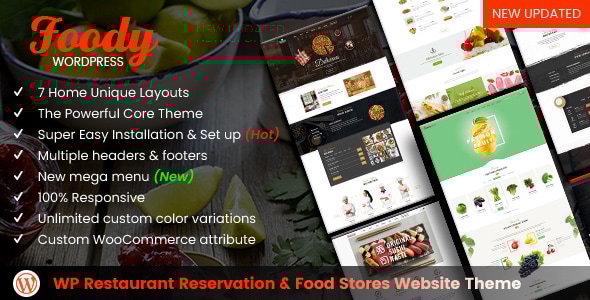
Foody - WordPress Restaurant Reservation & Food Store Website Theme
Foody is a WordPress theme designed for restaurant reservations and food stores, offering quick setup and flexible customization for any food business. It emphasizes a powerful core, multiple layouts, and extensible features for both developers and shop owners.
Product Overview
Foody – WordPress Restaurant Reservation & Food Store Website Theme is a perfect theme for selling all kinds of food bussiness as a restaurant, bakery, pizza, organic food and so on. Our teams build this theme based on a powerful core that you can install and configure easily and quickly.
Note: Please note that our package is not included a license key for “Ultimate Addons for Visual Composer” and “WP Bakery Page Builder”.
Contact & Support
Outsourcing Project Department supports all partners around the global. If you need to hire a team or set up a full fishing online business or do any customization, please feel free to contact us at
[email protected] to discuss further.
Why Use This Product – Product Benefits
- The theme was designed with the high-standard of UI/UX so your customer will have a complete shopping experience.
- Friendly and useful because it helps customers find and buy products in the fastest way without any trouble. Save huge time for customers on shopping.
- Powerful Core theme that helps admin create anything without coding any line. Admin can change the header, layout product, page, with a few clicks.
- Includes 3 Home page layouts, multiple Headers, and Footers to add variety. Easy to install and configure.
- Reasonable pricing with a high-quality product and dedicated support available.
How It Works for Clients
- Customers select products or searching for products they want to buy on Mage Menu.
- Customers can select and compare multiple products together by clicking the “Add to compare”. Then view their products in the Cart; display styles can be changed to list or grid. Social sharing is available.
- Click on Add to cart and then checkout.
How It Works for Shop Owners
- With One click Demo data, you can import the theme easily.
- Open the WordPress Admin panel → Appearance → Import Demo Data and click on import to start your installation.
The Powerful Core Theme
- Multiple headers: Our theme comes many header types that you can customize your website exactly the way you want.
- Multiple Footers: This theme includes a ton of footer options so you can choose your own suitable one.
- Various Google Fonts: Over 800 Google font which you can use and upload. Being stored on Google’s servers, displaying them will be fast & reliable.
- Powerful typography feature: Easily change and control your typography as well as fonts style to make your site stand out of your competitors.
- Unlimited custom color variations: Select and set dozens of color for your elements which are using our Custom Color Picker.
- Multi layouts for product category: You have many options to show your category with products on list or grid and you can change its content also.
- “Menu” layout for product category page: The products are displayed as the menu and this is the unique of this theme.
- Multi layouts for product detail page: You can edit title, sidebar, Meta layout, and tons of things to make your product page beautiful.
- Custom WooCommerce attribute: Show full of product information that customer can fully understand and they want to click adds to cart button.
- Dozens of Blog category layouts: Amazing features that will make your blog or magazine stand out among others.
- Beautiful blog details style and layout: You can design your own awesome blog page with many style and layouts that attracting readers.
- Custom Element style: Easily to change many elements for many features to enhance your website.
Revolution Slider
- Fully Responsive & Mobile Specific Features
- jQuery 1.7 – jQuery 2.x Supported
- All Sizes Possible (Full Responsive + Revolutionary 4 Level Advanced Sizes)
- Fullwidth, Fullscreen, Auto Responsive Slider sizes
- Published / Unpublished Slides
- Quick and Easy building based on Slider, Slide and Layer Templates
- Viewport based Slide Loading and Progress
- Huge Number of Possible Transitions
- Show/hide layers on Slider Effects, Events, Actions
- Combine Actions over different Layers and slides
- Left/Right, Top/Bottom Mouse Scroll events
- Vertical/Horizontal Keyboard actions
- Drag and Pull Carousel Feature
- Set position, color, size of Time Line
- Hide / Enable Navigation on Mobile Devices
- Fancy Navigation Skins with Slider Preview
- Set Start and End time
Visual Composer
- Intuitive Drag and Drop Interface: Lightweight, easy to use interface for page building.
- Easily Extendable: Third party developers can create plugins for Visual Composer.
- Frontend Editor: See how content will look on the frontend in real time.
- Backend Editor: Native content management on the backend with important options.
- Object Oriented Code: Modern programming patterns for best results.
- Multilingual Ready: .po and .mo files included for translation.
- Template System and Library: Copy or reuse pages, save templates, and access a library of layouts.
- Responsive Design: Content looks great on desktop and mobile with responsive controls.
- User Role Manager: Control access to features for different user roles.
- Custom Post Types Support: Works with any post type, including custom ones.
- Lifetime Update – Free of Charge: Automatic updates and latest releases.
- Professional Dedicated Support: High-quality support team.
- Shortcode Mapper: Add third party shortcodes to VC menu elements for reuse.
- Design Options: Borders, margins, paddings, backgrounds, color alpha options.
- Multi-language Support: Compatible with qTranslate X, Polylang, WPML.
- SEO Friendly: Compatible with popular SEO plugins like Yoast or All in One SEO.
- Woo Commerce Support: Fully compatible with WooCommerce and shortcodes available in VC Element Menu.
- Advanced Grid Builder: 40+ predefined grid templates, or create your own grids.
- Full Width and Height Rows: Stretch options with content alignment controls.
- Parallax Background: Parallax backgrounds with video and design options.
Max Mega Menu
- Works with your WORDPRESS RESTAURANT THEME: A drop-in replacement for the existing menu system.
- Visual Mega Menu Builder: Drag and drop interface for menus, with widgets.
- Unlimited Level Flyout Menus: Create unlimited levels of menus for complex menus.
- Choose your own style: Over 100 styling options, no CSS knowledge needed.
- Works with multiple Menus: Enable for single or multiple menu locations per page.
- Responsive & Touch Friendly: Works on all devices, including touch screens.
YITH WooCommerce Plugins
Wishlist
- Create multiple wishlists for users to manage items by category or other parameters.
- Estimate requests: Users can send wishlist items to admins for custom quotes.
- Search user wishlists: Public wishlist search functionality.
- Add to cart from wishlist: Add some or all items to cart with one click.
- Display popular products table: Show frequently wished items for targeted offers.
- Manage and search wishlist links: Direct access from wishlist tables.
- Encourage unlogged users to register: Access all wishlist features after login.
- Promotional email: Notify users about offers via email.
- See date of addition: Track when items were added for precise offers.
WooCommerce Compare
- Show comparison on another page: Compare entries on a dedicated page.
- Compare by category: Focus on relevant product attributes by category.
- Exclude specific categories: Activate only selected categories for comparison.
- Include product images in the table: Visual context for comparisons.
- Always show product information: Hide empty fields automatically.
- Share comparisons on social networks: Facebook, Twitter, Google+, Pinterest.
- Show related products under the table: Slider of related items by category/tag.
- Style and color customization: Ensure plugin styling matches the site.
- Customize attributes: Add attributes to appear in comparison tables.
- Create a table with desired products: Use shortcode to insert the table anywhere.
WooCommerce Quick View
- Choose button type: Quick view button vs. custom icon, placement near add to cart or product image.
- Browse products within quick view: Navigate prev/next without leaving the modal.
- Choose information to display: All or partial product details.
- Display method: Modal window or cascading unrolling effect.
- Access product detail page from quick view: Additional “view details” button.
- Share quick views on social media: Facebook, Twitter, Pinterest, Google+, email.
- Customize style: Colors of the quick view button and modal content.
- Place the quick view: Use shortcodes to place on any page.
Other Features
- Compatible WPML Multi Language, Currencies: Translations and currency options for multilingual sites.
- Quick View: Enhanced product previews via YITH WooCommerce Quick View integration.
- Responsive: Works on desktop, tablet, and mobile.
- Slider Revolution: A library of slider options for various businesses.
- SEO Friendly: Built with SEO best practices; recommended Yoast or All in One SEO plugins.
The Theme Updates & Support
- Free of Charge - After purchase, all updates are free of charge.
- Update Guarantee - We continue to update and improve this theme to keep it the best.
- WordPress Theme: The upgrade guide is in the user guides; buyer is responsible for upgrading.
- Ticket Support - Private ticket system; register and open a ticket; follow policy guidelines.
- Support Period - Netbaseteam supports only clients with a valid Themeforest support period.
WordPress Restaurant Theme Usages
- Presales Questions: Post in ThemeForest comments for presales questions.
- Template User Guide: Includes a detailed PDF user guide with updates.
- Template Installation on Live Site: Compatible with existing WordPress sites with data.
- Quick Start Installation Packages: Step-by-step documentation to install and configure the theme and plugins.
- Sample Data Included: IS INCLUDED in the purchased package with placeholder images.
- WordPress plugins: All plugins used on the demo are included in downloads; if a commercial plugin is tested, we notify.
Startup Privilege Program – For Web Owner
After years of supporting our customers, we offer a Start-up Privilege Program with benefits to help startups launch ecommerce projects more easily. Contact [email protected] to get this offer if you meet the criteria.
Conditions
- Applied for new customers who bought the product from 15/02/2010
- Netbase may update the program at any time; valid until 30/12/2020
- Eligible for Start-up Project that do not have hosting or domain or are hiring freelancers
What We Offer
- Free Hosting: 1 month for Themeforest Start-up Web Owner.
- Free domain for 1 year
- Free extension: One plugin from provided list
- Free 3h customization ($30/h) for plugin and theme selling on Themeforest
- Free installation service with demo data ($79)
Upgrade Path
- For Cmsmart Solution Start up Project: Free hosting (3 months), free domain (1 year), free extension from list, free 5h customization, free installation service.
Additional Services
- Theme customization, header/layout modifications, custom sliders, PSD mockups, footer redesigns.
- Extra website setup: SEO setup, performance, security, staging, WPML setup, content entry, maintenance (12 months), bug fixes, SSL setup.
- Full Sites Development: hosting on Amazon, customization, plugin setup, social integrations, site migration.
For inquiries, please contact [email protected].
Disclaimers
- Refund Policy - We comply with ThemeForest policies; refunds are handled by Envato.
- Media Images - Demo images are copyright-protected; placeholders can replace them.
- Commercial WordPress plugins - If a template uses commercial plugins, their licenses are separate and support is not included for those third-party plugins.
Thank you for reading. If you have any questions please leave your feedback at [email protected].
Version notes and updates are listed below.
Version History
-
Version 1.6.2 (16 Sep 2020)
- + Added: WooCommerce Dashboard for WP Marketplace & Multi Vendor Plugin 1.2.7
- + Updated: Woocommerce template files
- + Update plugin: Slider Revolution 6.2.19
- + Update plugin: Ultimate Addons for WPBakery Page Builder 3.19.6
- + Update plugin: WPBakery Visual Composer 6.4.0
- + Remove plugin: Open Table Widget
-
Version 1.5.1 (30 Nov 18)
- + Fix title element in Post and Page template
- + Fix missing javascript, css files
- + Fix W3C validator errors.
- + Update Plugin: Ultimate Addons for WPBakery Page Builder v3.17.0 ; WPBakery Page Builder v5.6
- + Fix Customizer errors
-
Version 1.5.0 (30 Oct 18)
- + Integrate plugin: Restaurant Reservations
- + Rewrite some elements from Grid Builder to Custom elements
- + Fix bugs: Display price box in menu
-
Version 1.4.0 (02 Oct 18)
- + Add Theme Setup Wizard
- + New Mega Menu
- + Fix some header style
- + Fix: can't set fixed header
- + Fix: some color options can't be changed
- + Fix a CSS bug that with Autoptimize
-
Version 1.3.0 (20 Jul 18)
- + Restructure core options and controls.
- + Add conditional dependencies for customize controls.
- + Add feature: export customize CSS to separate file.
- + Add pages: gallery, about us, testimonial, faq.
- + Improve Import process.
-
Version 1.2.0 (16 May 18)
- + Updated 1 home layout (wine)
- + Add new Find Product Attribute element
- + Add new Brand element
-
Version 1.1.0 (13 Mar 18)
- + Updated more 3 home layouts
- + Updated more options for Header, footer, and button such as background color, text hover color, border color, ...
- + Updated New Blog layouts
- + Fixed bug css + js exist themes
- + Update latest plugins
- + Add OpenTable Element and Widget and more elements on NB Framework
-
Version 1.0.0 (5 January 18)
The information on this website is sourced from the
ThemeForest product page
.