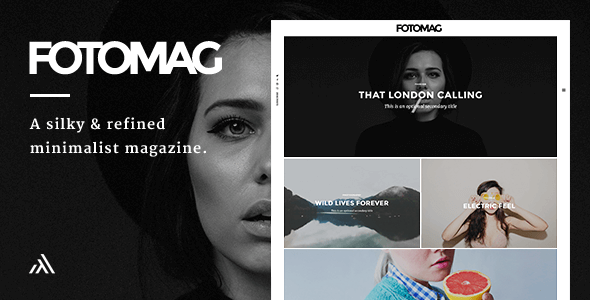
Fotomag - A Silky Minimalist Blogging Magazine WordPress Theme For Visual Storytelling
Fotomag is a minimalist WordPress photography magazine theme designed for visual storytelling across travel, recipes, personal blogs, and more, optimized for speed and easy customization via the WordPress customizer.
General features
- Custom CSS box to easily enter any specific visual customizations
- Custom JavaScript input to easily enter any custom JavaScript code
- Responsive design that looks great on screens of all shapes, orientations and sizes
- Retina Ready (HD) WordPress photography magazine theme
- Comes with .mo/.po files for quick and easy translation. Some languages have already been translated.
- Integrated lightbox (can be turned on/off in the customizer)
- Touch-friendly slider and user experience
- Author pages can add social network icons that link to author profile links
- Logo options, including Retina logo option
- Set top and bottom padding for header (logo area)
- Almost everything can be turned on/off from the customizer
Pages features
- Post Format: Gallery. Beautiful full-screen gallery that is super touch friendly and portrait-image friendly too. You can see the demo of it here: Gallery Post Demo
- Post Format: Video (Able to embed YouTube / Vimeo / Kickstarter / Viddler videos). They will appear in a minimalist lightbox at the press of the play button (YouTube starts playing automatically when the play button is pressed, and paused if the X button or background is pressed)
- Post Format: Audio (Able to embed any audio embed). They will appear in a minimalist lightbox at the press of the play button.
- Show Category Above Title (Can be turned on/off in Customizer)
- Down Arrow On Image (Can be turned on/off in Customizer)
- Like System (Can be turned on/off in Customizer)
- Progress Bar (Can be turned on/off in Customizer)
- Author Box (Can be turned on/off in Customizer)
- Publish Date (Can be turned on/off in Customizer)
- Tags (Can be turned on/off in Customizer)
- Sharing Block (Can be turned on/off in Customizer)
- Next + Previous Posts (Can be turned on/off in Customizer)
- Comments (Can be turned on/off in Customizer)
- Related Posts (Can be turned on/off in Customizer)
- Placeholder Image option to set a default image to show for posts without featured image
Pages features (continued)
- Progress Bar (Can be turned on/off in Customizer)
- Sharing Block (Can be turned on/off in Customizer)
- Comments (Can be turned on/off in Customizer)
- Right Sticky navigation menu
- Set any background image or color for the slide in navigation menu
- Set an opacity value for background image to make it more/less visible
- Set the menu items font color to work with your chosen background image/color
- Add social media icons to bottom of slide in menu
- Left Sticky navigation menu
- Add social media icons to appear on the left menu
- Show search icon + search lightbox modal (Can be turned on/off)
- Show subscribe + subscribe lightbox modal (Can be turned on/off) and recommended service is MailChimp
- Set text for subscribe button in left naviation menu
- Set text for subscribe lightbox modal title
- Set text for subscribe lightbox modal sub title
- Set any background image or color for subscribe lightbox modal/li>
- Set an opacity value for background image to make it more/less visible in the subscribe lightbox modal
- Set the subscribe lightbox modal font color to work with your chosen background image/color
Typography
- Set font family for titles (Select any Google font using a select option with all of them in the customizer)
- Set font family for body (Select any Google font using a select option with all of them in the customizer)
- Set font family special character extensions (None/One/Multiple can be ticked in the customizer)
- Set line height for desktops and mobiles (All easily controlled in the customizer)
- Set font size for desktops and mobiles (All easily controlled in the customizer)
- Set desired font color for article text (Easily controlled with colorpicker option in the customizer)
- Set desired font color for headings (Easily controlled with colorpicker option in the customizer)
- Set desired font color for blockquotes (Easily controlled with colorpicker option in the customizer)
- Set desired font color for links and links hover action (Easily controlled with colorpicker option in the customizer)
- Set desired font color for widget links and widget links hover action (Easily controlled with colorpicker option in the customizer)
Footer
- Footer widget area to insert widgets in the footer
- Logo options, including Retina logo option
- Text area to insert text under the Footer logo area
- Text area to insert copyright line text in the footer
- Lots of social icons options for the footer area
- Footer menu available in Appearance -> Menus. It appears above the copyright line
Extra options
- Integrated lightbox (can be turned on/off in the customizer)
- Minified Javascript Option (can be turned on/off in the customizer)
- Load YouTube API option for automatic play of video post formats (can be turned on/off in the customizer)
- Pagination style option: Number pagination or infinite scroll with load more button
- A dream: Super clean code and child-theme ready
- Fotomag was written following all modern WordPress coding standards, with regards to security, prefix best practises and file structure. The theme uses clean PHP, HTML5, CSS3 and Javascript code. The theme also comes with a ready-to-use child theme file that works instantly.
- For all theme customizations (i.e. add or change the theme?s code to make it do something it doesn?t do or add specific functionality) you will need to hire a developer to help you out. It is recommended to look for one on http://studio.envato.com as that site is run by the same people who run Themeforest.
Suggestions & credits
Suggestions for future updates? If you have a suggestion that you think would improve the theme, please leave a comment with the details and it will be considered.
Credits
- Images used are from Unsplash,
- Scatter Jar
- Hillary Boles
- under cc2 with some minor alterations (cropped/changed proportions).
Update Changelog
- Version 2.0.8 – 6th June 2021
Improved: Styling details
- Version 2.0.7 – 5th June 2021
Improved: Theme Options > Custom Code > Custom JavaScript: Option has been removed. If you have added custom JS, you need to move it to the child theme’s functions.php file
- Fix: Transparent Header in Posts logo wasn’t appearing
- Updated Documentation
- Updated Plugin: Fotomag Engine 1.0.1
- Version 2.0.6 – 1st May 2021
New: WordPress 5.7 compatibility
New: Vimeo social icon to theme options
- Version 2.0.5 – 9th December 2020
New: WordPress 5.6 compatibility
New: RSS Social Icon
- Version 2.0.4 – 6th April 2020
Fix: Sharing block on pages still visible even after disabling it
Fix: Previous/Next block on posts still visible even after disabling it
Fix: Transparent Header Not Working On Posts
- Version 2.0.0 – 5th June 2019
New: Fully Gutenberg Compatible
New: Sponsored Post feature
New: Each post can have a different featured image style “100% height/50% height/don’t show image”
New: Parallax on/off option for each post featured image
Improved: Updated all code to latest WordPress coding standards
Improved: Lightbox design and functionality
Improved: Improved speed of ajax auto next load post
Improved: Improved performance Post Formats Audio/Video/Gallery
Improved: Improved speed of Live Ajax Search
Improved: Added lots of new social network options (including LinkedIn, Dribbble, VK and more)
Improved: Retina Images: Performance and loading speed
- 24 October 2016 – Fotomag v1.4.6
- 13 September 2016 – Fotomag v1.4.4
- 13 September 2016 – Fotomag v1.4.3
- 06 September 2016 – Fotomag v1.4.1
- 02 September 2016 – Fotomag v1.4
- 21 March 2016 – Fotomag v1.2.1
- 20 March 2016 – Fotomag v1.2
- 06 March 2016 – Fotomag v1.1
The information on this website is sourced from the
ThemeForest product page
.