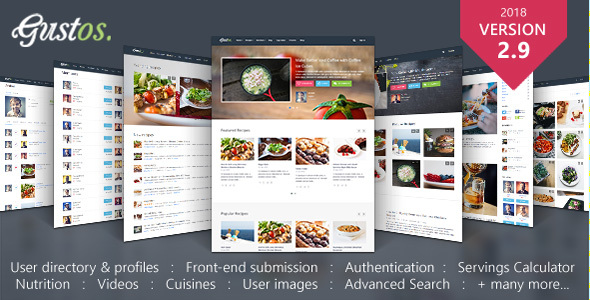
Gustos - Community-Driven Food Recipes with Front-end Submission System
This document provides a comprehensive overview of a cooking and recipe WordPress theme, covering user profiles, private messaging, recipe submission, archives, tags, forums, homepage widgets, and a detailed changelog across versions.
What’s already included?
- User profile info
- Private messages
- Members list
- Recipe submission
- Recipe Archive
- Tags Index
- Forums
- Homepage
- Widgets
- Changelog
User profile info
- Cooking levels – The cooking level for a user. It can be “None”, “Beginner”, “Intermediate”, “Expert” or “Professional”.
- Last user visit – Display the time when a user has been active on the site.
- Number of profile views – How many time other users visited the main profile page of a specific user.
- Living in – Allows the user to set the home country/location.
- User website – If the user has a website, it can display its URL on the profile page.
- Registration date – Shows the registration date. It may be useful for other users, because they will know how old this user is on the current site.
- Reputation score – Shows how many reputation points the user has, with the link to detailed info about it.
- Number of followers/following – The number of followers and the number of users that is following with the link to the list of users.
- About – A short description about itself.
- Send Private message – Allows other user to contact the user via a private contact form.
- Settings – Allows the user to set/update profile settings.
- Follow button – Using AJAX it allows to instantly follow a user.
- Awards – A list of awards that the user has won.
- Social profiles – A list of URLs to other social networks where the user is registered.
- User activity – A log with all user’s activity. It displays the recipes submitted, user following actions, recipes added to favorites and liked recipes.
- Avatars – Any registered user is allowed to upload a custom avatar image. The avatars work everywhere, in comments, members list, forums, etc. No limits.
- Password metter – When the user is updating its profile, and if picking a new password, there is an indicator that shows how strong the password is. This is done by following an algorithm that determine the password length and the characters used. If the password is at least 8 chars long and contains one lowercase letter, one uppercase letter, one number and one special character, it is determined to be strong.
- User profile “My recipes” – is a page where the user can see all its recipes. Check the status and access the edit tools.
Private messages
- All messages are delivered using AJAX. This will prevent the page reload and will provide a better user experience. If the message does not meet the minimum requirements or a problem occurred, the form will return a human readable error message.
- The user will get a notification in the website header with the number of new unread messages, each time a new message is sent from another member.
- Inbox – a list of all messages that has received a user.
- Sent – a list of all messages sent by a user.
- Important – a list of messages marked as important by a user.
- Stortcut messages send – Press Ctrl+Enter to send the message.
- AJAX message send – The private messages are sent via AJAX. This allows the message to be transferred almost instantly, without reloading the page.
Members list
Members list displays all registered users on the site. There is available a basic user info, number of recipes submitted, reputation and the “Follow” button with the number of followers.
Recipe submission
- Submit recipes directly from the website front-end, alowed for any registered user and reject user from accessing the WP dashboard. Only admin are allowed to access the admin side.
- Featured image – Use the native WP media Uploader to insert the featured image for a recipe.
- Ingredients – Allows to add an unlimited number of ingredients. Each ingredient can include the name, quantity, measurement and other notes. The measurements can be edited (remove, add new) from the control panel, accessible only for admins.
- “Preparation mode” and “Footnotes” – Use TinyMCE to create beautiful rich content that describes the recipe.
- Links – If the recipe is not original, or if it is a modified copy or whatever else, the user is allowed to insert the links in the footer of the newly submitted recipe. This field (like many other) is optional and may be left empty.
Recipe Archive
- Per page – The current reader can select how many recipes it wants to be displayed per page. It has the option to select from a drop-down menu.
- Sort by category or/and tag – When browsing recipes it can be hard to find the right one. That’s why it was implemented the sort by category or/and tag. If it selected only the category or only the tag, the page will show the results only for the selected value. But, if they are both selected, the page will show all recipes from the selected category that contains the selected tag. So you can be sure that the users will find the right recipes.
- Recipe view – There are 3 recipe styles. The user can select the view that it likes more. First has the most details, second is compact list view and third is a grid style that is aimed to provide a visual browsing using only the recipe photo and title.
Tags Index
The tags index is a very sly feature that allows to view all available tags and the number of recipes that’s using each. Also on that page is a filter that allows to minimize the list and to show only the tags that contains a part of a word. They can be viewed in inline or list mode. This is left at the user discretion.
Forums
For the forums is user the bbPress plugin. It is fully compatible with this theme and it’s styled to give a strong impression of a real standalone forum software. Check it, there are many modifications that you will not find in the default bbPress.
Homepage
The homepage is using a special drag and drop page builder. You can drag the modules and display recipes, by:
- Submission date.
- Last update date.
- Favorites count.
- Likes count.
- Comments count.
- Featured first.
Also you can display blog posts in grid or list view by:
- Submission date.
- Last update date.
- Comments count.
There are also other modules that can help you to build a better index page to impress your website visitors.
Widgets
The theme has packed some special widgets that you may find useful.
- Social – Display links to your social networks. In the demo you find only a few, but you really want you can make the sidebar full with different social networks links and each can have its logo, color, and special text.
- Recipes categories – Of course you’ll need this. The users should be able to pick a recipe category from the list.
- Recipes widget – Again like on the homepage you can display a list of recipes that is based on a set of settings: sorted by number of likes, favorites, date, etc.
- Top users – Shows the authors sorted by reputation. They make your website content, so they need some attention. (:
Changelog
v2.9.15
- Compatibility with WordPress 5.3.x and the latest PHP version 7.4
- Fix the rounding problem in recipe ingredients calculation
v2.9.4
- Compatibility with WordPress 5.x
v2.9.3
- New: Visual select form field “GustosVisualSelectField”.
- Other: Update language strings in .pot file.
- Other: Include theme guide in download package. I forgot to include it in previous version.
- Other: More hooks for developers.
v2.9.2
- New: Option to page builder rows visible only for registered or unregistered users respectively.
- New: Page builder module: “Follow Feed”.
- New: Option to send an welcome email to users after registration.
- Enhancement: Refactoring the pagination for recipes, users and comments.
- Bug fix: The collapsing functionality from backend forms are not working properly sometimes.
- Deprecated: smk_theme_pagination() function in favor for the new gustos_paginator().
v2.9.1
- Bug fix: Some UI elements from backend are not aligned properly.
v2.9.0
- New: Extended the email notification system.
- New: Show the total number of recipes that are pending for review, in administration menu.
- New: Possibility to add CSS classes to each button from “Buttons” page builder module.
- New: Spacing options for each page builder module.
- New: JSON-LD Recipe schema.
- New: WYSIWYG page builder module.
- New: Private awards. Now it’s possible to create private awards that will be visible only to the user who has it and admins.
- Enhancement: Theme loading performance. Now the theme loads much more faster in some cases.
- Enhancement: Refactoring to page builder modules.
- Enhancement: Renamed the label “Summary” to “User profile” on user settings page.
- Enhancement: Added {C} template shortcode, in customizer. This would be replaced by copyright sign.
- Enhancement: Display a simple menu when the theme is installed for the first time. Before it did not show anything until a new menu is created by user manually.
- Enhancement: Proper singular and plural words depending number values. For example display “1 member” instead of “1 members”.
- Enhancement: The submission form has been revised. Now it is fully accessible by using only the keyboard.
- Enhancement: More options in “Top authors” module from page builder.
- Enhancement: Full compatibility with WooCommerce 3.x.
- Enhancement: Page builder modules does not publicly display anymore a notice when a loop does not contains posts. The notice now is visible only to super admins.
- Enhancement: Display a tooltip when a user selects the rating.
- Bug fix: Load default values for customizer settings if they are not already saved in DB.
- Bug fix: Compatibility with “Social Profiles by ZeroWP” plugin.
- Bug fix: Preparation time is not visible.
- Bug fix: Difficulty is not visible.
- Removed: schema.org from HTML markup in favor for JSON-LD.
- Removed: The spacing from “Buttons” module in favor for general module spacing.
v2.8.0
- WordPress 4.9 compatibility.
- Improvement: Allow to set the exact image height (by cropping) on the homepage for recipes list.
- Improvement: Redesign some of the settings pages from WP admin.
- New: Added “Envato Market” plugin to the list of recommended plugins to install.
- New: The possibility to define custom redirect URLs for registration and login. See: Recipes->Settings.
- New: Two options on each page to show or hide the page header and/or footer.
- New: New advanced page builder module: Buttons
- Bug fix: Fix the incorrect display of followers, single and plural versions.
- Bug fix: Gustos\WP_Query class not found on theme update process.
- Bug fix: The loader is not visible on some pages from admin side.
- Bug fix: The menu links in responsive mode should not retain the default color.
- Bug fix: The responsive menu sometimes fails to close.
- Bug fix: The image module from page builder does not align properly when selected ‘center’ or ‘right’.
- Bug fix: Redesigned the menu UI close handle.
- Bug fix: Make user email addresses lowercase when sending a email about a PM.
- Improvements: More PM form hooks for developers.
- Improvements: Redirect to user profile after user settings are updated.
- Improvements: Show “x stars” instead of just a number in tooltip on rating stars hover.
- Improvements: Replaced the recipe notice for non-authenticated users with a more user friendly design.
- More descriptive info for some fields from admin side.
- Minor menu design improvements.
v2.7.1
- Bug fix: Parse error in lib/Adsense.class.php
- Bug fix: Gustos child does not load parent styles. Both parent and child themes were updated.
- Bug fix: User profile error.
v2.7
- UX improvements and codebase cleanup and better social links handling.
- Bug fix: Page builder does not correctly display the select fields options. Especially in “Row background” setting.
- Bug fix: The reputation points are not created for new registered users.
- Improvement: Show a notice on top of PM form for non authenticated users.
- Improvement: Disable PM form submission for non authenticated users.
- Improvement: The tooltip that says “You can’t follow yourself” is now red.
- Improvement: Top user menu UX improvements. Do not show the “Shopping cart” and “Private messages” dropdowns if they are empty. Also instead of title show respectively “No private messages” and “Shopping cart is empty”
- Improvement: Vertical alignment to center of top menus regardless of logo size.
- Improvement: Page builder structure/UX improvements.
- Improvement: Responsive menu UX improvements.
- Improvement: Changed the user navigation icon on top to provide a better idea of what it contains and to differentiate from main menu.
- Improvement: The mobile menu is now full-screen.
- Cleanup: Removed Ecwid styles as this theme never has a real support for this system.
- Cleanup: assets/css/styles.css moved to root
- Cleanup: style.css
- Cleanup: Removed or replaced other files and folders that are not required or outdated.
- New: Dynamic social network profiles using “Social Profiles by ZeroWP”. This replaces the built-in theme functionality that has only a few inputs for most popular networks. The new plugin adds support for 170+ networks.
- New: Migrate “Social Follow” widget to “Social Profiles by ZerowWP” plugin
- Removed: “SMK Widget Image” has been removed. Use default “Image” widget from WordPress.
- Dev: qTip has been replaced with a lighter jQuery plugin zTip.
- Dev: SMK Accordion replaced with Accordion.JS.
v2.6.1
- Bug fix: Hide difficulty and preparation time from “Large view” if the fields are disabled from admin panel.
- Bug fix: Servings field is not visible.
v2.6.0
- New: Built-in Google Adsense support.
- Add the correct version to style.css
- Add the option to change the the recipe author from admin side.
- The following strings, still not translatable: “Servings”, “Recommended products”, “Preparation Time”
- Responsive iframes support. Youtube, Vimeo, Google maps, etc.
- Bug fix: Hide “Difficulty” and “Preparation Time” info if the form fields are disabled from admin panel.
- Improvements: Added more hooks for developers.
- Improvement: Replace wp_reset_query() with wp_reset_postdata().
v2.5
- Bug fix: The theme updater notice, from wp-admin, does not disappear.
- Bug fix: “PHP Notice: Undefined variable: desciption” from recipe submission page.
- Many strings still were not possible to translate. To be exact, the translated strings were not loaded regardless of site language.
- Code refactoring and autoloading PHP classes on demand.
- Error when trying to format user views for the first time (PHP Warning Level).
- Bug fix: Some JS scripts not loaded on “edit recipe” page.
- Bug fix: Infinite browser redirects for non-logged users on some servers.
- New: Introduced a form to filter members directory results.
v2.4
- Major performance improvements.
- Complete review of all theme files. Ensure strings are translatable. Previously some strings were not translatable; this update fixes them.
- Check if the uploaded avatar ID is an image before display.
- Added theme version in functions.php for easy access. It is available under GUSTOS_VERSION constant.
- smk_theme.pot updated and more strings added that may need to be translated.
- Removed built-in widgets cache. This is plugin territory.
- Update “last user visit” every 5 minutes, not on every page request. This improves performance with higher concurrency.
- Major performance improvements. Better, revised XML demo data.
v2.3.2
- New: Show recipes with some of their metadata in REST API
- New: Show a tooltip on print page that will let the users know about the possibility to delete an element.
- New: Added theme support for customize-selective-refresh-widgets.
- New: Added a custom widget: “Advanced Recent Comments.”
v2.3.1
- Hierarchical display of categories
- Page builder support for images and “Contact form 7”
v2.3
- New: Custom and automated awards. Custom user awards and the possibility to modify existing.
- New: Automated user awards based on reputation, number of recipes, or registration date.
- New: Awards can use 3 styles and any colors; can use Font Awesome or other libraries.
- New: Possibility to upload an image for awards.
v2.2.6
- Bug fix: Servings calculator not working when servings is a big number.
- New: Option to disable social networks fields in user settings form.
v2.2.5
- Introduced more filter hooks.
- Theme included: gustos-child.
v2.2.4
- New filter hook: For measurements fields from submission page.
v2.2.3
- New: Added an option to search form to filter the recipes by calories.
- Improvement: Several changes to the floating search form.
v2.2.2
- New: Added a new option to set a default name for non-existing users.
- Bug fix: The fonts list in Customizer not loaded properly.
- New: JS tooltip for user awards.
- Bug fix: Parse error from widgets-cache.php.
- Bug fix: PHP 5.3 compatibility.
v2.2.1
- New: Added an option to set a sidebar on shop page to left or right.
- Autorefresh private messages when on single discussion page.
- Bug fix: The featured slider autoplay not working.
- Bug fix: The incorrect author display in featured slider.
- More readable colors for products price in page builder.
- Bug fix: Do not display the related products section if the selected ids are not actual published products.
- smk_theme.pot template file refreshed.
v2.2
- Performance improvements.
- Improvements: Cached user and recipe counts, show more dynamic data.
- Improvements: Floating search form creates clean URLs on submittion, excludes empty parameters.
- Bug fix: Hide registration form and links if registration is disabled by default.
- Bug fix: Translation functions and user settings form loaded within ‘init’ action hook.
v2.1.2
- Improvement: Page builder recipes list. Display recipes from 1 to 10 columns.
v2.1.1
- Bug fix: Allow the selection of multiple categories when the setting is set to 0 or empty.
- Bug fix: The same cooking level is assigned to a user multiple times.
- Bug fix: Do not downgrade the cooking level when the current level is higher.
- New: Filters for title and description on submittion form.
v2.1
- New option: Category limit or multiple category select. Maximum number of categories a user can select.
- New option: Send to pending. Allows anyone to publish recipes immediately without admin approval.
- New: Dynamic user cooking levels.
- New: Automatically assign cooking levels to users based on total number of recipes published.
- New: Send a PM when the cooking level is automatically updated.
- Bug fix: The form does not display the errors for some fields.
- Bug fix: Demo mode option is set to enabled by default. Now it will be disabled by default.
- The smk_theme.pot file has been updated.
v2.0.3
- New: Added “Recipes: Settings” link to admin bar.
- Added redirect to homepage if current user is not allowed to submit recipes. After redirect a notice will be shown on top.
- Now, if a user is not logged in and tries to submit a recipe, it will be redirected to homepage and the authentication form will be displayed.
- Now it’s easy to display the login/registration forms just by following a URL. Append ?auth=login to open the login form or ?auth=register to open the registration form.
v2.0.2
- New: Custom taxonomies. Unlimited taxonomy generator.
- Bug fix: The floating search form does not get the taxonomy term if it is on a taxonomy archive page.
- Bug fix: Error “image” property missing from schema.org
- Bug fix: Follow button text not localized.
- All taxonomy-*.php files deleted. File xwoocommerce.php has been deleted.
- New translation strings.
v2.0.1
- Bug fix: Email notification is not formatted as HTML message. This fix will add the paragraphs and display as HTML.
- Translation files removal to prevent overrides by site administrators.
- Bug fix: The links from user profiles are not formatted correctly if permalinks are not enabled.
- Fixed some date formats that are not translated. Updated date format to follow General Settings.
- Bug fix: Uploader does not accept files with extensions that are not lowercase.
- WooCommerce shopping cart in header. Enable it from Customizer.
- New: Align main menu to right. Enable from Customizer.
- New: Send a private message notification to admins when a user attaches images to a recipe.
- Enable or disable the rights to attach images for individual users.
v2.0
- New: Embed multiple videos from any provider via oEmbed by URL.
- New functions, filters and actions to ease adding new fields without modifying theme files.
- Improvements: Single recipe page design.
- New: jQuery slider on “single recipe” page to host recipe images and videos.
- Added new filters and actions. See the source code for more info.
- jQuery qTip update from v2.2.1 to v3.0.3 (min).
- New: Field called “Servings” and calculator for ingredients based on servings number.
- Bug fix: The user reputation log does not display the messages.
- Bug fix: Some parts are not using the right function to clean URLs.
- CSS bug fix: Content may be hidden due to overflow rules on some sections.
- CSS improvement: The row is larger when the layout is fullwidth.
- New frontend image uploader to improve UX and performance.
- New: Multiple images uploader for recipes.
- Bug fix: The old uploader failed on SSL sites; the new uploader fixes this.
- WP Media removed from frontend for performance.
- New: Demo mode forms. Users can see forms but not save changes when enabled.
- Uploading PHP settings info.
- New: Allow anyone to upload images to a recipe; logged in users can submit their own pictures.
- New: Nutrition labels based on a 2,000 calorie diet.
- New: Cuisine styles field added as a taxonomy and available in advanced search.
- New: Maximum upload file size settings field for single site WordPress installs.
- New: Floating advanced search form for easy access on any page.
- Improvement: Floating search form now creates clean URLs on submittion by excluding empty parameters.
- Added default background for icons in social follow widget and renamed to “Social Follow”.
- “Recipes Categories” widget updated to “Recipes Taxonomy” with ability to select any taxonomy assigned to recipes.
- Recipe metaboxes removed from backend; use frontend form instead.
- Prevent recipe edit from backend and redirect to frontend form (configurable).
- New: Send an email when a recipe is published.
- New: Send an email when a user gets a private message.
- New: Widget “Quick Search”.
v1.7
- No follow for search engines on print page.
- Added the possibility to create custom fields for social networks.
- New social network in user profile: Instagram.
- Font Awesome update to 4.7.0.
v1.6
- Compatibility with the latest WordPress version (4.6).
- Bug fix: Style for homepage featured slider.
- Bug fix: Incorrect tooltip position (out of viewport) (twice).
- Compatibility with latest WooCommerce version.
v1.5
- Safari 9 major bug fix.
- Fixed “lessphp” conflict between theme and other plugins.
- Bugfix: On “tags index” page first tag letter is dropped.
- Option to lock recipes for registered only users.
v1.4
- New: Following feed. Users can see activity of users they follow.
- Fixed incorrect display of tags in search filter for non-English characters.
- Fixed incorrect display of non-English characters on “Tags Index” page.
- Page Builder can display recipes from a specific category.
- Homepage can have a sidebar.
- Ingredients were not displayed due to a broken child theme; replaced.
- Fixed rating display issues on small devices.
- Fixed “Recipes List” widget number field and “Top Users” widget number field.
- Updated translation files. Use “Loco Translate” to translate the new strings.
- WordPress 4.3.1 compatibility.
v1.3
- Reviews and ratings. Search icon always visible. Controls to manage submission field requirements.
- Options to hide/unhide unapproved recipes for admins only.
- The widget that displays the recipe categories can be a dropdown menu.
- Sticky navigation and Revolution slider support (plugin not included).
- Control the required/enabled submission fields and other adjustments.
v1.2
- Bug fix: The page builder module “Forums” displays only 5 items; fix alignment and pagination.
- Improvements: Custom recipe slugs, SEO-friendly URLs for category, tag, ingredient pages.
- Page title structure and search icon improvements. Better icons and user menu controls.
- Single recipe meta can be moved to different positions; additional adjustments.
v1.1
- Site copyright option, dynamic layout, dynamic widths, and sidebars.
- Recipes index sidebar alignment, enhanced recipes settings, and submission field controls.
- Keyboard-accessible submission fields, improved navigation, and UI consistency.
v1.0 – v0.x era
- Initial feature set including basic submissions, user profiles, and basic widgets. Partial WooCommerce support and progressive enhancements documented.
The information on this website is sourced from the
ThemeForest product page
.