Halva - Minimal Theme for WordPress Blog
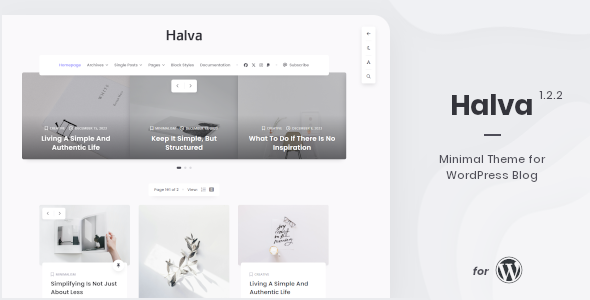
Halva is a lightweight, minimal WordPress theme designed for a personal blog, offering live switching between dark/light modes, fonts, and layouts, along with extensive editor compatibility and widget support.
Overview and Compatibility
- Compatible with WordPress 6.9.x
- Compatible with Block editor (Gutenberg; The default editor in WordPress since WordPress 5.0)
- Compatible with Classic editor (The previous default editor in WordPress, now available as a plugin: WordPress Plugins > Classic Editor)
Design, Layout and Interactivity
- Dynamic (instant) switching between: Dark/Light modes, Serif and Sans-serif fonts, Layouts with One and Three columns
- Carousel with posts on the home page to showcase featured or category-specific content
- Two blog layout options: One column or Three columns
- Lightboxes for images and galleries built-in for a focused viewing experience
- Support for Contact Form 7
- Responsive design ensuring good appearance on mobile devices
- Translation ready for multi-language use
Latest Version and How to View Changes
Latest version 1.2.2 – 11 December 2025 – Click here to view the changes.
Full changelog.txt
Version notes for quick reference: Updated documentation, block editor blocks support, CSS improvements, and compatibility updates.
Halva Theme: Core Features
- Compatible with WordPress 6.9.x
- The theme is optimized for two editors: Block editor and Classic editor. You can use the one you like best.
- Minimal and easy to use theme.
- Responsive design that looks good on mobile devices.
- Includes a set of Font Awesome icons (Version 7+).
- Compatible with all modern browsers: Firefox, Safari, Opera, Chrome, Edge.
- Theme settings powered by WordPress Customizer (You can see all available settings in the online documentation).
- Live switching between blog layouts: One column or Three columns.
- Two color modes: Light mode and Dark mode.
- Switch between two font types in real time: Serif and Sans-serif fonts.
- Two positions for menus: Header and Footer.
- Hidden sticky navigation is available when scrolling pages.
- Dropdown menu support (only menu in the header).
- Dropdown form with site search.
- Link to your “Subscribe” form in the main navigation.
- Social links in the main navigation.
- Supports two types of logos: Text logo and Image.
- Logo color-mode switching when toggling Light/Dark modes.
- Carousel with posts on the home page; can display by category or featured posts.
- Masonry-style cascading grid layout for blog posts (Three columns).
- Post and page counters: “Number of views” and “Number of comments”.
- Compatible with Contact Form 7.
- “Back to top” button for easy navigation.
- Ten post formats: Standard, Image, Gallery, Video, Audio, Aside, Link, Quote, Status, Chat.
- Lightboxes for images and image galleries.
- Section with information about the author of each post.
- Support for displaying related posts by tags.
- Hidden sidebar with smooth animation.
- Three additional footer widget areas: Footer Left, Footer Center, Footer Right.
- Five additional widgets: Halva: List Of Posts, Halva: Popular Posts, Halva: Random Posts, Halva: Recent Posts, Halva: Social Links.
- Support for all widget blocks and all classic widgets.
- Notice with information about cookies.
- Translation ready: Every word and phrase can be translated.
- Includes XML file with demo data and step-by-step offline documentation.
- Note: Halva will only work with WordPress.org software.
Post Formats in Halva
- Standard
- Image
- Gallery
- Video
- Audio
- Aside
- Link
- Quote
- Status
- Chat
Integrations, Widgets and Accessibility
- Lightbox functionality for images and galleries
- Back to top button
- Cookie notice display
- Social links and navigation widgets in the main menu
Changelog Highlights
Version 1.2.2 (11 December 2025)
- Updated: Documentation
- Tiny Slider (v2.9.3 -> v2.9.4)
- Font Awesome Icons (v6.7.2 -> v7.1.0)
- Fixes and Improvements:
- Added support for new blocks in the block editor (WordPress v6.9):
Accordion, Math, Stretchy Heading, Stretchy Paragraph, Several new blocks from the Theme section
- Added minor improvements to the theme CSS styles
- Fixed an issue with displaying the post update date on single pages
- Other Changes:
- The minimum required WordPress version for the theme has been raised to WordPress 6.7.x
- Important note: Please clear your browser cache for your site as all icons have been changed in this update.
Full changelog.txt • How to update
Version 1.2.1 (17 July 2025)
- Updated:
- Documentation: Updated screenshot with settings, animated mouse cursor info, fixed Bluesky profile link
- Translation file: Added one new phrase for translation: "Enable animated mouse cursor"
- Fixes and Improvements:
- Fixed some minor CSS issues
- Added:
- New feature: Animated mouse cursor (default disabled in theme settings). Enable via WordPress Dashboard > Appearance > Customize > Colors And Styles > Styles > Enable animated mouse cursor. Not available for mobile (< 992px)
Full changelog.txt • How to update
Version 1.2 (9 July 2025)
- Updated:
- Documentation: some screenshots updated, new settings info
- The Halva Additional Features plugin updated to 1.2 (Post views counter, Bluesky social button)
- Font Awesome Icons (Version 6.7.2)
- Magnific Popup (Version 1.2.0)
- Translation file: Added new phrases for translation
- Fixes and Improvements:
- Fixed minor block editor style issues, HTML5 markup enabled for styles and scripts, JS improvements
- Added:
- New setting for post views counter: Counter Type (Full vs Short)
- New social link: Bluesky
Full changelog.txt • How to update
Version 1.1.1 (12 December 2024)
- Updated:
- Documentation: fixed broken links, demo site copy info, Unsplash collection
- Font Awesome Icons (Version 6.7.1)
- Fixes and Improvements:
- Fixed minor CSS issues, improved carousel on home page, navigation visibility on single-post pages
Full changelog.txt • How to update
Version 1.1 (3 July 2024)
- Fixes and Improvements:
- Block editor styles, CSS issues fixed
- Added:
- New layout option: Horizontal order for blog posts (Three columns)
Full changelog.txt • How to update
Version 1.0 (27 January 2024)
Full changelog and update instructions are available at the links above.
Documentation, Demo Data and Documentation Links
- Documentation: Offline documentation included with the theme
- Demo data: Includes an XML file for quick setup
Full changelog and update instructions: Full changelog.txt • How to Update
The information on this website is sourced from the
ThemeForest product page
.