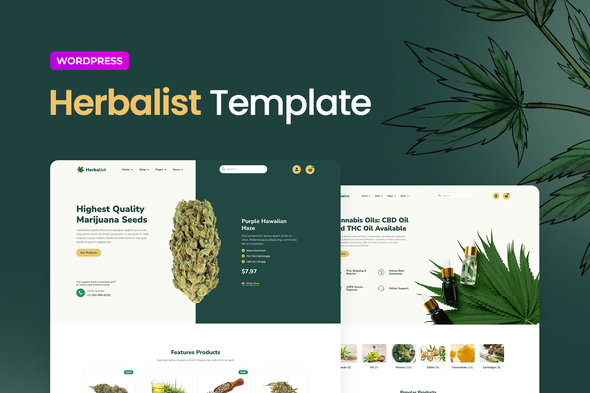
Herbalist – Medical Marijuana Store Elementor Template Kit
Herbalist is an Elementor Template Kit designed to help you quickly build a business website using the Elementor Pro Page Builder plugin for WordPress. It is organized and structured for easy customization of all parts, including backgrounds, colors, and global typography.
What Herbalist Template Kit Includes
This kit is not a WordPress theme. Template Kits contain page content for the Elementor page builder. It is optimized for the free Hello Elementor theme but may be used with most themes that support Elementor.
Pages
- Home
- Home 2
- About
- Contacts 1
- Contacts 2
- News
- News 2
- Sale
- Shop 1
- Shop 2
- Single Post 1
- Single Post 2
- Single Product
- Team
- Faq
- Form
- Error Page
Sections
- Hero Section With Icons
- Hero Section With Slider
- Section About
- Section Banner With News
- Section Category
- Section Companies
- Section Contacts Cards
- Section Contacts With Icons
- Section Countdown
- Section Cta Banners
- Section Faqs With Image
- Section Featured Product With Image
- Section Features
- Section Form
- Section Item On Sale
- Section Latest News
- Section Map With Contacts Information Right Side
- Section Numbers
- Section Page Title With Breadcrumbs
- Section Products Carousel
- Section Products Type 1
- Section Products Type 2
- Section Products Type 3
- Section Purchase Process
- Section Sidebar News
- Section Sidebar Shop
- Section Subscribe
- Section Team
- Section Testimonials
- Section Therapeutic Effects With Icons
- Section With Sales
- Burger Menu
- Header
- Footer
Features of Herbalist Template
- Global Theme Styles included
- 52 Elementor Templates
- Pixel Perfect Design
- 100% Fluid Responsive
- Clean and Simple Style
- Easy to Use and Customize
- All major browsers supported Chrome, Firefox, Safari, Edge, Opera
- Free Google Fonts Used
- Icons Provided by Font Awesome 5
- Tested in Color Blindness Simulator
- 100% SEO Friendly
- Optimized for Elementor Pro
- Quick, Dedicated and Professional Support
- Required Addons installed with kit
- Elementor
- WooCommerce
- Selection Lite
- Essential Addons for Elementor
- Prime Slider
Note: Elementor Pro upgrade is required for some templates and features (not included).
How to Use Template Kits
- Install and Activate the “Envato Elements” plugin from Plugins > Add New in WordPress
- Download your kit file and Do not unzip
- Go to Elements > Installed Kits and click the Upload Template Kit button. You may also import automatically by clicking Connect Account to link your Elements subscription, then import under Elements > Template Kits.
- Check for the orange banner at the top and click Install Requirements to load any plugins the kit uses
- Click import on the Global Kit Styles first
- Click Import on one template at a time. These are stored in Elementor under Templates > Saved Templates.
- Go to Pages and create a new page and click Edit with Elementor
- Click the gear icon at lower-left of the builder to view page settings and choose Elementor Full Width and hide page title
- Click the gray folder icon to access My Templates tab and then Import the page you’d like to customize.
- If you have Elementor Pro, headers and footers may be customized under Theme Builder.
Notes on Demo Content and Licensing
- Sources: This Template Kit uses demo images from Envato Elements: Envato Elements collection.
- You will need to license these images from Envato Elements to use them on your website, or you can substitute them with your own.
- Blog Content is not included – you will need to add a few posts to WordPress before post content will appear in templates.
Additional Considerations
- This kit is optimized for use with the free Hello Elementor theme but supports most themes that work with Elementor.
- It is designed to be quick to customize, with structured sections and globally configurable typography and color settings.
The information on this website is sourced from the
ThemeForest product page
.