Hoskia | Multipurpose Hosting WordPress with WHMCS Theme
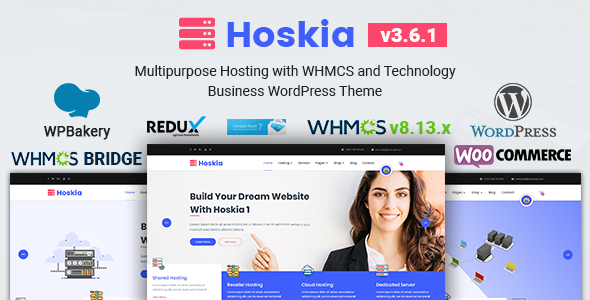
Hoskia is a multipurpose WordPress theme designed for hosting, domain, VOIP, cloud services, and technology businesses, with built-in WHMCS integration and a custom WHMCS template.
Main features
- Latest WordPress Ready
- Custom meta box cmb2
- WPBakery Page Builder Included
- WHMCS Template Included for WHMCS v8.13.x
- Full screen Image Background
- Mail-chimp Ajax Integrated
- Fully Compatible with Whmcs Bridge
- Error free code
- Strong focus on usability
- True One-Click Demo Installation
- Completely Styled Forms with included Contact-Form-7 Plugin
- Advanced Theme Options Panel ( Redux framework! )
- Blog page Layout Style ( Fullwidth, Left Sidebar, Right Sidebar)
- Page Layout Style ( Fullwidth, Left Sidebar, Right Sidebar)
- WooCommerce Ready
- WooCommerce Layout Style ( Fullwidth, Left Sidebar, Right Sidebar)
- Child Theme compatible (example child theme is already included)
- 3 WordPress Custom Post Types ( Slider, Gallery, service )
- Modern Cross Browser Compatibility: FireFox, Safari, Chrome, Edge, IE9, IE10, IE11
- Ready for translation ( .pot files included )
- Unlimited Color Version
- Strong Page Meta Option Like (Enable Page Loader, Page Breadcrumb Disable, Page Menu Selector, Homepage section image/color selector, Page Layout Selector, Header Selector, Header Logo Uploader)
- Unlimited Google Fonts
- Clean Code
- 100% Fully Responsive WordPress Theme
- Modern Cross Browser Support
- W3C Validated Code
- Free Updates
- Well Documented
WHMCS Compatibility
Hoskia offers complete WHMCS Bridge compatibility, meaning it works flawlessly with WHMCS to manage your hosting services, customer accounts, and billing system. Additionally, Hoskia comes with a custom WHMCS template specifically designed for WHMCS version 8.8.x, ensuring a streamlined look and feel between your WordPress site and WHMCS platform.
Seamless integration for hosting services
The theme makes it easy to integrate essential services, such as domain search and hosting registration. With Hoskia, customers can effortlessly find and purchase hosting plans, register domains, and view pricing tables for various hosting configurations—all directly from your website. This seamless integration provides a user-friendly experience that encourages customer engagement and satisfaction.
Drag-and-Drop page building
One of the major advantages of Hoskia is its use of the Visual Composer and WPBakery Page Builder. These intuitive page-building tools allow you to design and customize your site with ease—no coding required. With a simple drag-and-drop interface, you can create layouts, add elements, and adjust content quickly and effortlessly.
Pre-built demos for quick setup
This theme provides one-click demo installation to import pre-built demo sites, helping you launch a hosting business site or technology blog rapidly.
Custom post types
Hoskia includes 3 WordPress custom post types: Slider, Gallery, and Service, enabling structured presentation of media and service details.
Pricing tables
Fancy pricing tables enable you to display hosting prices for different server configurations and hosting packages clearly, helping customers compare plans at a glance.
Design and layout flexibility
- Color and Layout Flexibility with unlimited color options and multiple layouts
- Google Fonts access for typography
- Fully Responsive design for all devices
- Cross-Browser Compatibility including Chrome, Safari, Firefox, Edge, IE9–IE11
- WooCommerce Integration for selling products and services
- WooCommerce Layout Styles fullwidth, left sidebar, right sidebar
- Error-Free Code for performance
- W3C Validated Code for SEO and standards
- Translation Ready with .pot files included
WooCommerce readiness
Hoskia is fully WooCommerce-ready, allowing you to sell hosting plans, domains, and tech products directly from your site with flexible page layouts.
Technical reliability
- Error-Free Code
- W3C Validated Code
- Regular Free Updates
- Well Documented
What is WHMCS?
WHMCS (Web Hosting Management Complete Solution) is a comprehensive automation platform used primarily by hosting companies to manage client billing, support, and provisioning. It allows businesses to seamlessly integrate domain registrations, billing management, and service automation into their website, ensuring smooth operation of their services.
What Hoskia offers hosting and technology businesses
Perfect fit for hosting, domain, and technology businesses
Hoskia is perfectly suited for hosting companies, domain registrars, VOIP service providers, cloud service businesses, and tech startups. The theme’s versatility allows it to serve businesses that rely on digital services, offering a platform to easily manage their online presence and service customers effectively.
Why choose Hoskia?
With its wide range of features, Hoskia provides unmatched flexibility and functionality. From smooth WHMCS integration to intuitive drag-and-drop page building, the theme is designed to give businesses the tools they need to succeed. Whether you’re a hosting company looking to manage customer accounts or a software business needing a platform to showcase your services, Hoskia has everything you need to create a visually appealing and highly functional website.
Updates & CHANGE LOGS
Version 3.6.1 — 24 June, 2025
- Fixed Compatibility issue with WordPress 6.8
- Fixed Wishlist plugin Compatibility issue
- Fixed product slider not working issue
- Fixed CSS issues
- Updated hoskia-core plugin
- Fixed PHP error issues
- Fixed Some Other Errors
You need to remove and reinstall the "hoskia" Theme, "hoskia-core" and "WPBakery Page Builder" Plugins to get the above update
Version 3.5 — 26 October, 2023
- Compatibility with WordPress 6.3.x
- Update Bootstrap 3.3.0 to 5.2.2
- Update WPBakery Page Builder plugin
- Fixed Theme Options Issue
- Fixed js error issue
You need to remove and reinstall the "hoskia" Theme, "hoskia-core" and "WPBakery Page Builder" Plugins to get the above update
Version 3.4.1 — 26 March, 2023
- Compatibility with WordPress 6.1.x
- Add compatibility with all update plugins
- Fixed some other issues
You need to remove and reinstall the "hoskia" Theme, "hoskia-core" and "WPBakery Page Builder" Plugins to get the above update
Version 3.4 — 29 September, 2022
- Add compatibility with WordPress 6.0.2
- Fixed some Redux framework issues
- Add compatibility with all update plugins
- Update WPBakery Page Builder plugin
You need to remove and reinstall the "hoskia" Theme, "hoskia-core" and "WPBakery Page Builder" Plugins to get the above update
Version 3.3 — 31 October, 2021
- Add compatibility with PHP 8
- Add compatibility with all update plugins
- Update WPBakery Page Builder plugin
You need to remove and reinstall the "hoskia" Theme, "hoskia-core" and "WPBakery Page Builder" Plugins to get the above update
Version 3.2 — 28 February, 2021
- WHMCS template updated to be compatible with WHMCS Version 8.1.x
Version 3.1 — 21 December, 2020
Version 3.0 — 17 October, 2020
- Compitable With WordPress 5.5
- Updated WPBakery Page Builder
- Woocommerce Updated
- Translate Issue Fixed
Earlier updates
- Version 2.9 — 31 May, 2020
- Version 2.8 — 29 April, 2020
- Version 2.7 — 26 January, 2020
- Version 2.6 — 01 January, 2020
- Version 2.5 — 18 November 2019
- Version 2.4 — 01 October, 2019
- Version 2.3 — 18 September 2019
- Version 2.2 — 07 April, 2019
- Version 2.1 — 04 February, 2019
- Version 2.0 — 08 December, 2018
- Version 1.9 — 08 November, 2018
- Version 1.8 — 07 November, 2018
- Version 1.7 — 21 October, 2018
- Version 1.6 — 06 August, 2018
- Version 1.5 — 23 July, 2018
- Version 1.4 — 25 June, 2018
- Version 1.3 — 23 May, 2018
- Version 1.2 — 20 May, 2018
- Version 1.1 — 19 May, 2018
You May Also Like Some of Our Other Items
- Bizdrone | Multipurpose WordPress Theme
- Bluishost – Responsive Web Hosting with WHMCS Themes
Source and credits
- Photos: All images used on the demo site are for demonstration purposes
- Fonts Used: Google Fonts (Raleway)
- Fonts Sources: http://www.google.com/webfonts
- Icons: Font Awesome
- Frameworks / Libraries: reduxframework
- CMB2: https://wordpress.org/plugins/cmb2/
- jQuery: https://jquery.com/
- Twitter Bootstrap: http://getbootstrap.com
- Plugins Used: Visual Composer, Contact Form 7, Waypoints, jQuery CounterUP, Owl Carousel, jquery ajaxchimp
The information on this website is sourced from the
ThemeForest product page
.