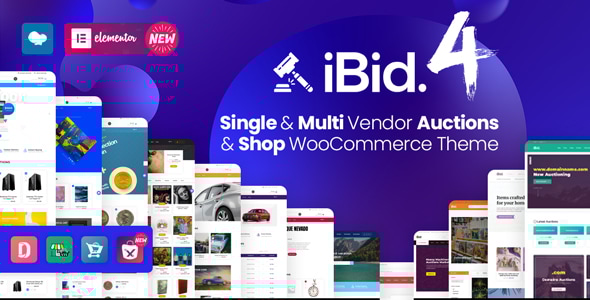
iBid - Multi Vendor Auctions WooCommerce Theme
This summary highlights the iBid theme’s auction-focused features, addon integrations (MT Auction Lots), NFT marketplace capabilities, and the extensive demos and documentation available. It also notes vendor, subscription, and payment options and how to preview demos.
MT Auction Lots, NFT Marketplace, and Marketplace Extensions
- MT Auction Lots addon for the iBid theme extends the current auctions functionalities and enables auction lots, offering shared timing or time-slot based auction scheduling.
- iBid NFT Marketplace (NFT Metaverse) provides a pathway to build an affiliate NFT marketplace by using the iBid theme.
- Enable monetization with MT Auction Subscriptions and Credits for iBid, and consult Online docs for detailed usage.
- The plugin bundles features for both customers and vendors:
- For customers: Purchase Credit Packages to bid on auctions.
- For vendors: Purchase Subscription Packages to add products on the marketplace.
Demo Importer, Demos, and One-Click Preview
Choose any demo from the list below and with one click using the Demo Importer your website will be identical.
Demo Importer enables quick replication of a chosen storefront appearance and auction setup.
- Available demo categories include Electronics, Countdown Auctions, Automotive, Automotive v2 (List Auctions), Shop (No Auctions), Antiques & Collectibles, Numismatics/Coins, Arts, Real Estate & Lands, Book Comics & Magazines, Fundraising & Charity Auctions, Heavy Machinery Auctions.
Step 1: Select a Demo from the list above to preview specific auction types and shop configurations.
Step 2: Demo Credentials for viewing the demos:
- Demo Username: auctioner
- Demo Password: 123456
The iBid theme is designed for a broad range of shop and auction marketplace needs, with compatibility across major multi-vendor frameworks and auction extensions.
Key Compatibility and Integration
- Compatible with Dokan Lite&Dokan PRO.
- Also compatible with WCFM Marketplace Lite&WCFM Ultimate (PRO).
- Compatible with WC Vendors Marketplace (Free & PRO).
- Compatible with MultiVendorX Marketplace (Free & PRO).
- Auctions functionality powered by WooCommerce Simple Auctions.
In addition, the theme provides advanced product grids, auction settings, and various shop layouts to suit different selling strategies.
Auction and Marketplace Features
- Comprehensive Auctions Settings, including Item condition (New, Used), Auction type (Normal, Reverse), Proxy bidding (Yes/No), Start Price, Bid increment, Reserve price, Buy it now price, Auction Date – Start, Auction Date – End, and Automatic relist options.
- Relisting options include relisting after a set number of hours and relisting if payment fails, with configurable durations in hours.
- Marketplace demos include categories such as Electronics Auctions Marketplace, Automotive Auctions Marketplace, Shop (No Auctions) Marketplace, Antiques & Collectibles Auctions Marketplace, Real Estate & Lands Auctions Marketplace, Numismatics/Coins Auctions Marketplace, Art Auctions Marketplace, Countdown Auctions Marketplace, Automotive v2 Auctions Marketplace, Heavy Machinery Auctions & Shop, Fundraising Auctions (crowdfunding for causes), among others.
- Note: Each demo can be used with or without the auctions features, and can function as a standalone marketplace or shop.
Additional capabilities include: Multi-language (RTL & LTR) support, Multiple currencies, WPML / Polylang / Loco Translate, Live search, and shortcodes for banners, product blocks, and widgets.
All-Demos, Widgets, and Theme Capabilities
- Theme compatibility with popular marketplace plugins and multi-vendor solutions.
- Centered around a robust Redux Framework Theme-Options Panel with sections for:
- General Settings
- Sidebars
- Styling Settings
- Header Settings
- Footer Settings
- Contact Settings
- Blog Settings
- Shop Settings
- 404 Page Settings
- Social Media Settings
- One-click importer and 600+ Google Fonts for typography variety.
- Icon fonts, responsive design, and high-speed performance optimizations.
- Comprehensive documentation, including online docs and video tutorials, to guide installation, configuration, and customization.
Documentation, Support, and Refunds
- Theme Docs, Change LOG, and Online Docs are provided for ongoing updates and usage guidance.
- Refund Policy: We do not provide refunds for mistaken digital purchases; only defective products may be refunded if verified, per Envato review standards.
Frequently Asked Questions
Q: Why should I purchase the iBid Auctions theme?
A: See the benefits and reasons highlighted in various resources and articles related to iBid’s auction capabilities and marketplace versatility.
Q: What is the name of the multi-vendor marketplace plugin?
A: Dokan (Free Version). It is also compatible with WCFM Marketplace – Multivendor Marketplace for WooCommerce (since v1.4) and WC Vendors Marketplace (since v1.7).
Q: How to Setup Vendor Commission?
A: See the provided tutorial and documentation for step-by-step guidance.
Q: How can I enable auction on a new or existing product?
A: Since v1.1.1 ( released 19th November 2019 ), auction options are available on the product edit screen in the Dokan dashboard (frontend). If the theme version is older, auctions can be modified from the WP admin panel (Products → Edit Product).
Q: Will there be options to set auctions from the vendor dashboard?
A: Yes. An update with this feature is planned for release in the near future.
Q: Is there a Single Vendor Functionality?
A: Yes. Multi-vendor functionality can be disabled with one click by turning off the marketplace plugin; store admins can still add products and auctions.
Q: Can I list both shop products and auctions together?
A: Yes. You can mix auctions and products or separate them onto different pages.
Q: Is there a way to verify vendors before listing auctions?
A: Yes. Check the addon documentation for vendor verification features.
Q: What about digital products (eBooks, photos, graphics) auctions?
A: You can enable a downloadable auction option in a straightforward two-step process.
Q: Can this theme be used for a normal WooCommerce shop?
A: Yes. If the Auctions plugin is disabled, auction features will disappear, and the shop operates as a regular WooCommerce store.
Q: How to set up Mega Menus for categories and the primary menu?
A: A tutorial is available on how to configure Mega Menus for optimal navigation.
Q: Are there server requirements?
A: The recommended server requirements are documented in the online resources.
Q: Are Photoshop PSD or design files available?
A: Figma design files can be purchased separately if needed.
Additional Details and Quick Access
- Theme Docs, Change LOG, Refunds pages are accessible for ongoing guidance and policy information.
- The platform emphasizes Multi-Language (RTL & LTR ready), Multi Currency Ready, and Video Tutorials for onboarding.
The information on this website is sourced from the
ThemeForest product page
.