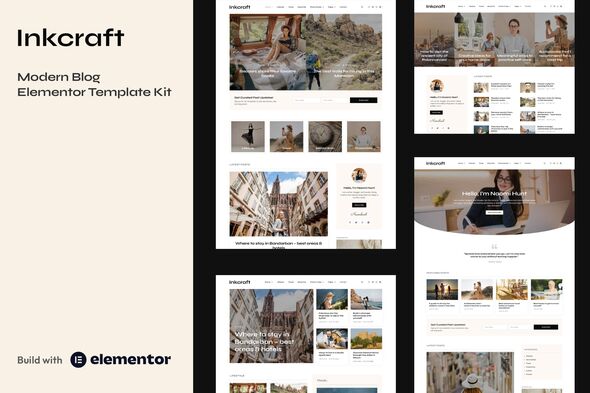
Inkcraft - Modern Blog & Magazine Elementor Pro Template Kit
Inkcraft is a feature-rich Elementor Template Kit tailored for bloggers, creators, authors, publishers, and creatives. It includes 55+ ready-to-use templates and blocks to accelerate site building.
Key Features
- 9 homepage layouts
- 25+ page templates
- 28+ blocks – mix and match to create new layouts
- Global Styles included
- SEO friendly design
- No coding knowledge required
- Header and Footer builder
- Elementor Pro upgrade (purchased separately) is required for most templates and features (not included)
Page Templates Included
- Home 1
- Home 2
- Home 3
- Home 4
- Home 5
- Home 6
- Home 7
- Home 8
- Home 9
- Category Layout 1
- Category Layout 2
- Single Blog Post 1
- Single Blog Post 2
- Single Blog Post 3
- Single Blog Post 4
- Author Archive
- Other Archive
- Blog Archive
- About Me
- Contact Me
- Search Results
- Photo Stories
- Single Photo Story
- Testimonials
- 404 Page
- Coming Soon
Block Templates Included
- Sidebar – Single Post and Archive
- Sidebar – With Author Box
- Sidebar – Without Author Box
- Header
- Footer
- Posts Slider 1
- Posts Slider 2
- Posts Slider 3
- Posts Slider 4
- Hero Banner 1
- Hero Banner 2
- Posts Grid 1
- Posts Grid 2
- Posts Grid 3
- Posts Grid 4
- Posts Grid 5
- Posts Grid 6
- Posts Grid 7
- Posts Grid 8
- Category Posts Box 1
- Category Posts Box 2
- Category Posts Box 3
- Category Posts Box 4
- Category Posts Box 5
- Category Posts Box 6
- Page Title
- Contact Form
- Newsletter Popup
- Newsletter Subscription
- Category Boxes
Plugins Installed with Kit
How to Use Template Kits
- Install and Activate the “Envato Elements” plugin from Plugins > Add New in WordPress.
- Download your kit file and do not unzip.
- Go to Elements > Installed Kits and click the Upload Template Kit button. You may also import automatically by clicking Connect Account to link your Elements subscription, then import under Elements > Template Kits.
- Check for the orange banner at the top and click Install Requirements to load any plugins the kit uses.
- Click import on the Global Kit Styles first.
- Click Import on one template at a time. These are stored in Elementor under Templates > Saved Templates.
- Go to Pages and create a new page and click Edit with Elementor.
- Click the gear icon at lower-left of the builder to view page settings and choose Elementor Full Width and hide page title.
- Click the gray folder icon to access My Templates tab and then Import the page you’d like to customize.
- If you have Elementor Pro, headers and footers may be customized under Theme Builder.
Detailed Guide: How to use the Envato Elements WordPress Plugin v2.0
For further support, go to Elementor > Get Help in WordPress menu.
How to Setup Sidebar
- Import the Sidebar block and customize it.
- Edit the template where the sidebar appears (such as Single Post, Archive page, or Blog under Theme Builder).
- Click on the Template element in the sidebar area and make sure your Sidebar block is selected.
Image Licensing
This Template Kit uses demo images from Envato Elements. You will need to license these images from Envato Elements to use them on your website, or you can substitute them with your own. Blog content is not included – you will need to add a few posts to WordPress before post content will appear in templates.
Envato Elements collection: LKJWH2G8CX
The information on this website is sourced from the
ThemeForest product page
.