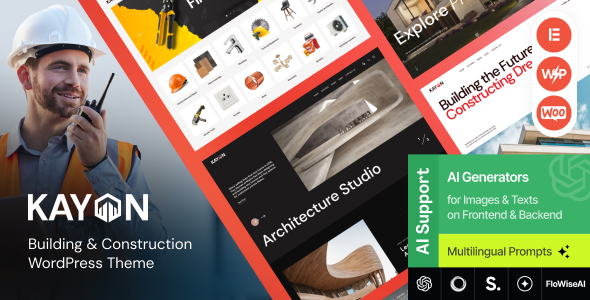
Kayon - Building & Construction WordPress Theme
Kayon is a Construction Business & Building Company WordPress Theme with a modern, responsive design and multiple gallery layouts for showcasing projects, services, and teams. It includes six ready-to-use demos, WooCommerce compatibility, and premade pages for services, about, contacts, team, gallery, products, and more.
Construction WordPress Theme features
- 6 Ready-to-use Homepage Demos
- Full Woocommerce store compatibility
- Custom Portfolio
- Online Appointments
- Advanced Contact Forms and crypto payment option
- Premade pages: services, about, contacts, team, gallery, products etc
Kayon theme is 100% responsive, looking stunning on all retina devices, and being WooCommerce ready, the theme is fantastic to create an online store of building tools and equipment.
Building & Construction WordPress plugins
Kayon offers unique homepage layouts, gorgeous Slider Revolution as a home slider, Elementor Page Builder integration to help you build your own page designs, compatibility with AI Engine and a lot of other premium features that will contribute a lot to your company’s success. Do not miss a chance to give exposure to your construction business with ProBuild.
Included integrations and capabilities
- Slider Revolution
- Swiper Slider included
- Elementor Page Builder integration
- AI Engine: Chatbots, Generators, Assistants, GPT 4 and more!
Kayon Key Features
- Professional design
- One-Click demo installation
- Modern, Flexible, Customizable
- WordPress 4.5+ Tested and Approved
- Built with HTML5 and CSS3 code
- Cross-Browser Compatibility: FireFox, Safari, Chrome, IE11+
- Slider Revolution & Swiper Slider included
- Retina Images Support
- User menu and Main menu support
- Interactive Ajax Search
- Flexible Colors & Typography
Layout Features
- 100% Responsive & Mobile-friendly
- Boxed and Fullwidth page layouts
- Elementor support – modify any page content easily
- Customize Header and Footer Layouts in Elementor Page Builder
- Advanced Blog Settings
- Multiple Blog Styles
- Flexible Layout Options
- 20+ Post Animations
- Customizable Blog Feed (choose from post types or categories)
- Post views, likes and sharing buttons
- Related Posts Section
Powerful Theme Framework
- Setting Inheritance and Override System
- 750+ Customizer Options
- Custom Post Types
- Custom Widget Sets
- Custom Shortcodes
- Custom Theme Options Panel
- Optimized for best performance
- ...and many more!
Plugins Compatibility
- Elementor
- Advanced Popups
- AI Engine: Chatbots, Generators, Assistants, GPT 4 and more!
- Contact Form 7
- MC4WP: Mailchimp for WordPress
- Slider Revolution
- ThemeREX Addons
- ThemeREX Updater
- Smash Balloon Instagram Feed
- TI WooCommerce Wishlist
- WooCommerce
- WPML
- Fontello & Image Icons
- Google Fonts
Fonts and assets
- Fonts: Google Fonts
- Clipart sources: shutterstock.com, peopleimages.com, flaticon.com
Changelog
- 19.12.2025
- Version 1.8 – Update
- - WP 6.8.2 compatibility has been added;
- - Plugins have been updated to their latest version
- 09.10.2025
- Version 1.7 – Update
- - Added QW Extension addon (to version 1.6.2) has been added;
- - Accessibility improvements for WP Accessibility Check have been added;
- - Events list Widget: the Classic layout now includes the event time in addition to the date;
- - Images Compare Widget: Separate styling for separator/handler, option to hide handler and control tag/offsets for "Before" & "After" have been added;
- - Style tweaks for The Events Calendar integrations have been added;
- - Audio widget: template "default" (select audio from library) has been added.
- 17.09.2025
- Version 1.6 – Update
- - Added: Plugin Settings – Added links to documentation and descriptions of custom Elementor settings/widgets.
- - Stack Sections – Added transition duration control for Zoom, Blur, Opacity effects.
- - Elementor Presets Support – Added ability to save/load custom style presets for widgets, sections, columns, and containers. Stored in /plugins/trx_addons/presets/trx_addons-presets.json.
- - Skin Notice – Admin notice now includes "Dismiss" (7 days) and "Never Show Again" options.
- - Accessibility Improvements – Added role="button" to non-link anchors, converted anchor tags to where appropriate, and added control for target="_blank" for external links.
- - TrxAddons: Hook for SportsPress to prevent redirecting to the “Welcome” screen after activation during demo import.
- - Theme Core Check: Added warning if theme core isn't updated before skin update (to avoid missing functions).
- - Backdrop Blur: New settings for sections, columns, containers, and all Elementor widgets; default semi-transparent background for sticky sections.
- - HotSpot Widget: Major redesign for responsive positioning and styling; added tag selection, icon customizations, popup alignment, offsets, and more.
- 11.09.2025
- Version 1.5 – Update
- - CSS\PHP fixes for WP 6.8.2 (shortcodes\widget layouts);
- 02.06.2025
- Version 1.4 – Update
- - Updated: QW Extension addon (to version 1.6.1);
- - Updated: Optimized all image files stored in the plugin and theme folders;
- - Added: WPML translation support for Elementor Extensions like "Background Text";
- 20.05.2025
- Version 1.3 – Update
- - CSS\PHP fixes for WP 6.8 (shortcodes\widget layouts);
- 07.01.2025
- Version 1.2 – Update
- - Removed: Disabling of rendering replacement in the Post Featured Image block for FSE themes (works only for video, audio, and gallery formats now)
- - Fixed: Sticky sidebar positioning script on fullwidth pages, when fixed_blocks_sticky == false selected in the options
- 14.12.2024
- Version 1.1 – Update
- - Added: Option "Redirect 404"
- - Added: Option "Disable word hyphenation for the headings on tablets and mobile devices"
- - Added:Parameter "Show Description" in Layouts - Title shortcode
- - Added: Layouts: filter 'trx_addons_filter_sc_layout_content_need_inline_css' for custom layouts
- - Added: Elementor: default settings for compatibility with Elementor "Optimize Control Loading"
- - Added: Options for customization of shortcodes Switcher and HotSpot
- - Added: Slider Widget: responsiveness for "Slides per view" and "Slides space" parameters
- - Added: AI Helper: API support for ModelsLab music generation
- - Added: AI Helper: Text To Speech/Speech To Text/Voice Covering API from OpenAI and ModelsLab and a new widget Audio Generator (AGenerator)
- - Added: AI Helper IGenerator: script for repeated opening of images
- - Added: AI Helper: authorization parameters for Open AI and Google AI APIs to use proxy servers
- - Added: API Text To Speech / Speech To Text /
- - Added: Elementor Page Settings: a filter to disable a default section background for layouts
- - Fixed: Mouse Animation styles
- - Fixed: Revolution Slider: demo url to support a new version of slider tables
- - Fixed: FontAwesome 4 compatibility
- - Fixed: "NavMenu" script for layout submenus
- - Fixed: PHP8 Compatibility for CPT Services
- - Fixed: Iframe resize of fullscreen video
- - Fixed: Elementor 3.25.0+ compatibility
- - Fixed: AI Helper Chat: title and button styles
- - Fixed: API Stable Diffusion renamed to ModelLab
- - Fixed: xxx_get_file_dir() for file compilation in /uploads on multisite installations
- - Fixed: Rendering of Instagram video posts
- - Fixed: Woocommerce: styles of product discounts
- - Updated: QW Extension addon (to version 1.6.0)
- 28.08.2024
The information on this website is sourced from the
ThemeForest product page
.