Kidvero - Kindergarten & Child Care Elementor Template Kit

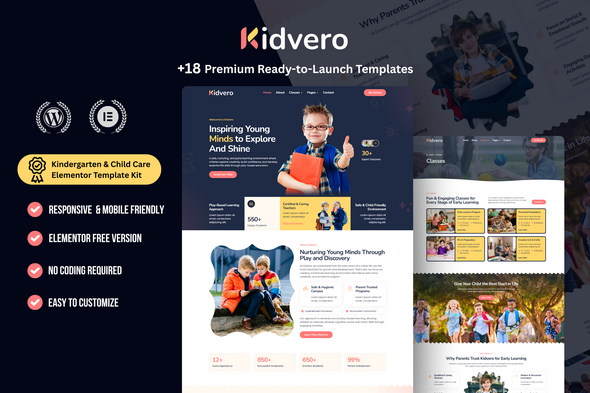
Kidvero is a premium, no-code Kindergarten & Child Care Elementor Template Kit built for the early childhood education and care industry. It delivers a colorful, engaging, and highly functional website framework optimized for parent enrollment, curriculum showcasing, and search engine visibility.
Target Audience & Best Used For
- Kindergartens
- Preschools
- Daycares
- Child Care Centers
- Early Education Academies
- Summer Camps
Designed for organizations that need a playful yet professional digital presence to build trust with parents and streamline student admissions.
Core Features & Technical Benefits
- Playful & Trust-Building UI/UX: A vibrant, cheerful, and welcoming design layout built to instantly communicate safety, fun, and educational value to parents.
- Student Enrollment Engine: Features dedicated “Admissions” pages and high-converting “Enrollment Forms” built with MetForm to seamlessly capture parent inquiries and student registration details.
- Curriculum & Activities Showcases: Includes specialized “Classes” and “Activities” templates to beautifully present daily schedules, learning modules, and extracurricular fun.
- Educator Profiles: A dedicated “Teachers” layout to highlight your staff’s qualifications, early education backgrounds, and certifications, establishing authority and care.
- Visual Editing (No-Code): 100% customizable using the free Elementor drag-and-drop builder, supercharged by Gum Addon. Easily modify typography, playful brand colors, and layouts without touching any code.
The combination of these features creates a complete, ready-to-launch digital presence that supports admissions, showcases learning programs, and highlights staff expertise, all while enabling non-developers to tailor the site visually.
Required Plugins (Available for Free)
- Elementor
- MetForm
- Jeg Elementor Kit
- Gum Addon for Elementor
All listed plugins are available for free, ensuring a cost-effective setup that remains highly capable for customization and functionality.
Included Page Templates (Website Sitemap)
- Home Page (Main School/Daycare Hub)
- About Page (Facility Overview & Core Values)
- Classes Page (Age-Group Programs & Curriculum)
- Class Details Page (Specific Program Breakdown)
- Activities Page (Extracurriculars & Play Modules)
- Admissions Page (Enrollment Process & Requirements)
- Teachers Page (Educators & Caregivers Directory)
- Pricing Page (Tuition & Daycare Rates)
- FAQs Page (Parent Support & School Policies)
- Blog Archive & Single Post (Parenting Tips & School News)
- Contact Page (Location & Outreach)
- 404 Page
- Contact Form (General Parent Inquiries)
- Enrollment Form (Student Registration Intake)
- Newsletter Form (School Updates Capture)
- Header & Footer (Global Templates)
The kit provides a complete sitemap to support enrollment, communication, and content marketing, with dedicated templates for staff, activities, and parent resources.
Important Notice
This is an Elementor Template Kit, not a traditional WordPress Theme. It contains design data for Elementor only and can be imported seamlessly using the Envato Elements plugin or directly through the Elementor library.
How to Import MetForm Custom Form
- Import all MetForm templates first.
- Edit the page where the form is placed using Elementor.
- Click the MetForm widget and choose Edit Form.
- Select “New”, keep it blank, and click Edit Form.
- Click the gray folder icon → open My Templates → insert the imported MetForm template.
- Click Update to save changes.
How to Setup Header in Jeg Elementor Kit Plugin
If you are using Elementor Pro, manage headers and footers via Theme Builder. Otherwise, go to Jeg Elementor Kit → Header Template → Add New Header → set condition to Entire Site → click Create. Edit the header with Elementor. Insert the header template using the gray folder icon. Customize as needed and click Save.
Detailed Installation Guide
For step-by-step instructions, refer to the Envato help article: How to Upload & Install Elementor Template Kits from ThemeForest to WordPress.
Images & Licensing Asset Information
This Template Kit uses high-quality demo images from Envato Elements. You must license these images from Envato Elements to use them on your live website, or easily replace them with your own school facility and classroom photography.
Envato Collection Link: https://elements.envato.com/collections/AV3DNU7P2H