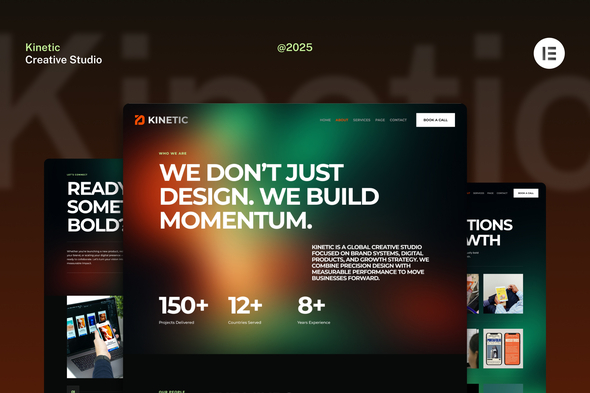
Kinetic - Creative Studio Website Elementor Kit

Kinetic is a modern Creative Studio Elementor Template Kit designed for agencies, designers, and digital professionals seeking a bold online presence. Fully responsive and easy to customize without coding, it showcases portfolios, services, and brand stories with a professional, high-impact design optimized for performance.
Key features
- True no-code customization with drag and drop visual builder
- Customize fonts and colors in one place or fine-tune on individual elements
- Modern, professional design
- Fast-loading
- Works with most Elementor themes
- Note: This is a headless eCommerce solution to be integrated with the cart plugin or platform of your choice.
Included pages
- Homepage
- Work
- Case Study
- Services
- About
- Careers
- Blog
- Single Post
- Coming Soon
- 404
- Contact Us
Plugins installed with kit
- Jeg Elementor Kit
- Metform
How to use Template Kits
This is not a WordPress Theme. Template kits contain the design data for Elementor only and are installed using the envato Template Kit Import plugin for WordPress or directly through Elementor.
Detailed Guide: How to Upload-Install Elementor Template Kits from Themeforest to WordPress.
For further support, go to Elementor > Get Help in WordPress menu.
How to setup header in Jeg Elementor Kit plugin
- If you have Elementor Pro, setup headers and footers in Theme Builder. Pages you create with Elementor must have the Page Layout set to Elementor Full width for the global header and footer to appear.
- Go to Jeg Elementor Kit menu item > Header Template
- Click Add New Header
- Add condition > All Site and click Create
- Click the pencil icon to Edit and elementor will appear
- Click gray folder icon to access My Templates tab
- Insert the header template.
- Customize and Save.
How to Import MetForm Custom Form
- While editing a page where a form should appear, open the Elementor navigator to locate the Metform widget.
- Click Edit Form in the builder panel.
- Select New, leave blank selected then click Edit Form button.
- Click ‘Add Template’ grey folder button.
- Click ‘My Templates’ tab.
- Choose your imported MetForm template, then click ‘Insert’.
- Once the template is loaded, click ‘Update’.
Images and licensing
This Template Kit uses demo images from Unsplash. You will need to license these images from Envato Elements to use them on your website, or you can substitute them with your own. Blog Content is not included – you will need to add a few posts to WordPress before post content will appear in templates.