Local - Modern Blog & Magazine Elementor Template Kit
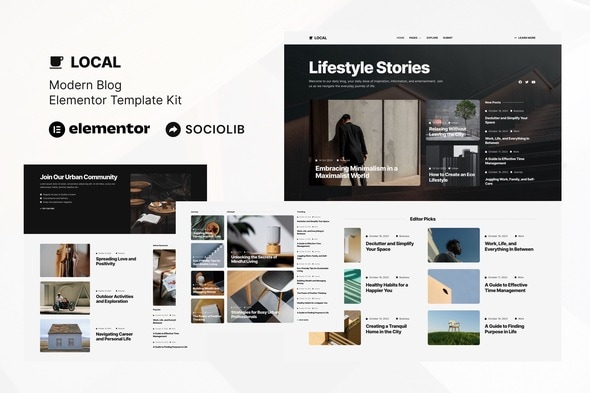
Local is an Elementor Template Kit for quickly and easily creating Modern Blog using the Elementor Page Builder plugin for WordPress. Suitable for Blogger, Journal, News, Portal, Stories, Magazine etc. Style your wordpress website with this creative and modern webdesign style template kit to bring a modern feel to your blog.
What this kit is and how it works
Local Template Kit provides page content for Elementor page builder and is not a WordPress theme. This kit has been optimized for use with the free Hello Elementor theme but may be used with most themes that support Elementor.
Key features
- 13+ Templates
- True no-code customization with drag and drop visual builder
- Customize fonts and colors in one place or fine-tune on individual elements
- Clean and Minimal Design
- Fast-loading
- Works with most Elementor themes
- Responsive Design
Template catalog
- Home
- Explore
- Submit
- About
- Contact
- Subscribe
- Blog
- Post
- Metform Contact
- Metform Subscribe
- Metform Submit
- Header
- Footer
- Global Style
Plugins installed with kit
Compatibility and prerequisites
This is not a WordPress theme. Template Kits contain page content for Elementor page builder. This kit has been optimized for use with the free Hello Elementor theme but may be used with most themes that support Elementor.
How to use Template Kits
- Template Kits use the Template Kit Import plugin to install to WordPress (no subscription required).
- Install and Activate the “Template Kit Import” plugin from Plugins > Add New in WordPress
- Do not unzip
- Go to Tools > Template Kit and click the Upload Template Kit button.
- Before importing a template, ensure the Install Requirements button is clicked to activate required plugins
- For best results, do not import more than one template at a time.
- Go to Pages and create a new page and click Edit with Elementor
- Click the gear icon at lower-left of the builder to view page settings and choose Elementor Full Width and hide page title
- Click the gray folder icon to access My Templates tab and then Import the page you’d like to customize
- Detailed Guide: https://help.market.envato.com/hc/en-us/articles/900000842846-How-to-use-the-Envato-Elements-WordPress-Plugin-v2-0
- Note: You must have posts created in WordPress before they will appear in templates. Each post element must be configured with your query or categories to personalize the content.
- For further support, go to Elementor > Get Help and ElementsKit > Get Help in WordPress menu.
Additional guidance
Blog content is not included – you must have posts created in WordPress before that content will appear in your pages.
Global header and footer setup
- Setup Global Header and Footer in ElementsKit Lite Header Footer Builder Plugin
- Import the header and footer template
- Go to ElementsKit Lite > Header Footer and click Add New button
- Give it a title and select Header, Display on Entire Site and click Publish
- Click Edit with Elementor
- Click the gray folder icon to access My Templates tab and select the header template to import and Update.
- Repeat for Footer
Importing Metforms
- Import the metform block templates
- Import the page template where the form appears and right-click to enable the Navigator
- Locate and select the Metform widget and click Edit Form. Choose New, then Edit Form. The builder will appear
- Click ‘Add Template’ grey folder icon.
- Click ‘My Templates’ tab.
- Choose your imported metform template, then click ‘Insert’ (click No for page settings).
- Once the template is loaded, make any desired customizations and click ‘Update & Close’ The form will appear in the template
- Click Update
Content and licensing notes
- Blog content is not included – you must have posts created in WordPress before that content will appear in your pages.
- This Template Kit uses demo images from Envato Elements and Unsplash. You will need to license these images from Envato Elements to use them on your website, or you can substitute them with your own.
Reference images and assets collection: https://elements.envato.com/collections/23JXSEZ5T8
Support and help resources
- For further support, go to Elementor > Get Help and ElementsKit > Get Help in WordPress menu.
The information on this website is sourced from the
ThemeForest product page
.