Mantos, Responsive Email with Template Editor
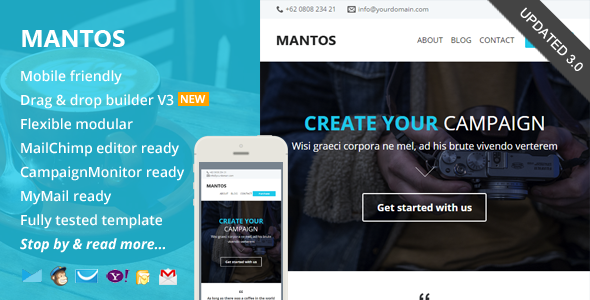
Mantos is a responsive, minimalist email marketing template with a drag‑and‑drop editor and ready‑to‑use templates for MailChimp, Campaign Monitor, and MyMail. It includes modular layouts, detailed help documentation, and video tutorials to simplify template creation.
What Mantos Offers
- Responsive, minimalist email templates designed for broad client compatibility
- Free online template builder / editor access
- MailChimp ready templates, Campaign Monitor & MyMail ready templates are also included
- Flexible, repeatable modular layout to arrange the design and build your own template easily
- Detailed help documentation and video tutorials
Editor & Workflow
Drag and Drop Theme Builder / Editor
- Drag & drop, add, remove, arrange modules easily. Customize the color schemes, edit both text and image content. Download it in .zip file contain regular HTML and image files
Template Readiness & Editor Integration
- MailChimp Ready: Add & remove modules or hide elements, easily with MailChimp editor.
- You can also set the theme color directly via MailChimp editor.
- There’s a detailed insruction from how to upload and setup template in to your MailChimp account, customize it, up to sending & testing email.
Campaign Monitor Ready
- Campaign Monitor Ready: Add or remove modules easily with Campaign Monitor editor.
- There’s also a detailed insructions (including video) from how to upload and setup template in to your Campaign Monitor account, customize it, up to sending & testing email.
MyMail WP Plugin Ready
- MyMail WP Plugin Ready: Add or remove modules easily with MyMail plugin editor.
- You can also set the theme color directly via the editor.
- There’s also a detailed insructions (including video) from how to upload and setup template in to your WordPress website, customize it, up to sending & testing email.
What You’ll Get in the Download Package
- Total 5 HTML files, with 1 mixed modules variations.
- 1 HTML files for MailChimp templates (in separated folder)
- 1 HTML files for Campaign Monitor templates (in separated folder)
- 2 HTML files for MyMail WP plugin templates (in separated folder)
- and 1 other for regular HTML templates
- 1 PSD file
- Image files, in the “images” folder in each of layout and color variations.
- Help Docs – Including videos.
Compatibility & Notes
- Compatible Browsers:
- Android
- AOL Mail Chrome
- AOL Mail Explorer
- AOL Mail Firefox
- Apple Mail
- Gmail
- Hotmail
- iPad
- iPhone 3, 4 and 5
- Mozilla Thunderbird
- Opera Mail
- Outlook 2010
- Outlook 2013
- Outlook.com
- Windows Live Mail
- And mostly all clients that render valid HTML
Notes: Background image on featured area & call to action section working in most major clients, including Outlook.
Update history
- Version 3.0 – April 8 2015
- Updated theme builder. Added more useful features.
- Minor template code updates
- Update 1.2 Jan 19 2015
- Improved MyMail template version (fixed responsive issue)
- Update 1.1 Dec. 23 2014
- Improved MyMail template version
- Added Yahoo! Mail Compatibility
- Improved responsive codes
- Update 1.0
Support requests
- For support related, please send me your support request / question, or any advice via this contact form.
- I will respond you usually within 24 hours in Monday – Friday.
Credits & Licensing
- Font awesome icons
- Images from:
- People images on testimonial section are from: http://www.imcreator.com/free Under CREATIVE COMMONS 2.0 LICENSE – Free for commercial use, attribution to the creator is required.
- Other images are from Unsplash.com Under CREATIVE COMMONS 0 1.0 Universal – Free for commercial use, or whatever you want, no attribution required.
The information on this website is sourced from the
ThemeForest product page
.