Megaphone - Podcast WordPress Theme
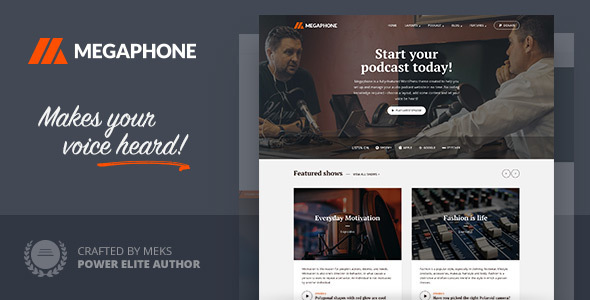
Megaphone is a feature-rich WordPress theme designed to quickly set up and manage audio podcast websites, suitable for personal podcasts, networks, online radio streaming, and audio book sites with broad platform integrations.
Key capabilities and platform support
- Fully-featured WordPress theme created to help you set up and manage your audio podcast website in no time.
- Fits both personal podcasts and large podcasting networks with multiple hosts and shows.
- Can be used for online radio stations with live audio streaming and for audio book websites.
- Support for Spotify, iTunes, SoundCloud, MixCloud, Stitcher, PodBean, Blubrry LibSyn, Spreaker, Cadence, Podomatic, Deezer and many more.
- No coding knowledge required – choose a layout, add content and let your voice be heard.
Use cases and example scenarios
- Podcast website with personal touch
- Podcast portal (for community portals of other podcasts)
- Online radio stations using Megaphone for audio streaming
- Music websites with a large database of music
You can also check Megaphone theme showcase and see our users in action!
Support, resources, and knowledge
Having questions or wishing to learn more about Megaphone theme, we have a huge selection of useful articles which you can easily browse at our Knowledge Base.
Changelog
1.5.3
- Fixed: Episode numbers not displaying in some cases
1.5.2
- Added: Icon for podcast platforms which can be recognized and displayed in the Subscribe menu(Amazon, Rumble)
- Improved: Tested compatibility with WordPress 6.3 (yes, it’s safe to update your theme)
- Improved: Tested compatibility with PHP8
- Fixed: Episodes section on Front page not showing sidebar for Layout G
- Fixed: PHP warnings on search template that appeared in specific cases
- Fixed: Several minor styling issues
1.5.1
- Added tiktok, parler, amazon, rumbler icons
- Improved: Tested compatibility with WordPress 6.0 (yes, it’s safe to update your theme)
- Fixed: Gallery popup option not working in WP 5.9+
- Fixed: Theme options presets not working on Kirki 4.0+
1.5
- Fixed: WP 5.8 issue with specific settings to separate podcast episodes and regular blog posts
- Fixed: Play button not working on episodes page template
- Fixed: Sidebar Ads display issues
- Fixed: Several minor styling issues
1.4
- Improved: WordPress 5.8 compatibility tweaks (yes,you can update your theme)
- Improved: Several onpage SEO tweaks (added noopener tag to several target="_blank" attributes)
- Fixed: Elementor page problem fixed
- Fixed: Several minor styling issues
1.3.2
- Added: New Apple Podcast Icon
- Added: Episodes listing page template
- Fixed: WP 5.7 Gutenberg editor font size problem
- Fixed: Several minor styling issues
1.3.1
- Added: Icon for podcast platforms which can be recognized and displayed in the Subscribe menu(Whooshkaa)
- Added: Support for (Whooshkaa)(Theme Options -> Podcast -> Player)
1.3.0
- Improved: Your website now loads faster because of Google Fonts optimization (switch to new Google Fonts API)
- Added: Several icons for podcast platforms which can be recognized and displayed in the Subscribe menu(Deezer,Captivate.fm, Transistor.fm, Wooshakaa)
- Added: Support for Deezer, Captivate.fm, Transistor.fm, Wooshakaa (Theme Options -> Podcast -> Player)
- Added: Show name is now displayed in the audio player – beside the episode
- Fixed: Static home pagination problem
- Fixed: Share functionality on Ajax load inside Meks Audio Player
- Fixed: Several minor styling issues
1.2.2
- Improved: WP 5.5 Compatibility tweaks
- Added: Support for Castos podcast hosting
1.2.1
- Added: Full Support for Buzzsprout (Theme Options -> Podcast -> Player)
- Improved: Custom area functionality
1.2
- Power Add: Users can pick and add more Custom areas (Theme Options -> Front Page -> General -> Number of custom content sections )
- Power Add: Users can display content from desired page inside Custom area (Theme Options -> Front Page -> Custom content -> Pull custom content from )
- Added: Several icons for podcast platforms which can be recognized and displayed in the Subscribe menu(iHeart, TuneIN, Overcast, Ausha, Anchor, Megaphone.fm, iVoox, Simplecast, BuzzSprout )
- Added: Support for Simplecast, iHeart, TuneIN, Anchor.fm, Ausha embeds (Theme Options -> Podcast -> Player)
- Added: Option to have custom order of Shows (Theme Options -> Podcast -> Shows -> Shows to display)
- Added: Option to limit description on Shows (Theme Options -> Podcast -> Shows -> Display description -> Description excerpt limit)
- Added: Authors page template option to display guests (Page template: Authors -> Display data from: Host authors / Guests authors)
- Fixed: Pagination problem, including infinite scroll pagination problem
- Fixed: Multiple authors problem on mobile
- Fixed: Several minor styling issues including IE fixes
1.1
- Added: Option to switch logic which separates episodes from regular posts if you are using Podlove or Seriously simple podcasting WordPress plugins (Theme Options -> Podcast -> General)
- Added: Option to modify the player height (Theme Options -> Podcast -> Player)
- Added: Option to display Download button for audio episodes inside the player (Theme Options -> Podcast -> Player)
- Added: Several icons for podcast platforms which can be recognized and displayed in the Subscribe menu (Mixcloud, Spotify, Stitcher, Podbean, Libsyn, Spreaker, Cadence13, Podomatic, Blog Talk Radio )
- Added: Another “blank” section on the home page which can display any custom content (Theme Options -> Front Page)
- Added: Options to choose alternative background color for Featured area and Welcome area on front page (Theme Options -> Front Page)
- Added: Support for Megaphone.fm, BuzzSprout and iVoox embeds (Theme Options -> Podcast -> Player)
- Added: Option to enable the play button/icon over the episode thumbnail in all episode listing layouts (Theme Options -> Podcast -> Episode Listing Layouts)
- Fixed: Play button not working on the page template which listed all shows
- Fixed: Several minor styling issues
1.0.1
- Fixed: Several minor styling issues
- Fixed: template-functions.php throwing errors on specific server/PHP configurations
The information on this website is sourced from the
ThemeForest product page
.