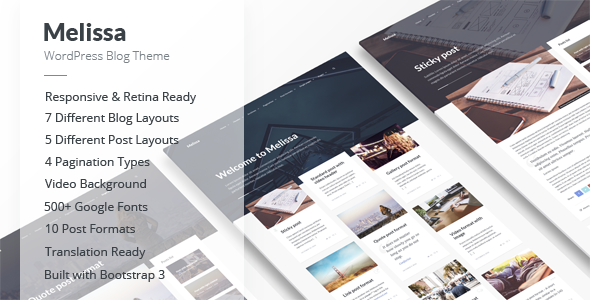
Melissa - Personal Blog/Magazine WordPress Theme
Melissa is a modern, clean and easy to use personal blog/magazine WordPress theme built on Bootstrap 3, with extensive layouts, post formats, and customization options designed for mobile friendliness and flexible presentation. The latest version 2.2.2 (28 January 2022) tightens CSS, adds compatibility notes, and reiterates its rich feature set for WordPress sites that require stylish headers, multiple layouts, and widget areas.
Overview of Melissa
- Compatible with WordPress 6.8.x (WordPress with Classic Editor).
- Built with HTML5 and CSS3; responsive design; retina ready.
- Built with Bootstrap 3; 500+ Google fonts; 500+ Font Awesome Icons.
- Theme options powered by WordPress Customizer; translation ready.
- Header customization with video, image, color backgrounds; parallax header background.
- Social icons in footer; sticky and dropdown menus; views/comments counters; “I like” counter.
- Seven custom widgets and seven widget areas; seven layouts for Home/Category/Tag/Archive pages.
- Ten post formats; four pagination types; five layouts for single posts; three layouts for pages.
- Seven areas for widgets (Homepage, Archive Pages, Single Post, Page, Footer columns).
- Social share buttons (Facebook, Twitter, VK, Pinterest) and XML demo data included.
Key Features and Capabilities
- Standard fonts and icons: 500+ Google fonts; 500+ Font Awesome Icons.
- Header and background options: Video background; Image background; Color background; Video/Image background in the header for the whole site and for each post/page; Parallax background for the header (video or image).
- Show/Hide most elements; Translation ready; Social icons in footer; Sticky menu; Dropdown menu support.
- Post and page layout versatility: 7 Layouts for Home/Category/Tag/Archive pages; 4 pagination types; 10 post formats; 3 page layouts; 5 layouts for single posts with various placements; 7 areas for widget placement.
- Post utilities: Views counter; Comments counter; “I like” counter; “About the Author” section; Related posts; “Back to top” button.
- Content presentation enhancements: Video background in header; single post and page header customization; header content subtitles; preconnect for Google fonts (in newer updates).
Layout, Post Formats & Pages
- 7 Layouts for Home/Category/Tag/Archive pages:
- 1 Column
- 1 Column + Right sidebar
- 1 Column + Left sidebar
- 2 Columns
- 2 Columns + Right sidebar
- 2 Columns + Left sidebar
- 3 Columns
- 10 Post formats:
- Standard format
- Image format
- Gallery format
- Video format
- Audio format
- Aside format
- Link format
- Quote format
- Status format
- Chat format
- 4 Pagination types: Standard pagination; Next/Previous page links; Infinite scroll; Load More button
- 5 Layouts for single posts:
- Right sidebar
- Left sidebar
- Full width
- Featured media – Right sidebar
- Featured media – Left sidebar
- 3 Layouts for pages: Right sidebar; Left sidebar; Full width
Widgets and Widget Areas
- 7 Custom widgets:
- Melissa: Popular Posts
- Melissa: List Of Posts
- Melissa: Random Posts
- Melissa: Recent Posts
- Melissa: Slider With Posts
- Melissa: Social Links
- Melissa: Thumbnail Gallery
- 7 Areas for widgets:
- Homepage (right or left column)
- Archive Pages (archive, author, category, tag, etc)
- Single Post (right or left column)
- Page (right or left column)
- Footer (Column 1)
- Footer (Column 2)
- Footer (Column 3)
Compatibility, Requirements & Tips
- Melissa will only work with WordPress.
- Note: In WordPress 5.x/6.x you need to use the Classic Editor. For WordPress 5.8+ you need to install the “Classic Widgets” plugin.
Changelog
Version 2.2.2 – 28 January 2022
- Fixed: Fixed minor CSS style issues: comment form styles and quote styles
Full changelog: http://documentation.birdwp.com/wp-melissa/changelog.txt
Version 2.2.1 – 25 November 2021
- Fixed: Some minor CSS issues
- Minor improvements: Removed unnecessary files from the theme
Full changelog: http://documentation.birdwp.com/wp-melissa/changelog.txt
Version 2.2 – 18 September 2021
- Updated:
- Plugin updated: Melissa Social Media (v1.3)
- Plugin updated: Melissa Widgets (v1.1.1)
- POT translation file (/melissa/languages/melissa.pot)
- Documentation
- Fixed: Meta boxes sometimes did not appear on the post creation and editing page (Admin side, Block editor)
- New:
- Added new words for translation: "Category:", "Tag:", and "Author:"
- Added smoother animation for header area, dropdown search form and menu
- Default settings changes:
- Colors > Menu > Menu Link Color (#c1c4cc > #dadde5)
- Font Size & Style > Menu > Submenu: Font Style (Bold > Normal)
- Colors > Sticky Menu > Sticky Menu Link Color (#c1c4cc > #dadde5)
- Colors > Dropdown Search Form > Search Icon Color (#c1c4cc > #dadde5)
- Colors > Header Content > Subtitle Color (#c1c4cc > #dadde5)
- Colors > Header Content > Subtitle Link Color (#c1c4cc > #dadde5)
- Colors > Header > Header Background Transparency (9 -> 6)
- Blog Post/Metedata: Bold to Normal in various areas
- Widget metadata: Bold to Normal
- Added preconnect for Google fonts
- New setting: "Show full images instead of thumbnails"
- New setting: "Enable hover effect only for posts on archive pages"
- Added search form for mobile version
- New views counter
- Several minor improvements
- Deleted: Removed the setting "Colors > Dropdown Search Form > Search Form Border Color"
Full changelog: http://documentation.birdwp.com/wp-melissa/changelog.txt
Version 2.1.2 – 6 January 2021
- Updated: "Melissa Social Media" Plugin (v1.2)
- Fixed: Fixed an issue where posts overlap each other
Full changelog: http://documentation.birdwp.com/wp-melissa/changelog.txt
Version 2.1.1 – 2 October 2020
- Fixed: Few minor CSS issues.
- All other changes: Added the wp_body_open function to the theme header file (new requirement for all themes).
Full changelog: http://documentation.birdwp.com/wp-melissa/changelog.txt
Version 2.1 – 12 December 2019
- Updated: Documentation; Translation file; "Melissa Social Media" Plugin (v1.1) with new social links
- Updated: "Melissa Widgets" Plugin (v1.1) with new social link options
- Fixed: Some minor CSS issues
- New:
- Ability to skip logo scaling when uploading it
- New option: "Logo Width, px"
- New social icons: "Stack Overflow" and "Slack"
- New options for social links and footer colors
Full changelog: http://documentation.birdwp.com/wp-melissa/changelog.txt
Version 2.0 – 27 May 2019
- How to update Melissa guidance; major changes to meet WordPress theme submission requirements
- All theme code edited to meet WordPress code standards; use of get_theme_file_path(); updated sanitization; moved customizer styles to a separate file
- Plugins: Melissa Widgets and Melissa Social Media required for certain functions
- Other changes: Documentation, Bootstrap v3.4.1, Superfish v1.7.10; rel="noopener" added to external links
- Header and background improvements; various UI/UX refinements; updated post and widget behavior
Full changelog: http://documentation.birdwp.com/wp-melissa/changelog.txt
Version 1.1.x — 2017–2018
- Various updates to Slider Revolution plugin compatibility and CSS
- New social icons (Stack Overflow, Slack) and translation improvements
- New options for featured media, footer colors, and social links
- Theme compatibility and performance enhancements; retina and mobile improvements
Full changelog: http://documentation.birdwp.com/wp-melissa/changelog.txt
Version 1.0 – 29 November 2016
Additional Notes & Documentation
- Changelog file: Full changelog.txt available at the linked documentation URL
- Update instructions: How to update Melissa with step-by-step guidance
The information on this website is sourced from the
ThemeForest product page
.