Melon – Flat & Responsive Admin Template
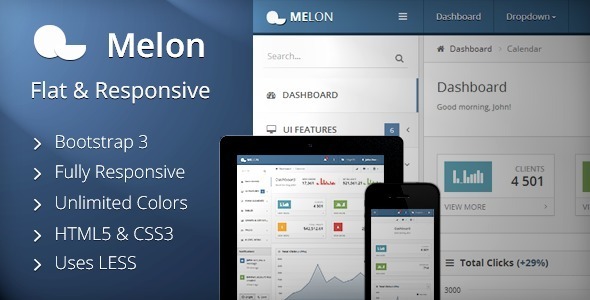
Melon is a premium flat and responsive Admin Template built on Bootstrap 3, featuring a flexible content structure and a modern HTML5/CSS3 stack designed for backend solutions of any size. It emphasizes speed, lightweight design, and a rich set of expandable components for a wide range of devices.
Overview of design, tech stack, and core capabilities
- Based on Twitter Bootstrap 3 with a clean, modern, intuitive, and fully responsive flat style design that works across major browsers, tablets, and phones
- Build with valid HTML5, CSS3, and JavaScript; CSS built with LESS (LESS is included)
- Unlimited Colors Possible and Unique Charts for flexible branding and data visualization
- Well Organized & Documented Code for developer friendliness and easier maintenance
- Responsive Tables, Fixed and Unfixed Header/Sidebar, Show/Hide/Resize Sidebar
- Two Sidebar Themes: Bright & Dark to suit different UI preferences
- Login-, Sign Up-, and Password Forgotten-pages; Full suite of authentication UI
- Interface Elements including Modals (Bootbox), Tooltips & Popovers, Date-, Time-, and Color-pickers (fullscreen date/time picker)
- Extensive UI Components: Buttons in multiple sizes and colors, Dropdowns with Search, Sliders, Tabs, Accordions, Nestable Lists
- Charts & Data Visualization: Flot charts (Lines, Bars, Pies) with auto-updating charts and chart widgets
- Tables: Static, Dynamic/Managed (DataTables), Responsive, Striped/Bordered/Hoverable/Condensed tables with pagination
- Typography and styling presets for headings, blockquotes, and descriptive text
- Form Elements: Default inputs, textareas, validation, WYSIWYG editor, masked inputs, dual list boxes, and integrated validation
- Advanced widgets: Date/time/color pickers, real-time tooltips, and grid-based layouts for multiple widget configurations
- Developer-friendly code with extensive documentation and a rich set of UI components for rapid development
Design system, layout, and component stack
- Flat, modern design with intuitive navigation and a focus on usability
- Responsive grid and layout system with adjustable header and sidebar behavior
- LESS-based CSS with included preprocessor for easier customization
- Header and Sidebar management: fixed/unfixed headers, resizable sidebars, show/hide controls
- Two distinct sidebar themes (Bright and Dark) for flexible theming
- Comprehensive set of interface elements (forms, modals, widgets, charts, and tables)
UI components, widgets, and interface elements
- Sidebar Search and Project Switcher
- Notifications and Modals (including Bootbox)
- Progress Bars and Alerts
- Multiple Widget Layouts and Labels/Badges
- Tooltips & Popovers
- Date-, Time-, and Color-picker (including fullscreen Date- and Timepicker)
- 7 Button Colors: grey, blue, cyan, green, yellow, red, black
- Button Sizes: Mini, Small, Large, and Block buttons
- Button Dropdowns and Ups/Gird Tabs (Box- and Inline Tabs in all directions) with Accordions
- Sliders (jQuery UI and Circle Dials) and Nestable Lists
- Styled Typography, Form Elements with placeholders, autofocus, tooltips, read-only/disabled states, length limits
- Textarea with fixed height, auto-growing, and character counter
- Styled Dropdowns with Search
- WYSIWYG Editor and Integrated Validation Engine
- Horizontal & Vertical Forms, Masked Inputs, and Dual List Boxes
- Flot Charts: Lines, Bars (vertical/horizontal), Pies
- Auto Updating Charts and Chart Widgets
- Tables: Static, Dynamic/Managed (DataTables) with responsive behavior
- Typography, Headings, and CSS-Styled Descriptions
- Left and Right Blockquotes, Emphasis Styles, and List Styles
- Additional features and visual utilities to support a wide range of admin use cases
Charts, data visualization, and tables
- Integrated Flot charts for rich visual data representation
- Chart Widgets with tooltips for contextual insights
- Dynamic/Managed DataTables with pagination, search, and column filtering
- Responsive tables that adapt to different viewports
- Static and advanced table variations including striped, bordered, hoverable, condensed styles
Forms, typography, and input components
- Default text inputs with placeholder, autofocus, hover tooltip, and read-only/disabled states
- Textareas with fixed height and auto-grow behavior and character limit counters
- Styled dropdowns with search capabilities
- Masked inputs and validation integration for robust form handling
- WYSIWYG editor for rich text content
- Dual List Boxes for intuitive item transfer between lists
- Horizontal and vertical form layouts for flexible design options
Theme, branding, and accessibility considerations
- Unlimited color customization options to align with branding
- Accessible keyboard and screen-reader friendly components where possible
- Clear typography and UI/styling presets for consistent presentation
Version history
Version 2.0.0 (22 April 2014)
- Features
- New: Updated to Bootstrap 3.1.1
- New: Added ribbons
- Bugfixes
- Fixed z-index issue from DatePicker
- Form Wizard: It does not validate the form anymore, if clicked index from step buttons is lower than active index
- Allow clearing select-box in a DataTable with ColumnFilter
- Prevent toggling disabled checkbox if the ‘toggle all checkbox’ was clicked
- Multiple Textareas with Character Counter are now possible on the same page
- Styling for a Bootstrap 3 List-Group Inside a Boxed Widget With “no-padding”
- Dual Lists weren’t submitting their value (thanks syscover!)
- Printed Pages from Firefox have no borders anymore
- Google Street View and zoom in/out buttons are now displaying correctly in Google Maps Widgets
- Fixed border from search at DataTables in Internet Explorer 9
Version 1.2.0 (11 November 2013)
- Features
- New: Form Wizard
- New: 404 Error Page
- New: Bootstrap Switch (“iOS checkboxes”)
- DataTables are now supporting the ColumnFilter-plugin with the use of data-columnFilter=’{}’-attribute
- Improved checkable DataTables with pagination: Master toggle is now switching into the correct state when pagination was used
- DataTables can now be extended with a function which you can set with data-dataTable-function=”” (thanks karlfalconer!)
- Adding support for .table-vertical-align
- Header Top Left Menu is now responsive and can be shown on phones
- Bugfixes
- Removed accents in filenames
- Fixed sidebar with left whitespace after resizing the window when the sidebar was resized
- Widget-header toolbar-buttons were sometimes 1px too high in Firefox
- Input-icons at login are now hiding correctly when switching to registering-tab
- Bootbox does not have double scrollbars anymore
- Fixed jQuery Validation resetForm()-function
- TableTools and ColVis can now be used together
- Tabs inside tabs are now possible
- Typing on focus at select2-boxes is now working in Chrome
- Improved validation on vertical forms
Version 1.1.0 (15 September 2013)
- Features
- Login has now built-in validation
- Full featured Google Maps Widgets
- Zoomable Charts with Overview
- “Display Length” from DataTables can now be configured via data-display-length="10" attribute directly in HTML
- Added Horizontal Scrolling example and possibility for data-horizontal-width="150%" attribute
- Added data-dataTable="" attribute for DataTables to set something like an ajax-source directly in HTML
- Removed Underscore.js and switched to Lo-Dash (resulting in faster page load)
- Multiple Project Switcher are now possible
- Added Slim Progress Bars (like on YouTube) for Ajax-Requests or similar (using nprogress)
- Bugfixes
- Removed accents in filenames
- assets/img/icons/iconsweets/is2(white|dark)/exposé.png to expose.png
- Added if-clause in app.js for $.cookie
- Fixed displaying white space instead of sidebar on Android-tablets (only landscape) with Chrome
- Headers from DataTables on resize are now aligning correctly
- Selects are now styling correctly with an ajax-source in DataTables
- Fixed some IE8-issues
Version 1.0.0 (3 September 2013)
Support, community, and notes
- Support forum: Visit the Support Forums
- Account creation: Create an Account
- Note: If you want to rate this item with less than 5 stars, please contact the author. Feedback is valued to improve updates and address criticisms.
The information on this website is sourced from the
ThemeForest product page
.