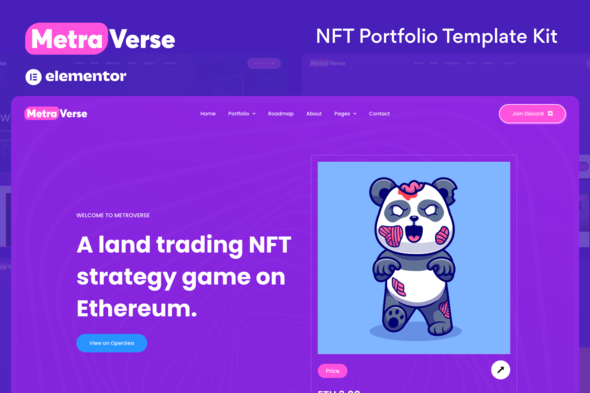
Metraverse - NFT Portfolio Elementor Template Kit
Metraverse is an Elementor Template Kit for quickly and easily creating websites for your business using the Elementor Page Builder plugin for WordPress. This is not a WordPress theme.
Overview and Theme Compatibility
Template Kits contain page content for Elementor page builder. This kit has been optimized for use with the free Hello Elementor theme but may be used with most themes that support Elementor.
Key Features
- Modern & Clean Design
- 10+ Ready to use templates
- Fully Responsive Layout
- Retina Ready
- Fully Customizable
- Cross-Browser Compatibility: Chrome, Firefox, Safari, Opera
Templates Included
- Home Page
- Portfolio (3 types of styles)
- Portfolio Style 1
- Portfolio Style 2
- Portfolio Style 3
- Roadmap Page
- About Page
- Our Team
- Blog Page
- Single Post Page
- Faq Page
- 404 Page
- Contact Page
Compatibility, Prerequisites, and Integrations
- Elementor Pro upgrade is required for some templates and features (not included)
- Easily integrates with WooCommerce and NFT minting plugins for WordPress, we recommend using addons specifically designed for Elementor
- Optimized for use with the free Hello Elementor theme but may be used with most themes that support Elementor
How to Use Template Kits
- Install and Activate the “Envato Elements” plugin from Plugins > Add New in WordPress
- Download your kit file and Do not unzip
- Go to Elements > Installed Kits and click the Upload Template Kit button. You may also import automatically by clicking Connect Account to link your Elements subscription, then import under Elements > Template Kits.
- Check for the orange banner at the top and click Install Requirements to load any plugins the kit uses
- Click import on the Global Kit Styles first
- Click Import on one template at a time. These are stored in Elementor under Templates > Saved Templates.
- Go to Pages and create a new page and click Edit with Elementor
- Click the gear icon at lower-left of the builder to view page settings and choose Elementor Full Width and hide page title
- Click the gray folder icon to access My Templates tab and then Import the page you’d like to customize.
- If you have Elementor Pro, headers and footers may be customized under Theme Builder.
Images and Licensing
Illustrations used are licensed from freepik.com and for demo purposes only. They must be replaced with your own for use on your website.
The information on this website is sourced from the
ThemeForest product page
.