Meup - Event Marketplace WordPress Theme
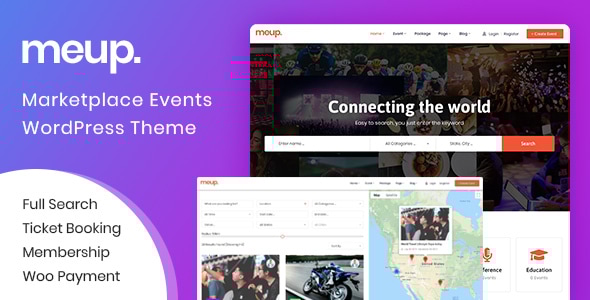
Meup is a feature-rich WordPress event marketplace and directory theme that enables vendors to submit events, manage listings, and monetize through structured pricing, packages, and commissions. It supports both virtual and in-person events, with QR ticket scanning and a comprehensive vendor/customer workflow.
Core capabilities and structure
- SaaS monetization model includes System Fee, Package Fee, Commission, and Advertisement to monetize per transaction or per listing.
- Multi-role access supports Site Owner, Vendor (event organizers), and Customer accounts with dedicated workflows.
- Event submission & management for unlimited events, with configurable packages that govern registration, ticketing, and attendee management.
- Flexible search and discovery with Quick Search, Advanced Search, and Ajax with Google Map integration to help users find events by name, category, location, price, duration, dates, and more.
Demo access and credentials
Monetization and pricing mechanics
- System Fee: Customers pay a small fee to the site owner for each successful transaction.
- Package Fee: Vendors pay a fee to register a package, enabling event submissions and access to additional features.
- Commission: Vendors pay a percentage of sales per transaction as commission.
- Advertisement: Vendors can pay manually to feature events.
Search and discovery features
- Quick Search Form: 3 custom fields (e.g., Event Name, Category, Location) tailored to your needs.
- Advanced Search Form: Multiple fields including Event Name, Category, Location, Venue, Price, Object, Event Duration, Start Date, End Date.
- Ajax Search: Results displayed with Google Map integration for intuitive location-based results.
- Virtual vs. Physical: Separate handling for online events (links/passwords) and offline events (Seat Code List or Seat Map).
Event packaging and lifecycle management
- Manage Package:
- Site Owner: configure multiple packages with options such as Register Fee, Package Time, Event Total, Fee per Paid Ticket, attendee/ticket export, and tax settings.
- Vendor: selects a package and processes payment to register events.
- Manage Category:
- Site Owner can create unlimited categories.
- Vendor can choose a category when creating a new event.
- Manage Venue:
- Site Owner can create unlimited venues.
- Vendor can select existing venues or create new ones.
- Manage Location:
- Two-level location structure (State, City) with translation support; vendors select State/City when creating events.
Event creation and feature set
- Basic Information: Name, Category, Tags, Description, State, City, Venue, Google Map, Image, Gallery, Video, Contact Info.
- Unlimited Ticket: Direct tickets and Affiliate tickets; supports Seat Code or Seat Map for varied business models.
- Calendar: Individual or Recurring events.
- Coupon: Coupons for per-ticket type.
- Staff: Assign staff to check tickets at the door.
- Cancel Booking: Customers can cancel bookings according to policy.
- Tax: Tax configuration by event (percent or fixed).
- Extra Services: Sell additional services per ticket.
Customer bookings, wallet, and administration
- Manage My Bookings: Customers can download PDF tickets, email tickets, download invoices, and cancel bookings.
- Manage Wallet: Vendors view balance, profits, payout history, and payout methods; admin can manage payouts.
- Manage Sales, Tickets, Attenders (Vendor): Access event-specific metrics, including totals before/after tax, profit, tax, coupons, bookings, and tickets; export data and view QR codes.
- Download & Create Tickets: Vendors can generate and send PDF tickets; site owners can view and manage tickets and commissions.
- Multiple Payment Gateways: Supports PayPal, Stripe, and WooCommerce-based payments.
- PDF Invoice: Invoices can be sent to customers after ticket purchases.
Attendee check-in and communications
- Check in attendees through two methods:
- Web-based check-in by entering ticket QR code or partial details.
- App-based check-in via mobile app to scan QR codes (free with the theme).
- Automatic Email Notifications:
- Confirmation emails after successful bookings with order details, PDFs, QR codes, and invoices.
- Reminder emails sent days before events.
Form customization and data flexibility
- Custom Checkout Field: Supports Text, Password, Phone, Email, Textarea, Radio, Checkbox, and File inputs to tailor booking forms.
- Unlimted Custom Taxonomy: Add custom fields and taxonomy for filtering in search forms.
- RTL Support: RTL compatibility for Arabic and other languages.
Calendar, headers, and page-building
- Event Calendar: View events by day, week, month, or list; users can choose dates easily.
- Header & Footer with Elementor: Build custom header/footer templates using Elementor.
- Full Theme Elements: Compatibility with Elementor and full-page builder elements; supports multiple hooks for customization.
Other notable features
- Manual Booking: Admins can add orders via manual entry or phone bookings.
- Membership Management: Add or update member information and track memberships.
- Cancel/Refund Booking: Bookings can be canceled or refunded per policy.
- Payout Management: Admins can track payout history and manage payout settings for vendors.
- SEO, Performance, and Compatibility: SEO-optimized, browser compatible with GTMetrix scores reported (e.g., 96 points in some builds); built on Elementor with a flexible grid and typography controls.
- Multilingual and Font Support: RTL ready and fonts support via Google Fonts and custom fonts.
Global features and ecosystem
- Free bundled plugins: No need to purchase extra plugins; the theme includes built-in functionality.
- One-click demo content and lifetime updates for the theme.
- Extensive documentation with step-by-step guides.
- Live customization and typography/color customization in the WordPress Customizer.
- Wide layout options including Wide & Boxed layouts and 1170px grid system.
Version history and release notes (highlights)
Version 2.1.2 – 20 November 2025
- Update Theme Version 2.1.2
- Update Event List Plugin version 2.0.9
- New Wallet feature for users
- Vendor can cancel booking
- Feature icon for featured events in listing
- Improve Cancel/Refund feature
- Miscellaneous settings updates
- Ticket handling fixes related to seat maps
Version 2.1.1 – 23 October 2025
- Update Theme Version 2.1.1
- Update Event List Plugin version 2.0.8
- Register package fixes and backend UX improvements
Version 2.1.0 – 09 October 2025
- Update Theme Version 2.1.0
- Update Event List Plugin version 2.0.7
- New date field for custom checkout fields
- Fix password during new user registration
- Allow change of Membership ID when editing an event
- Mobile hero image slider improvements
- Various UI and search/booking fixes
Version 2.0.9 – 20 August 2025
- Theme and plugin updates with security fixes
- Display improvements for video in event detail
Version 2.0.8 – 28 July 2025
- Theme updates and event list plugin improvements
- Bug fixes for coupon handling and cart behavior
Version 2.0.7 – 22 July 2025
- Theme updates and security fixes
- Event List Plugin security fixes
Version 2.0.6 – 07 July 2025
- Theme updates and Event List Plugin fixes
- Fixes for link display in orders and header
Version 2.0.5 – 17 June 2025
- Theme and plugin security fixes
Version 2.0.4 – 09 June 2025
- Theme and plugin updates; fix WooCommerce templates
Version 2.0.3 – 30 May 2025
- Theme updates and vendor upload image fixes
Version 2.0.2 – 29 May 2025
- Theme updates; Event List Plugin v1.9.x and related fixes
Version 2.0.1 – 27 May 2025
- Theme updates; improvements to event listings, PDF ticketing, and UX
Version 2.0.0 – 15 May 2025
- WooCommerce template updates; general stability improvements
Earlier releases
- Versions 1.9.x to 1.0.x contain iterative improvements across event lists, map integrations, booking flow, vendor management, and plugin compatibility with PHP versions.
The information on this website is sourced from the
ThemeForest product page
.