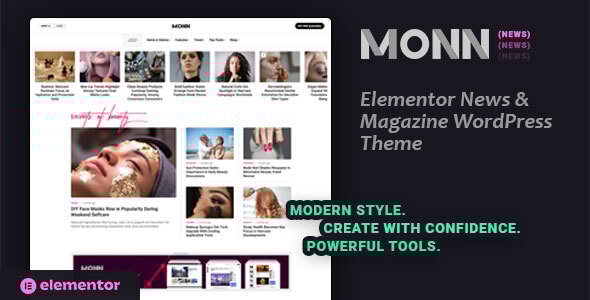
Monn - Elementor News & Magazine WordPress Theme
Monn is a modern, stylish WordPress theme designed for bloggers, content creators, and lifestyle magazines, offering extensive customization, pre-built demos, and seamless plugin integration without coding.
Key Features
Pre-Built Demos for Versatility
A versatile set of ready-to-use designs crafted for diverse niches.
- Monn includes 10 professionally crafted demos, tailored for a variety of niches: News, Auto, Beauty, Lifestyle, Entertainment, Food, Gadgets, Photography, Sport, Travel
- Coming Soon: more new demos are in the works, expanding the possibilities for your site!
- Use the One-Click Demo Import feature to get started quickly.
Seamless Plugin Integration
Designed to work with essential WordPress tools for design, marketing, forms, and commerce.
- Elementor Free Page Builder for drag-and-drop design.
- Mailchimp for building email lists.
- Contact Form 7 for easy form creation.
- WooCommerce for online stores.
Advanced Mega Menu Options
Two configurable mega menu modes to optimize navigation and category display.
- Standard Mega Menu: Create visually appealing, large menus for your site navigation.
- Category Mega Menu: Dynamically display subcategories and posts from the selected category, with AJAX-powered Next/Previous navigation.
Flexible Header Layouts
Multiple header styles to align with brand and layout preferences.
Custom Widgets
Extend functionality with a suite of Frenify widgets for ads, authors, comments, categories, donations, followers, posts, social, and Mailchimp subscriptions.
- Frenify Ads
- Frenify Author
- Frenify Comments
- Frenify Categories
- Frenify Donations
- Frenify Followers
- Frenify Posts
- Frenify Social
- Frenify Subscribe (Mailchimp)
Elementor Widgets for Advanced Customization
Custom Elementor widgets unlock flexible design with powerful post controls.
- Posts Widget: The advanced Posts Widget supports 21 layouts (with more in development) and allows unparalleled post filtering and sorting options:
- Query options: post number, offset, and specific formats.
- Include/exclude by post IDs, categories, authors, tags, or keywords.
- Filter by comment count (operators like =, >, <).
- Sorting options: order by ID, popularity (pageviews), rating, votes, date, and more.
- Date Query: unlimited options for date-based filtering.
Great Post Format Support
Monn supports a wide variety of post formats to handle diverse content styles.
- Gallery: Beautiful layouts for image-heavy content.
- Video: Seamless integration with YouTube and local videos, with autoplay and customization options.
Light/Dark Mode & Styling Options
Easily toggle between light and dark modes. Access 800+ Google Fonts and advanced typography settings. Customize your site’s colors for a unique look.
- Light and dark mode toggle
- 800+ Google Fonts and advanced typography settings
- Customizable color options for a unique look
Monetization Ready
Integrate advertisements with flexible placements to maximize revenue.
- Easily integrate advertisements (Google Ads or custom banners) with flexible placements:
- Off-canvas
- Below the header
- Above the footer
- Between list posts
- Inside and after single post content
Additional Features
Extras to enhance site management and user experience.
- Coming Soon Page: Prepare your audience for a new launch with a beautifully designed coming soon page.
- Custom 404 Page: Stylish and user-friendly 404 error page.
- Protected Page Design: Custom design for password-protected pages.
- Sticky Menu: Ensure your menu stays visible as users scroll.
Why Choose Monn?
Monn combines an intuitive options panel, pixel-perfect design, and advanced functionality to help you build a standout site. Its flexibility suits bloggers, lifestyle magazines, and creative professionals who want a polished, high-performance online presence. Take your website to the next level with Monn WordPress Theme!
You can seamlessly integrate external video sources, such as YouTube, or use local video files from any location. These features are included in the Monn Blog & Magazine WordPress Theme. Simply purchase the theme and start building your blog website effortlessly, whether you’re a personal blogger or a company. The theme offers unique features like voting, built-in reactions, custom reactions, and more.
Access and manage features globally via Dashboard → Monn → Theme Options, covering a wide range of controls including general options, typography, colors, header and footer settings, social lists, advertising, custom CSS, SEO, and more.
- General Options
- Main Colors Options
- Logo Options
- Popup Options
- Header Options
- Typography Options
- Social List Options
- Viral Options
- Blog Single Options
- Blog Options
- Footer Options
- Share Options
- Advertising Options
- Custom CSS
- SEO Options
- Full Features
- WooCommerce Compatible
- RTL Ready
- Custom Advertisement Areas
- Custom Widget Areas
- Off-Canvas Sidebar
- Featured Posts
- Categories Block
- Mailchimp Ready
- Infinite Scroll for Single Posts (Ajax Previous Post)
- Custom Scroll to Top Button
- Share Posts
- Unlimited Reaction Options for Blog Posts
- Customizable Voting Widget Areas
- Pixel-Perfect Design
- Contact Form 7 Plugin Support
- Custom Logo Support
- Easy to Use for Any Type of Website
- 404 Page with Custom Design
- Protected Page with Custom Design
- Strong Focus on Typography and Usability
- XML File with Demo Content
- Well Organized, Commented & Clean Code
- Fullwidth & Standard Layouts
- Compatible with Many Popular Plugins
- Free Lifetime Updates
- Enhanced Isotope Grids
- Elegant and Unique Design
- Online Documentation
- True Responsiveness
- Translation Ready
- One-Click Demo Importer
- 800+ Google Fonts
- Custom Coloring Option
- Dedicated Support
- Online Documentation
- Video Guide for One Click Demo Import
How to Update & Maintenance
Automatic updates are supported via the Envato Market Plugin. Go to Dashboard → Envato Market → Settings to activate full updates. To update manually: update via Envato Market → Themes, then update the monn-core plugin when prompted. Alternative: deactivate and delete the Monn Core plugin, download the latest monn.zip from ThemeForest, upload and install, then install required plugins.
Change Log
Version 1.0.0
May 15, 2025 — INITIAL RELEASE
The information on this website is sourced from the
ThemeForest product page
.