Monocolor - Premium Moodle Theme
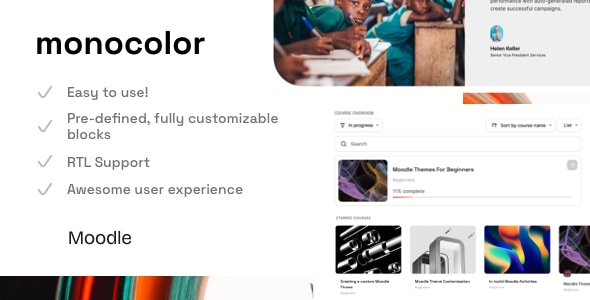
Monocolor is a premium Moodle theme (Version 1.10.7) designed for Moodle 5.1, 5.0, and 4.5 LTS, delivering a sleek, aesthetic course interface with enhanced front page blocks, dark mode, and multi-language support. This overview covers core features, usage guidance, and a comprehensive changelog detailing updates from recent releases.
Theme at a glance
- Version: 1.10.7 (October 15, 2025)
- Compatibility: Moodle 5.1, 5.0, 4.5 LTS
- Primary design: Monocolor – simple, stylish front page with additional tabs for enhanced UX
- Key capabilities: fully responsive design, in-build dark mode, unlimited color options, Google Fonts, multi-language and RTL support
- Documentation and support: online documentation page and dedicated support
Key features
- 30+ fully customizable front page blocks
- Simple Front Page Builder
- Custom Enrollment Page
- Fully Responsive Design
- In-build Dark Mode
- 2-course layouts (Standard, Tabs)
- Online documentation
- Multi-language Support
- Support for RTL languages
- Compatibility with popular plugins
- Unlimited Colors
- Google Fonts Support, GPDR Support
- Awesome Customer Support
For Beginners
- Detailed documentation and a dedicated support page.
For Pro
- Fully access to SCSS.
- The Child-theme in the package.
Documentation, access, and support
- Online Moodle Theme Documentation
- Access an admin user to test all available options, install custom plugins, and build a course
- Support page/form available for assistance
Changelog overview
The Monocolor Premium Moodle Theme changelog documents changes, improvements, and fixes across versions, with a focus on UI refinements, accessibility, and feature enhancements.
[1.10.2] - May 14, 2025
- Fixed: Badge display and alignment issues in course contents block
- Fixed: Calendar header UI improvements for better visibility and accessibility
- Fixed: Adjusted recently accessed items icon size for consistent display
- Fixed: Resolved H5P iframe flickering issue by implementing proper positioning and responsive dimensions
- Fixed: Improved block controls positioning in mobile view
[1.10.1] - April 11, 2025
[1.10.0] - March 6, 2025
- Added: Enhanced Category Menu for improved navigation experience
- Added: Engaging Login Page Introduction Image
- Added: Redesigned Login Page Layout #6
- Added: User Table with Filter Dropdown featuring a scrollbar
- Improvements: Revamped Custom Enrollment Page UI
- Fixed: Forum Module UI issues
- Fixed: Search Course functionality bugs
- Fixed: Various minor bugs for stability
[1.9.6] - February 24, 2025
- Added: Optional background image for enhanced visual appeal
- Fixed: Minor Bug Fixes to ensure consistent performance
[1.9.5] - February 1, 2025
- Fixed: Minor Bug Fixes to maintain system integrity
[1.9.4] - August 21, 2024
- Improvements: Enhanced Blog Layout for better readability and user engagement
[1.9.3] - August 1, 2024
- Fixed: Minor Bug Fixes to ensure smooth functionality
[1.9.2] - July 19, 2024
- Fixed: Minor Bug Fixes to enhance user experience
[1.9.1] - June 26, 2024
- Fixed: Minor Bug Fixes to maintain system reliability
[1.9.0] - June 20, 2024
- Added: Custom Enrollment Page for improved onboarding
- Improvements: User Tour enhancements and WCAG accessibility improvements
- Fixed: Minor Bug Fixes for performance
[1.8.3] - May 20, 2024
- Fixed: Minor Bug Fixes to enhance overall stability
[1.8.2] - April 19, 2024
- Added: Support for Moodle 4.4
- Fixed: Minor Bug Fixes for system integrity
[1.8.1] - April 17, 2024
- Fixed: Minor Bug Fixes to ensure smooth operation
[1.8.0] - April 16, 2024
- Added: New Icon system — FontAwesome replacing image-based icons
- Added: Course Custom Fields UI
- Added: New UI progress bar for Weekly format
- Improvements: Course Page cover image aspect ratio preservation
- Fixed: Dark Mode UI issues
- Fixed: Minor Bug Fixes for performance
[1.7.2] - March 6, 2024
- Improvements: Child theme enhancements, general UI cohesion
[1.7.1] - March 5, 2024
- Added: Dark Mode Customization Options
- Improvements: Guest Badge back-to-top button
- Fixed: Dark Mode UI issues for accessibility
- Fixed: Minor Bug Fixes for performance
[1.7.0] - February 21, 2024
- Added: New SEO options, new custom icons
- Improvements: Course Index UI, Book UI, Forum UI, Quiz UI
- Fixed: Minor Bug Fixes for reliability
[1.6.1] - February 8, 2024
- Added: Roster Report UI; new icons
- Improvements: GPDR compliance for code visibility
- Fixed: Course Activity Icons Color customization; stability fixes
[1.6] - February 5, 2024
- Added: Custom Alert IDs, video full-width option, Supporter Administration Tool, Realtime Quiz UI
- Added: Roster Report UI
- Improvements: Block Timeline UI, Feedback Activity UI, login form enhancements, dark mode improvements
- Fixed: Resolved various minor issues; performance improvements
[1.5.2] - December 8, 2023
- Minor Bug Fixes (Groups - Moodle 4.3)
[1.5.1] - November 27, 2023
- Improvements for Moodle 4.2 compatibility; minor bug fixes
[1.5] - October 10, 2023
- Added: Custom color classes, Back To Top Button, Course Card custom fields, Show/Hide Sidebar button icons and ARIA labels
- Added: Admin settings icon, Sidebar label on hover, tooltips for messages and notifications
- Improvements: Calendar UI, Course Management UI, Course Format Tiles UI, Course Image on course page, Backup UI
- Improvements: Calendar, Forms, Label Module responsiveness, Lesson UI, Proctorio support, Grade Report UI
- Fixed: Blinking page with right sidebar, duplicate reactions, TinyMCE issues
[1.4.3] - June 24, 2023
- Improvements: Edwiser Dark Mode support for course formats
- Fixed: Minor Bug Fixes
[1.4.2] - June 20, 2023
[1.4.1] - June 15, 2023
[1.4] - June 14, 2023
- Added: Front page blocks subheading, Course Activity Icons color, Light Mode Tooltip Title
- Added: Optional Course Language Badge, Active tab setting, Admin messages UI
- New: Messages UI; Updated: FontAwesome 6.4.0
- Improvements: Guest accessibility, Database UI, Lesson UI enhancements
- Fixed: Dark Mode minor bugs, general stability improvements
[1.3.1] - April 27, 2023
- Added: Optional Edit mode button on the top bar
- Improvements: Auto open course tab #2 when course index is open; top bar button styling
- Fixed: Course Tab regions
[1.3] - April 20, 2023
- Added: Body class by user roles; top bar menu customization; course card description for clarity
- Fixed: Minor bug fixes
[1.2.3] - April 3, 2023
- Improvements: Avatar icon when switching role
- Updated: FontAwesome 6.4.0
- Fixed: Confirmation account UI issues; Quiz UI in dark mode; minor fixes
[1.2.2] - March 10, 2023
- Fixed: Confirmation account UI issues; Course Image Mask Color
[1.2.1] - March 10, 2023
[1.2] - March 7, 2023
- Added: Workplace certificate UI; Database UI for Moodle 4.1
- Improvements: SCORM UI; Top Bar Logo Settings; PHP optimization; Course Card improvements; Dark Mode enhancements
- Fixed: Hints bugs; general UI fixes
[1.1.2] - February 26, 2023
- Fixed: Image roundness for blocks
[1.1.1] - February 22, 2023
[1.1] - February 11, 2023
- Added: Theme Settings including H5P CSS, Dark Mode, front page blocks sorting
- Added: Course Index Page options including optional index, new icons, and simple course list
- UI Improvements: Atto editor, assignments, course index navigation, dark mode accessibility
- Fixed: Display and UI aspects, password inputs, and minor bugs
[1.0.1] - December 30, 2022
- Fixed: Unnecessary gap on course footer without cover image
- Fixed: Missing Course Index on activity page; z-index issues
- Improvements: Course tabs, Show More/Less button, refined Cancel button
[1.0.0] - December 12, 2022
The information on this website is sourced from the
ThemeForest product page
.