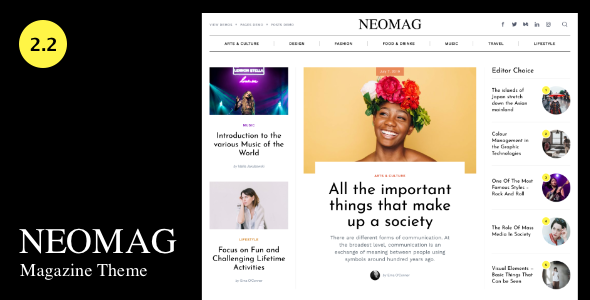
NeoMag - News and Magazine WordPress Theme
NeoMag is a magazine theme designed for both small indie magazines and large, multidisciplinary publications. It leverages WordPress features to deliver speed, flexibility, and a customizable online publication experience across desktop and mobile.
Key Features
- Customizer – Make changes and see it live.
- Text Logo – Use graphic or text logo.
- Typography – Google fonts collection
- Colors – Change colors of site background and text, links, forms, etc.
- Date Formats – Regular or Human date formats.
- Gutenberg and Classic Editor – Full compatibility with new WordPress Gutenberg and Classic editors.
- Sticky Sidebars – Option to make sidebars sticky in homepage, archives and single post.
- Single Post Autoload – Autoload single posts on scroll
- Popular Posts – Show the most popular posts with views count.
- Smooth Page Load – Load each page with smooth fade-in effect.
- SEO Optimized – Theme was built on-page SEO best practice, rules and ranking factors.
- Fully Responsive – Your site will look great on all modern devices.
- RTL Support – Full support for right to left languages.
- Demo Import – Get all demos with one click.
- Monetizing – Built-in, widget based, ads functionality with 10 ads ready slots that gives you the option of adding ads into different parts of your site. Header, footer, sidebar and under the post content. Each part is controlled separately.
- The sidebars can be optionally stuck – Sidebar layout options to fit your design.
- Header – Six header variations.
- Controllable offcanvas panel (“hamburger” menu) – Can be displayed on both desktop and mobile; shows menus, search, social or custom content.
- Sticky Navigation – Option to choose the menu which will appear as sticky.
- Use the site logo or upload additional – Flexibility for branding.
- Homepage – 7 dynamic and changeable sections and an option to disable the pagination for a real magazine look.
- Top Carousel – Newest Posts with Five layout variations.
- Latest Posts variation – Two layout options.
- Center Carousel – Two layout options.
- Posts By Category – Four layout variations.
- Older Posts – Four layout variations.
- Carousel Bottom – Two layout options.
- Archives – Different layouts options for archives and categories.
- Category – Three layouts of the newest posts, two layouts of the latest post, with an option to add an ad instead of the last post.
- Other archives – Four layout options for all other archives, including category.
- Single Post – Can be with or without the sidebar; if used with sidebar, some posts can be used with the no-sidebar template. Two layout variations.
- Gutenberg and Classic Editor Compatibility – Ensures workflow across editors.
- Related Posts
- Author Box – Choose to show or hide the author box.
- Ads under the post content
- Author Page – Author box with image, name, bio, and social icons. Two layouts of posts.
- Static Page – Two templates: Default Template and Canvas Template for building pages with Gutenberg.
- Footer – Widgetized footer with configurable columns, optional secondary and social menus, changable copyright text and a back-to-top link.
Theme Structure and Layout
- Homepage architecture – 7 dynamic sections that can be rearranged and personalized to create unlimited variations of the homepage.
- Header and navigation – Multiple header variations, offcanvas menu, and sticky navigation for a seamless browsing experience.
- Content presentation – Articles, carousels, and category-based layouts designed for magazine-style reading.
- Archives and categories – Flexible layouts for category pages and other archive types, with ad placement options.
- Post templates – Single post layouts with optional sidebar, author box, related posts, and ad placements.
- Footer and widgets – Widgetized footer with multiple columns and configurable menus.
Editors, Widgets & Content Experience
- Gutenberg and Classic Editor Compatibility – Full compatibility with WordPress editors, enabling flexible content creation.
- Related Posts – Automatically or manually displayed related content to boost engagement.
- Author Box – Optional author bio block on posts and author page.
- Ads under the post content – Monetization options integrated within post body.
- Author Page – Dedicated author profile with image, name, bio, and social icons; two post layouts.
- Static Page – Default Template and Canvas Template to craft pages with Gutenberg.
Footer, Documentation & Demos
- Demo Import – Get all demos with one click.
- Online Documentation – Comprehensive guidance for theme usage and customization.
Addons Plugin
After activating the theme, you can install and activate the NeoMag Addons plugin which was created specially for this theme. Plugin includes the following features:
- Social Sharing icons in single post
- Custom widgets to use in sidebars
- Online Documentation
Change Log
Version 2.2 – February 21, 2022
- Changed: Support for the latest Kirki update
- Added: Switch in Customizer to show the same posts in different homepage sections
- Added: Filter for theme's Post Views to allow integration with different plugins with similar functionality
- Fixed: Some accessibility issues
- Fixed: Google Lighthouse notice "Buttons do not have an accessible name"
Version 2.1 – August 12, 2021
- Added: Support for the AMP plugin
- Added: Web Core Vitals compatibility
- Added: Turn on/off the Newest Posts homepage section
- Added: Option to select H1 tag for the Newest Posts section title
- Added: Single Post: Turn the excerpt on/off
- Added: Option to add custom fonts via third party plugins such as "Custom Fonts" or "Custom Adobe Fonts (Typekit)" and then select the added fonts from Customizer
- Fixed: Latest PHP8 version errors
- Changed: Different code fixes and improvements
- Fixed: Translation strings
- Fixed: Classic Editor option to show colors and fonts same as in Gutenberg
Version 2.0 – January 30, 2019
- Added: Single post autoload on scroll.
- Added: Popular Posts with views count and Carousels section.
- Added: Sticky Previous/Next post in Single Post.
- Added: Option to hide excerpts in the Newest Posts section.
- Changed: Back to top button in single post is now sticky with colors and visibility options
- Changed: Some Structured Data information.
- Fixed: Some translation strings.
- Fixed: Classic Editor option to show colors and fonts same as in Gutenberg.
Version 1.2 – December 16, 2019
- Fixed: Appearance of some elements.
- Fixed: Demo import paths.
- Added: Option of changing thumbnails shape, square or rounded, in homepage "Magazine 2" layout.
Version 1.1 – December 10, 2020
- Fixed: Small objects appearance on Mobile.
- Fixed: Gutenberg align wide class on Mobile.
- Added: NeoMag Addons plugin: Social Share Icons in single post.
Version 1.0 – December 5, 2019
The information on this website is sourced from the
ThemeForest product page
.