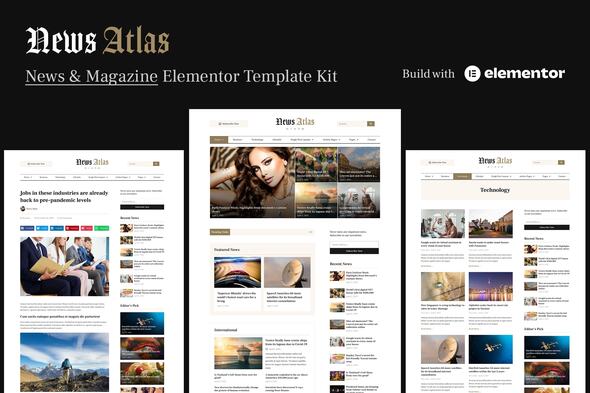
News Atlas is a news & magazine Elementor template kit with a clean and modern design, ideal for sharing stories about today’s evolving technology and the latest breaking news. It’s designed for blogging and is well-suited for news, newspaper, magazine, and publishing sites with SEO-friendly, fast-loading, and easily customizable templates.
What News Atlas Includes
Not a WordPress theme — Template Kits contain page content for Elementor page builder.
Optimized for use with the free Hello Elementor theme but may be used with most themes that support Elementor.
4 homepage layouts and 3 single post layouts for flexible design options.
19 ready-to-use templates and 40+ blocks/sections for diverse content presentation.
Global Styles included with total color & typography customization.
SEO-friendly design and no coding knowledge required.
Quick import feature and easily workable form builder.
Header and Footer builder; fully responsive layout; cross-browser compatibility.
Lifetime free updates.
Important Notes
Elementor Pro upgrade (purchase separately) is required for most templates and features (not included).
This template kit is not a WordPress theme. Template Kits contain page content for Elementor page builder.
How to install and use: Template kits are installed using the Envato Elements plugin for WordPress or directly through Elementor.
Elementor Pro upgrade (purchase separately) is required for most templates and features (not included).
Template Features
Elementor Pro required.
Modern & Clean Design.
4 homepage layouts.
3 single post layouts.
19 Ready to use templates.
40+ blocks/sections.
Many ways to show your content.
Great social engagement.
Global Styles included.
Total color & typography customization.
SEO-friendly design.
No coding knowledge is required.
The quick and easy templates import feature.
Easily workable Form builder.
Header and Footer builder.
Fully Responsive Layout.
Fully Customizable.
Cross-Browser Compatible.
Lifetime free updates.
Page Templates
Home Page
Home Page 2
Home Page 3
Home Page 4
Category Archive
Post Archive
Author Archive
Other Archive
Search Results
Single Post 1
Single Post 2
Single Post 3
About
Our People
Testimonials
Gallery
Pricing
Pricing
Contact
404 Page
Blocks / Sections
Header Block
Footer Block
Mobile Menu Block
More News Popup Block
Posts Module Block 1
Posts Module Block 2
Posts Module Block 3
Posts Module Block 4
Posts Module Block 5
Posts Module Block 6
Posts Module Block 7
Posts Module Block 8
Posts Module Block 9
Posts Tile Block 1
Posts Tile Block 2
Posts Tile Block 3
Posts Tile Block 4
Posts Tile Block 5
Posts Tile Block 6
Page Title Block
Sidebar: Single Post & Archive
Sidebar: Home 1 and Home 3
Sidebar: Home 2 and Home 4
Content Block 1
Content Block 2
Newsletter Subscription Block
Testimonial Block 1
Testimonial Block 2
Team Block
Contact Information Block
Contact Form Block
Pricing Table Block
FAQs Block
Gallery Block
Videos Block 1
Videos Block 2
Posts Ticker Block
Social Networks Block
Social Share Block
Author Biography Block 1
Author Biography Block 2
Posts Carousel Block 1
Posts Carousel Block 2
Search Bar Block
Required Plugins
Elementor
AnWP Post Grid and Post Carousel Slider for Elementor (Free)
Essential Addons for Elementor (Free)
Elementor Pro upgrade (purchase separately) is required for most templates and features (not included).
How to Install and Use Template Kits
This is not a WordPress Theme. Template kits contain the design data for Elementor only and are installed using the Envato Elements plugin for WordPress or directly through Elementor.
Elementor Template Kits use the Envato Elements plugin to install.
Elementor Pro upgrade (purchase separately) is required for most templates and features (not included).
For further support, go to Elementor > Get Help in WordPress menu.
How to Setup Sidebar
Import the Sidebar block and customize it.
Edit the template where the sidebar appears (such as Single Post or Blog under Theme Builder).
Click on the Template element in the sidebar area and make sure your Sidebar block is selected.
Assets and Licensing
This Template Kit uses demo images from Envato Elements. You will need to license these images from Envato Elements to use them on your website, or you can substitute them with your own.
Blog Content is not included – you will need to add a few posts to WordPress before post content will appear in templates.