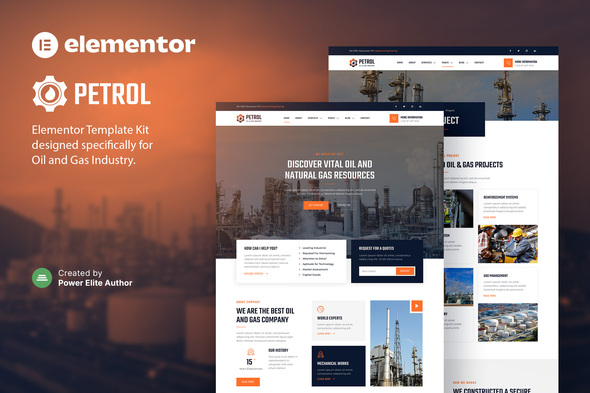
Petrol – Oil & Gas Industry Elementor Template Kit
Petrol is an Elementor Template Kit designed to quickly build a modern, visually-appealing website for oil, gas, and industrial/engineering businesses using the Elementor Page Builder. It features a responsive, retina-ready design with code-free customization.
Key Features
- Using Free Plugins (Elementor Pro is not required)
- Modern & Clean Design
- 15+ Ready to use templates
- Fully Responsive Layout
- Retina Ready
- Fully Customizable
- Cross Browser Compatibility: Chrome, Firefox, Safari, Opera
Templates Included
- Home
- About
- Services
- Service Details
- Project
- Team
- FAQ
- 404 Page
- Blog
- Single Post
- Contact
- Header
- Footer
- Metform Contact
- Global Theme Style
Kit Details and Compatibility
- This is not a WordPress theme. Template Kits contain page content for Elementor page builder.
- This kit has been optimized for use with the free Hello Elementor theme but may be used with most themes that support Elementor.
- Template Kits use the Envato Elements plugin to install to WordPress (no subscription required).
How to Install
Follow Envato Elements guidance to install Template Kits into WordPress.
Detailed Guide: How to use the Envato Elements WordPress Plugin v2.0
How to Import Metforms
- Import the metform block templates.
- Import the page template where the form appears and right-click to enable the Navigator.
- Locate and select the Metform widget and click Edit Form. Choose New, then Edit Form. The builder will appear.
- Click “Add Template” grey folder icon.
- Click “My Templates” tab.
- Choose your imported metform template, then click “Insert” (click No for page settings).
- Once the template is loaded, make any desired customizations and click “Update & Close.” The form will appear in the template.
- Click Update.
How to Setup Header in Jeg Elementor Kit Plugin
- Go to Jeg Elementor Kit menu item > Header Template.
- Click Add New Header.
- Add condition > All Site and click Create.
- Click gray folder icon to access My Templates tab.
- Insert the header template.
- Customize and Save.
Notes on Images and Licensing
This Template Kit uses demo images from Envato Elements. You will need to license these images from Envato Elements to use them on your website, or you can substitute them with your own. Envato Elements collection.
The information on this website is sourced from the
ThemeForest product page
.