Piningit, Responsive Email with Template Builder
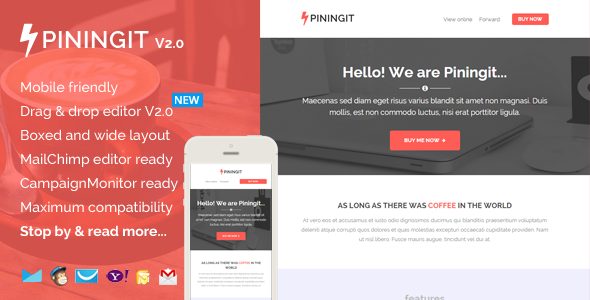
Piningit is a multi-layout, responsive email marketing template packed with features and a free online template builder. It includes MailChimp ready templates, Campaign Monitor & MyMail ready templates, boxed and wide layouts, and a drag-and-drop editor with detailed help documentation and video tutorials.
What Piningit offers
- Two layout versions: boxed and wide, with flexible and repeatable modular design that you can arrange to build your own unique template.
- Drag and Drop Theme Builder / Editor for easy customization.
- Detailed help documentation and video tutorials to guide you through usage and editing.
- Compatibility for diverse email marketing scenarios: newsletter campaigns, sponsorship emails, and lead nurturing.
Template editors and platform readiness
Drag and Drop Theme Builder / Editor
- Drag & drop, add, remove, arrange modules easily. Customize the color schemes, edit both text and image content. Download it in .zip file contain regular HTML and image files
MailChimp Ready
- Add & remove modules or hide elements, easily with MailChimp editor.
- You can also set the theme color directly via MailChimp editor.
- There’s a detailed instruction from how to upload and setup template into your MailChimp account, customize it, up to sending & testing email.
Campaign Monitor Ready
- Add or remove modules easily with Campaign Monitor editor.
- There’s also a detailed instructions (including video) from how to upload and setup template in to your Campaign Monitor account, customize it, up to sending & testing email.
MyMail WP Plugin Ready
- Add or remove modules easily with MyMail plugin editor.
- You can also set the theme color directly via the editor.
- There’s also a detailed insructions (including video) from how to upload and setup template in to your WordPress website, customize it, up to sending & testing email.
General features and accessibility
- Free access to our new, simple, easy-to-use Template Builder.
- Maximum clients compatibily, in all major email clients. From old Outllook 2010, up to the most used clients like Apple iPhone.
- Mobile friendly, coded with media query CSS
- Well-commented codes
- Ready for Campaign Monitor, MailChimp, and MyMail plugin powerful template editor!
- 16 unique flexible modular that you can very easy to remix them to create your own layout.
- Flexible button with inline CSS (guide to create your own button, see next section). Very easy to make your own button and flexible to place it as your needs.
- On-going support along with detailed help documentation files (including the videos) – (cover how to work with PSD file, work with the HTML file, up to sending email with most popular email marketing services like MailChimp, GetResponse, Campaign Monitor, AWeber, MyMail plugin, and how to create your own button).
- Major email inbox compatible (test both direct and tool). Direct test on my Android 4.1.2 phone, iPhone mail, Gmail (IE, Chrome, Firefox, Safari), Yahoo Mail (Chrome, Firefox, Safari), Outlook 2010, Windows Live Mail. Online test using Inbox inspector from Getresponse
- Easy to copy, add or remove modules with clear comments in codes. Even you can mix and create your own layout variations while everything is still working properly.
- For MailChimp and Campaign Monitor users, add, remove, move, edit blocks content via their powerful editor.
Download package contents
- Total 10 HTML files, with 1 mixed modules variations. (boxed and wide layout version)
- 2 HTML files for MailChimp templates (in separated folder) (boxed and wide layout version)
- 2 HTML files for Campaign Monitor templates (in separated folder) (boxed and wide layout version)
- 4 HTML files for MyMail WP plugin templates (in separated folder) (boxed and wide layout version)
- 2 other for regular HTML templates (boxed and wide layout version)
- 1 PSD file
- Image files, in the “images” folder in each of layout and color variations.
- Help Docs – Including videos.
Compatible browsers
- Android
- AOL Mail Chrome
- AOL Mail Explorer
- AOL Mail Firefox
- Apple Mail
- Gmail
- Hotmail
- iPad
- iPhone 3, 4 and 5
- Mozilla Thunderbird
- Opera Mail
- Outlook 2010
- Outlook 2013
- Outlook.com
- Windows Live Mail
- Yahoo Mail
- And mostly all clients that render valid HTML
Notes
- Background image in the featured area is using bulletproof codes, so it’s working in most major clients, including Outlook.
- While background image in the Footer area is not use a bulletproof code, and will be replaced with solid background color in the email clients that doesn’t support for background image.
Update 2.0 (October 20, 2014)
- Updated Help docs. file.
- Updated to the Template Builder: Added more advanced template editing features.
Update history
- Update 2.0 October, 20, 2014: Updated Help docs. file. Updated to the Template Builder: Added more advanced template editing features.
- Update 1.1 Sept. 28 2014: Added boxed layout version
Support requests
For support related, please send me your support request / question, or any advice via this contact form. I will respond you usually within 24 hours in Monday – Friday.
Credits
- Font awesome icons
- Images from: http://unsplash.com
- All images are included in the download package, and free to use for any purposes.
- Under Creative Common Zero License – CC0 1.0 Universal (CC0 1.0)
The information on this website is sourced from the
ThemeForest product page
.