Qrack - Responsive Shopify Theme with sections
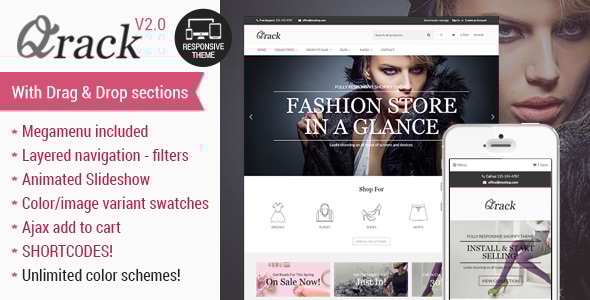
Qrack – Responsive Shopify Theme with Mega Menu is a modern, clean and professional Shopify theme with extensive features and full mobile responsiveness designed to accelerate setup and customization.
Theme Architecture and Foundation
- Qrack is based on Timber – official Shopify framework but taken to another level with many of their issues fixed and multiple functionality added.
- Easy to Customize: Theme is suitable for ANY type of shop, no matter which items you are selling. It will look beautiful for Fashion, Clothing, Fragrance, Shoes, Makeup, Accessories, Jewelry, Flowers, Sushi Food, Pizza, Cupcakes or any other type of e-commerce.
- Responsive Design: Works perfectly on all types of mobile devices and tablets; tested on iPhone, Samsung, iPad and HD tablets for accessible shopping.
Design and Customization
- DESIGN — Choose Fullwidth or Boxed layout (use widget on demo store for preview).
- Advanced Group Filters — boost your sales by allowing customers to make a detailed filtered search to find the right item they need.
- Predefined color presets — Choose from 6 different color schemes (theme variations) and start customizing colors to match your branding further (use widget on demo store for preview).
- Templates — Choose between full width, right or left sidebar for any of the pages: regular page, collections, product page, article page, blog category.
- Custom Product Thumbnails — Change the product image size to show any photo proportions you have with no need to crop and prepare images.
- Custom Fonts — Use from a variety of hand picked Google fonts.
- Branding/ Logo — Upload your logo and favicon and show it on the regular pages and checkout page as well without any coding skills!
- Homepage Slider with CSS animations — Attractive slider with easy setup, just change text, link and image. No need for design skills; customize colors and background images, set opacity to make text stand out.
- Unlimited colors — control over EVERY block/section of your store; choose from a wide range of Theme Settings options.
- Large image on the product page — plus thumbnails; no limits on thumbnail images.
- Zoom Image — enhanced product imagery for detail.
- Mobile compatible — responsive code and design for easy browsing on mobile devices.
User Experience and Navigation
- Mega Menu — create mega menus from existing items and add banners, products, or videos in columns.
- Instagram feed (by hashtag or by user) and Latest Tweets widgets — easy social integration.
- Currency switcher for international users.
- AJAX add to cart — customers add to cart without leaving the page.
- New and On Sale product “swipe” sliders on home page or any other collection.
- Vendor link on the product page — include a brand link to their collections to promote the vendor.
- Custom buttons on product pages with pop-ups (contact forms, size charts, etc.).
- Custom tabs on product pages — show additional information in tabs (size chart, shipping, etc.).
- Social share on the product page — increase social engagement.
- Zoom Image for product image galleries and thumbnails carousel.
- “Reviews” tabs on product page — compatible with FREE Shopify Product Reviews and FREE Yotpo Reviews apps.
- Drop downs with product variations on the product page — price changes with selected variation.
- Related products on the product page — boost cross-sell opportunities.
- “Previous/Next” links on the product page — navigate through collections.
- “Filter by tags” on collection pages — fast, tag-based filtering (Shopify second depth limitation workaround).
- “Sort by…” filter on collection pages — sort by newest, price, etc.
Product and Collection Page Enhancements
- Collection Sidebar Widgets — Product tags, Advanced group tags, Collections List, Vendors List, Link lists, Recent Articles, Best Sellers, + ADD ANYTHING via shortcodes.
- Blog Sidebar Widgets — Recent Articles, Filter by blog tags, Link lists, + ADD ANYTHING via shortcodes.
- Footer Widgets — Custom text and credit card icons, Recent blog posts, Link lists, Instagram feed widget, Twitter widget, Newsletter Subscribe (MailChimp ready), + ADD ANYTHING via shortcodes.
Shop Administration and Content Management
- Drag and drop sections with over 20 widgets.
- SHORTCODES to place ANY widget on ANY page (product, collection, static page, etc.).
- Control ANY block/section across the website; change functionalities or edit colors from a single Theme Settings page.
- Custom Thumbnail Crop Script — upload largest image with automatic middle-crop for good appearance on regular, retina, and HD screens.
- Single place for all the options — centralized Theme Settings for easy management.
- Upload slideshow and banner images from the control panel; no FTP or coding needed.
- Show products from ANY collection on 6 different places on your home page via collections and theme settings.
- Full control over home page and other pages; quick start tutorial and extensive documentation included.
- Support — great support with 24h turnaround.
- Included in Download Package — Theme zip files to install on Shopify, detailed installation & user guide.
- Not Included — images used for featured collections, product galleries, slides, banners, and thumbnails (external sources listed).
Latest Theme Versions / Updates
- VERSION 2.0.6 – April 22 2019
- Product page Shopify javascript error fix (for new stores with API restrictions, when Product treshold option enabled)
- Product page gallery thumbnails carousel optimization and improvements.
- VERSION 2.0.5 – Dec 13 2018
- Open graph tags for Facebook - better image control
- Option to remove Sold Out items from collection pages grid
- Improvement for Related products by same tag
- Quick cart max-height option
- Filters: Natural ordering for filters added (to allow 01,02,03 etc order)
- Filters: Order for size filter fixed
- Product page error fix when description tab not in use
- Slider shortcode - make slider center option
- Full width shortcode fix (wrapper removed - use wrapper shortcode inside this one)
- Product page - popup fix (when only one gallery image)
- Yotpo reviews fix (show reviews per product)
- Secure download button shortcode (download links shown only to registered users)
- Newsletter shortcode now available in shortcode generator
- Sub-menus - ability to create sub-menus with the same name for different parent (example: Shoes [Men], Shoes [Women] will show as Shoes in submenus under Men or Women parent)
- Fix for select and buttons on product page when apostrophe used in variation names
- Image banner shortcode improvement
- Social icons shortcode (add them wherever you want)
- Button shortcode new option - external links option
- Icon shortcode new option - change color per each icon
- VERSION 2.0.4 – Aug 13 2018
- More header options (new template, my account icon etc)
- Form errors list styling improvement
- Blog grid template layout fix
- Custom slider font
- Wishlist table styling improvement
- Google font similar name fix
- Minor styling improvement
- Option to remove additional payment buttons on cart (to make them appear on checkout)
- Option to remove checkout button on quick cart (force cart page)
- VERSION 2.0.3 – Jun 07 2018
- Collection menus now allows sub-menus with accordion functionality
- Slideshow with left navigation styling fix and improvement
- Search page grid fix
- Short description shortcode now viewable on list and grid view
- Main navigation 'More' link sub menu position option
- Branding header new template with search centered in the middle
- Branding header template "template 3 - icons" improvement
- Product page title left align when in column
- VERSION 2.0.2 – May 15 2018
- Product page gallery fix with assigned variant images
- More templates for collection thumbnail hover
- Boxed layout header and megamenu fix for boxed layout
- Shortcode sections removed from homepage
- Fix for Sale tag overlapping countdown timer on grid
- Featured Products section now have image banners block (can be used for columns)
- Product page swatches iphone fix
- VERSION 2.0.1 – May 05 2018
- Megamenu fix - mega menu sections not showing blocks/widgets.
- VERSION 2.0.0 – May 04 2018
- Complete theme makeover with drag & drop sections + shortcodes
Full updates list available in our documentation file.
The information on this website is sourced from the
ThemeForest product page
.