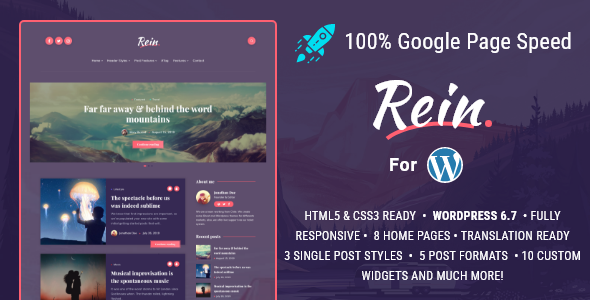
Rein - Minimal Lightweight Dark Theme for WordPress
Rein is a modern Blog theme by EstudioPatagon designed for speed and high contrast, with RTL and multilingual support, optimized for SEO and easy customization.
About Rein
- High-speed, dark-color design that fits lifestyle, photography, personal, or coding blogs with high contrast.
- Super light and fast theme built with multiple techniques to achieve excellent Scores on Google.
- Easy to use and customize with 11 customs widgets and a powerful theme options panel.
- RTL support and multilanguage including Turkish, French, Portuguese, Spanish and English.
- Lightweight & fast themes are highlighted by EstudioPatagon, with more lightweight options available at estudiopatagon.com.
Key Features
- Super Light and Modern design.
- Highly optimized and lightweight (just 1.5mb size).
- Constantly updated.
- Translation ready (English, Turkish, French, Portuguese and Spanish included).
- Minified and Optimized code.
- ACF Pro bundled (save $29).
- One Click Updates.
- RTL included.
- Open Graph Support.
- Built with SCSS and pre-compiled with Prepos 6 (Windows and Mac compatible).
- Dedicated advertising section (below header, before and after post content, custom advertise to place anywhere).
- Advertising section between grid posts.
- demo here
- Supports menu with icons
- Sticky sidebar for Posts
- Lazy Load for Lists (home pages, archives, categories, etc).
- Lazy Load for post content.
- Lazy Load for embed (iframes like Youtube/Vimeo/Soundcloud).
- HTML5 & CSS3 ready.
- 3 Single post dispositions
- Fullwidth: cover for large images, see here
- Standard: image inside the article, see here
- Classic No sidebar: see here
- No Sidebar Style for Post and Pages see here
- Custom Tag page, see here
- Custom Author page, see here
- Custom 404 Page see here
- About me Widget.
- Custom Tag Cloud Widget.
- Custom Galleries.
- Advertising sections.
- Disqus and Facebook support.
- Fully responsive.
- Video Support (Vimeo, Youtube, etc).
- Retina Display Ready.
- Font Awesome icons.
- Works on Android, Ipad and Iphone.
- Documentation included.
- Clean Design.
- Well Coded.
- Navigation Menu.
Usage, Support & Resources
- Follow us: estu dioPatagon.com
- Support: We offer direct help via our support system, just submit a ticket if you have any question.
- Demo: demo here
Changelog
v2.5.0 - 08 April 2024
- - Fixed: Some notices on PHP 8.
- - Fixed: Shortcode Lightbox 403 forbidden error on very specific server configurations (Nginx + htaccess combination).
- - Fixed: Unordered alignment issues on Gutenberg Editor.
- - Improved: Theme Options menu location.
- - Improved: Some adjustments to EstudioPatagon dashboard.
- - Improved: Fields alignment for Theme Options and Customizer.
- - Added: Compatibility up to WP 6.5.
- - Added: PHP Compatibility up to 8.2.x
- - Added: Discord and TikTok social profiles.
v2.3.0 - 11 August 2022
- - Fixed: Gutenberg Editor background color problem, when fullscreen image is selected.
- - Fixed: Lightbox for Images not grouping properly in WP v5.8 - 6.x.
- - Improved: EP legacy widgets preview is always disabled (this apply for WP 5.8 and greater).
- - Improved: Tested Theme compatibility up to WP v6.0.1
- - Added: Theme compatibility up to PHP v8.1.4
- - Added: Compatibility for other image extensions on our theme Lightbox Gallery (webp and jpeg).
- - Added: wp_body_open PHP action.
- - Added: New field custom script on , on Theme options -> adv settings.
- - Removed: Custom Gutenberg styles from Widgets section to prevent any design issue.
v2.2.8 - 02 February 2022
- - Fixed: Solid Background color not applied on Gutenberg editor.
- - Fixed: Custom Gutenberg Styles not removed from Theme options -> adv settings.
- - Fixed: Incorrect Color Title on Gutenberg editor (WP 5.9 bug)
- - Fixed: Some custom Google Fonts (with complex names) not rendered properly.
- - Fixed: Shortcodes not working on Footer -> copyright text.
- - Fixed: Logo font icon not working properly with Redux v4 and greater.
- - Fixed: Incorrect alignment of Gallery Block on Gutenberg editor.
- - Fixed: Icon shortcode size not applied properly.
- - Improved: Tested compatibility up to WP v5.9
v2.2.7 - 02 January 2021
- - Fixed: Shortcodes Generator not working on WP 5.6.
- - Fixed: Incorrect icon on buttons group from latest version of Redux Theme Options.
- - Fixed: Incorrect alignment for Blockquotes on Gutenberg editor.
- - Fixed: Incorrect colors for mobile navigation (it should be the same color as submenu).
- - Improved: Vertical alignment on some buttons.
- - Improved: Sticky posts will no longer appear on widgets, this will prevent incorrect amount of posts.
- - Improved: Javascript compability for future releases (WP 5.7) of jQuery.
- - Removed: Color validation from styling section (on some server configuration the colors are always sanitized as "#FFFFFF" generating some important color issues).
- - Added: New color option for reply comments button (inside theme options -> styling -> buttons).
v2.2.6 - 22 November 2020
- - Fixed: Safari/IOS devices generating important incorrect styles on Single Post texts when Disqus is selected as main comment method.
- - Fixed: Recent Tweets widget not working.
- - Fixed: Incorrect alignment on Unordered list (back-end).
- - Removed: Prefetch CSS method (preload will be used as fallback).
- - Improved: Footer Copyright section now uses full editor (with shortcode generator).
- - Improved: Now shortcodes works inside EP Tabs container.
- - Improved: Show comments toggle animation.
- - Added: Rel "nofollow noopener" to all social/share external links.
- - Added: HTML 5 validation for email and website fields on comments section.
- - Added: Unique ID to all home modules and for other stories and related posts (single content), so they can be linked with custom anchors.
v2.2.5 - 04 September 2020
- - Fixed: Overlay color not applied from Theme options -> styling section.
- - Fixed: Caption not visible on Gutenberg Galleries when linked to media files.
- - Fixed: Open Graph meta, is not visible if a custom page is assigned as front-page.
- - Fixed: Header height overlap when entering in Fullscreen mode events, for example: Youtube.
- - Improved: Latest tweets widget, now the amount of tweets is more accurated.
- - Improved: Caption on Gutenberg Galleries is not a selectable element anymore.
- - Improved: How lightbox is applied to Gutenberg Galleries.
- - Improved: Now Gutenberg Galleries and Single Gutenberg image will display caption on Lightbox.
- - Improved: How SCSS files are generated (developer friendly).
- - Improved: Update Notification layout for WP 5.5
- - Improved: Gravatar cache policies warning.
- - Improved: Now if Lazy load is enabled, it will be applied to Gravatar (comments section).
- - Improved: If no menu is assigned to header, the mobile menu icon will not appear.
- - Improved: Mobile input fields size to 16px (google warning).
- - Removed: Transparent color for Footer, now the default color is the same as the main website background.
- - Added: New option to exclude replies on Latest Tweets widget.
v2.2.0 - 03 August 2020
- - Fixed: Twitch social button do not appear on Header.
- - Fixed: Minor script versioning when using Child themes.
- - Fixed: PHP Error when the theme is changed and Rein functions plugin is still active.
- - Fixed: Disqus console error if comments are not open.
- - Fixed: When title max length is assigned, sometimes missing character appears on Japanese language.
- - Fixed: Featured image do not appear on admin -> all articles.
- - Fixed: False/Positive for videos on Edge browser (not loading due a block of smart screen).
- - Fixed: Passive listener warning from Google Insight.
- - Fixed: Pattern Background not working properly.
- - Fixed: RTL styles not loaded when Rein Child is active.
- - Improved: Full Background image solution for mobile devices.
- - Improved: If max title length is assigned and the title is less than the limit, the "..." (dots) will not appear if not needed.
- - Improved: Lazy Load for PHP 7.4
- - Improved: Now functions/sidebars.php, post-formats.php and theme-functions.php can be used inside the child theme, to override any function of these files.
- - Improved: Now Prism JS will be loaded only if needed (speed up improvement).
- - Improved: Mobile views and comments counter (for large amounts).
- - Improved: Fonts Icons load.
- - Improved: Several changes to improve LCP on Single Post Content.
- - Improved: Several changes to improve LCP on Articles List and some home modules.
- - Improved: Instagram API was deprecated, so the Instagram widget was replaced with a guide.
- - Added: Update notification for Core plugin, some customers do not see the update button, this will ensure all is up to date.
- - Added: New option to upload mobile image logo.
- - Added: New option to change mobile body font size, and mobile single post font size.
- - Added: Fallback license validation method for those FTP who don't allow edit/create files.
- - Added: New optimization section (advanced settings).
- - Added: New option to select theme font icons method (standard, javascript or in footer), this will improve TTI and reduce a little the LCP from CWB.
- - Added: New option to add a delay to the font icons load (only available for Javascript method).
- - Added: New option on Optimization -> adv settings, now low priority CSS can use Prefetch, Preload or Standard methods.
- - Added: New Speed Option, Async Scripts inside Theme options -> Optimization -> advanced.
v2.0.6 - 14 April 2020
- - Fixed: Minor warning when some colors are empty.
- - Fixed: Custom color for Bold texts.
- - Fixed: Incorrect redirection after finishing the Wizard on some server configurations.
- - Fixed: Hover color for tag button text.
- - Improved: description for Child theme.
- - Added: Rel nofollow on EP Social Widget.
- - Added: Rel nofollow on Social profiles (header).
- - Added: Apply_filters to comments fields (this will ensure some plugins can dequeue any form fields, for example website field).
- - Added: Tags description and custom background image (same feature as Categories) to improve SEO.
v2.0.5 - 29 January 2020
- - Fixed: Error if the license page can't connect to the updates server.
- - Fixed: Google font extra request when custom fonts are not selected on Theme Options panel.
- - Fixed: Align Center not applied on some Gutenberg elements.
- - Fixed: JS error on old browsers (IE 10 - IE 11)
- - Fixed: Theme Options URL redirect on some WP installations that are not in English.
- - Fixed: EP Social Widget redirect tab.
- - Removed: Some CSS and JS .maps files to make the theme lighter.
- - Removed: Old webfonts to make the theme lighter.
- - Removed: Webfonts on Reco Functions plugin to make the plugin lighter.
- - Improved: Preload on custom Google Fonts from Theme Options.
- - Improved: How to get purchase code on theme activation page.
- - Improved: How to get username on theme activation page.
- - Improved: Now after theme update is succesfully installed, it will display a update plugin button, just to ensure all is up to date.
- - Improved: If the update was already downloaded, it will install directly from the license page to avoid more external requests.
- - Improved: Iframes fixed height on mobile devices (replaced with responsive embeds).
- - Improved: Now SCSS config compilator moved from Prepos v6 to Prepos v7.
- - Improved: Prepos configuration to make the compilator faster.
- - Improved: Optimized theme usage disk space from 1.4MB to 1.1MB
- - Improved: Highly optimized disk space on main Rein Functions plugin from 1.2MB to 178KB
- - Improved: Compatibility test up to PHP 7.4.1
- - Improved: Styles for changelog (on license page).
- - Added: Check connection button on license page.
- - Added: nofollow attribute to social buttons on header.
- - Added: Responsive embeds.
- - Added: New option to disable default Google Fonts on Theme Options -> Typography.
- - Added: New external changelog page with the detail of all versions.
v2.0.0 - 13 January 2020
- - Fixed: when title length is assigned, that was affecting menu items (navigation widget).
- - Fixed: embeds/iframes incorrect height on mobile devices.
- - Fixed: incorrect alignment of sidebar on tablet devices.
- - Fixed: incorrect background color for image captions.
- - Fixed: blockquotes not changing font family (it should be the same as content titles).
- - Fixed: footer copyright not changing font family (it should be the same as content titles).
- - Improved: added a new way to detect the parent theme, this should avoid customers using Child Theme see disappears the Theme Options section after updates.
- - Improved: footer copyright now will use wpautop to prevent incorrect behavior on specific plugins (Elementor, Galleries Manager Pro).
- - Improved: footer copyright now will use wpautop to prevent incorrect behavior on specific plugins (Elementor, Galleries Manager Pro).
- - Improved: title length limit for grid posts will work for grid sidebar layout as well.
- - Improved: input and submit buttons appearance on IOS devices.
- - Improved: now share buttons will use short url instead, this will improve sharing posts on any language.
- - Improved: now whatsapp share button works on Desktop and Mobile.- Improved: now One Click Demo importer plugin is not needed anymore.- Improved: All documentation about how to update the theme.
- - Speed Improvement: now when selecting Google Fonts from Theme Options it will be displayed with swap attribute.
- - Added: translation strings for Twitter Widget (days ago, hours ago, etc).
- - Added: new welcome page with the minimun system requirements and changelog of the theme.
- * New Feature: 1 Click Updates, there is a new License page to download updates directly also the theme will periodically check for new versions.
- * New Feature: Theme Wizard, if is your first installation it will appear a new Wizard page to guide new customers accross all required stuff to make the theme working properly.
v1.4.0 - 13 December 2019
- - Fixed: Instagram widget loaded even if the option was disabled (on footer).
- - Fixed: meta info (comments and views counter) not displayed on grid sidebar layout.
- - Fixed: columns shortcodes not aligned properly when using home text editor module.
- - Fixed: lazy load incorrect syntax on Gutenberg Galleries.
- - Fixed: EP shortcodes not working on WP 5.3
- - Fixed: caption styles not applied on Gutenberg Galleries WP 5.3
- - Fixed: incorrect alignment on Gutenberg Galleries WP 5.3
- - Fixed: special characters when using share buttons (Twitter, VK, Facebook, etc).
- - Improved: How to get Access Token from EP Instagram Widget.
- - Improved: now paragraphs can be used on Footer Copyright text.
- - Improved: now EP Recent Post Widget will exclude the current post (on single post) to avoid duplication (SEO boost).
- - Improved: now EP Posts by Category Widget will exclude the current post (on single post) to avoid duplication (SEO boost).
- - Added: rel nofollow to social profiles.
- - Added: rel nofollow to custom banners.
- - Added: new filter for all main posts modules (grid and classic), now the posts can be ordered by Date, Views (popular) and Title.
- - Added: new filter for all main posts modules (grid and classic), now posts can be ordered ASC or DESC.
v1.3.0 - 16 November 2019
- - Fixed: When Author box was disabled on Single Post, that was affecting the main author page (archives.php)
- - Fixed: titles not disabled properly on pages.
- - Fixed: incorrect text domain on Social Widget (not translatables strings).
- - Fixed: minor translation text on Spanish.
- - Fixed: incorrect background color for comments and views boxes (only on mobile).
- - Added: new option to change lightbox background color (main search lightbox and galleries) on Styling -> header.
- - Added: new option to limit the title length for grid posts and classic posts lists, this option is located on Theme options -> blog -> global options.
- - Added: Instagram Widget.
v1.2.0 - 20 October 2019
- - Fixed: Facebook APP ID moderation tool not working for FB comments.
- - Fixed: minor fix on fullsize background images on mobile.
- - Improved: now ADS will use CSS to hide them on mobile/tablets (just to ensure ADS are removed if cache plugins are installed).
- - Improved: delay of lazy load images on single articles, this should improve Google Insights several points.
- - Improved: srcset problem with lazy load images on mobile devices, this should improve between 2 and 10 points on Google Insights.
- - Added: Lazy Load on galleries.
- - Added: new option to change the overlay color on fullscreen background on Theme options -> styling -> body background.
v1.1.0 - 24 September 2019
- - Fixed: incorrect color on social profiles buttons from Theme Options -> Styling section.
- - Fixed: incorrect color for pagination buttons from Theme Options -> Styling section.
- - Added: submenu arrows not working on IOS 6+ on Safari browser.
- - Important Improvement: now comments and view counters are visible on mobile and tablet, instead of a tooltip.
- - Improved: now related posts use lazy load if enabled.
- - Improved: added boxes bg color to styling options.
- - Improved: footer custom styling colors.
- - Added: now Carousel module has 2 new filter options: order by views and order by date (all time, past month and past week).
- - Added: now Recent Posts with Image Widget has a new filter: order by date (all time, past month and past week), this could be combined with posts views filter to show your most popular posts.
- - Added: new option on Theme Options -> Blog -> Global to change the number of visible categories, by default: 2.
- - Added: new option to disable titles on Pages.
v1.0.3 - 12 September 2019
- - Important Fix: masonry posts not working properly if W3 Total Cache is enabled and is a front page or home. Custom homes on subpages works fine.
v1.0.2 - 10 September 2019
- - Improved: now Gutenberg single images and Classic editor single images that are pointing to "media file", will be opened in the default lightbox.
- - Improved: now Rein Functions plugin size is 1.1mb instead of 1.4mb
- - Added: all strings of Back-End (theme options and others) into rein-functions/languages.
- - Added: PHP, Java, HandleBars, JSON, TypeScript, Objective-C, Visual Basic as default languages on Prism (syntax highlighter).
- - Added: Full RTL support.
v1.0.1 - 09 September 2019
- - Fixed: duplicated category on masonry (only on posts without images).
- - Fixed: incorrect alignment on comments section.
- - Fixed: incorrect alignment on post without sidebar on mobile devices.
- - Improved: comments position on pages.
v1.0.0 - 06 September 2019
The information on this website is sourced from the
ThemeForest product page
.