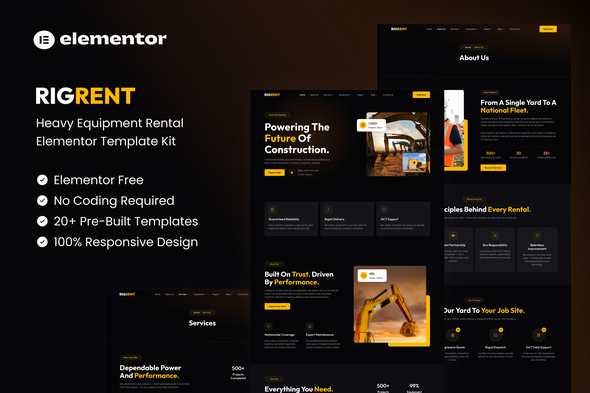
Rigrent - Heavy Equipment Rental Elementor Template Kit

Rigrent is a bold, modern Elementor Template Kit designed for heavy equipment rental, construction businesses, and industrial machinery services. It features a responsive dark theme with a yellow accent system, emphasizing reliability, power, and professionalism, all configurable via drag-and-drop using the free Elementor widgets.
Overview and design philosophy
Rigrent exists to provide a complete, ready-to-use design system for equipment rental companies. The kit combines strong typography, a striking visual language, and a practical page structure to help service providers present fleets, services, pricing, credentials, and case studies in a cohesive, conversion-friendly format. The emphasis on a dark theme paired with a bright yellow accent creates a bold brand impression while maintaining readability and usability across devices.
As a Template Kit, it is built to accelerate website assembly without requiring coding knowledge. The design aligns with modern web standards and is optimized for Elementor’s free version, ensuring broad accessibility for agencies, teams, and individual business owners who want a polished online presence quickly.
What’s included
- Fully With Elementor Free Version (Elementor Pro is not required)
- Simple, Modern and Clean Design
- No Coding Knowledge Required
- 20+ Ready To Use Templates
- Easy & Fully Customizable
The kit is engineered to cover every essential touchpoint for a heavy equipment rental business, from the initial landing experience to service detail pages and contact workflows. The combination of ready-made pages and a consistent global style helps maintain brand cohesion while enabling fast customization.
Template catalog
The Rigrent Template Kit bundles a comprehensive set of templates that address typical customer journeys and internal processes for an equipment rental company. Core templates and pages include:
- Global Kit Style
- Home
- About Us
- Services
- Service Detail
- Equipment
- Equipment Detail
- Our Team
- Pricing
- Career
- Testimonials
- Blog
- Single Blog
- FAQ
- Contact Us
- Metform Contact
- 404 Page
- Coming Soon
- Header
- Footer
These templates collectively enable a complete site architecture for heavy equipment rental businesses, including content pages for fleet catalogs, pricing structures, service listings, team introductions, and customer engagement forms. Each item is designed to be fully editable within Elementor, ensuring non-technical users can tailor text, images, and components to their specific brand and offerings.
Technical requirements and compatibility
- Elementor compatibility: Fully With Elementor Free Version (Elementor Pro is not required)
- Design characteristics: Simple, Modern and Clean
- Usability: No Coding Knowledge Required
- Contentscope: 20+ Ready To Use Templates
- Customization: Easy & Fully Customizable
Because the kit is built around Elementor, users benefit from familiar controls, widgets, and editing workflows. The reliance on free Elementor widgets keeps costs predictable and broadens accessibility for small teams and individual creators who want a professional site without licensing barriers.
How to install and use Template Kits
Important: This is an Elementor Template Kit. Do not use WordPress “Tools > Import.” Instead, install the Template Kit Import plugin (Plugins > Add New), then go to Tools > Template Kit to import. Template kits contain design data for Elementor only and are installed using the Envato Template Kit Import plugin for WordPress or directly through Elementor.
The official guidance from Envato and Elementor provides a step-by-step path to uploading and activating template kits, ensuring that designers and site owners can deploy the kit without conflicting with WordPress themes or other plugins. For detailed instructions, consult the Envato help documentation linked below, which covers the exact workflow for uploading and installing Elementor Template Kits from ThemeForest to WordPress.
Detailed Guide: How to Upload & Install Elementor Template Kits from ThemeForest to WordPress
For ongoing assistance, open Elementor > Get Help in your WordPress menu. This resource is referenced by support workflows to resolve common issues during kit usage and customization.
MetForm integration and form workflows
Rigrent supports MetForm, enabling advanced form creation and submission workflows within Elementor-based pages. The kit includes steps to import and integrate MetForm templates and to deploy forms across contact pages or landing sections.
- Import the MetForm template that accompanies the kit.
- Open the page where a form should appear, then edit in Elementor.
- Click the MetForm widget in the column where the form should be and select Edit Form.
- Choose New and leave the default selections, then click Edit Form again.
- Click the Add Template grey folder button.
- Choose the My Templates tab and select your imported MetForm template, then click Insert.
- Once the template loads, click Update to apply changes.
These steps enable streamlined form design with consistent styling and data collection across the site, leveraging MetForm’s templating capabilities within Elementor’s editing environment.
Header and footer setup with Jeg Elementor Kit
If you have Elementor Pro, headers and footers can be customized under the Theme Builder. The kit provides a dedicated workflow with Jeg Elementor Kit to manage global header and footer templates.
- Go to Jeg Elementor Kit menu item > Header Template.
- Click Add New Header.
- Set conditions to All Site and click Create.
- Click the pencil icon to Edit and Elementor will open.
- Click the gray folder icon to access the My Templates tab.
- Insert the header template and customize as needed.
- Save your changes to apply the header across the site.
Images, licensing, and assets
This Template Kit uses demo images from Envato Elements. To use these images on your website, you will need to license them from Envato Elements, or you can substitute them with your own imagery. The licensing requirement ensures proper usage rights for visual assets included in the kit.
Envato Elements workspace reference: Envato Elements workspace
Support resources and guidance
- Official instructions and support are accessible via Envato Help Center and Elementor’s help channels.
- For WordPress-specific help, use the Elementor > Get Help workflow within your WordPress admin.
- Meta-guidance for template kit usage, imports, and troubleshooting is provided through the Envato documentation and the Elementor community resources.
Notes on usage, compatibility, and best practices
- The kit is designed to be fully editable with Elementor’s drag-and-drop interface, enabling non-developers to tailor content, images, and layouts quickly.
- While the kit is compatible with the free Elementor version, certain advanced header/footer customization requires Elementor Pro; Jeg Elementor Kit supports these scenarios with an integrated workflow.
- Because the kit emphasizes a bold visual identity, careful image selection and typography choices will reinforce branding while maintaining readability across devices.
- To preserve performance, minimize image sizes, leverage lazy loading, and implement concise content that aligns with your rental business value proposition.