Royale - Creative WordPress Theme
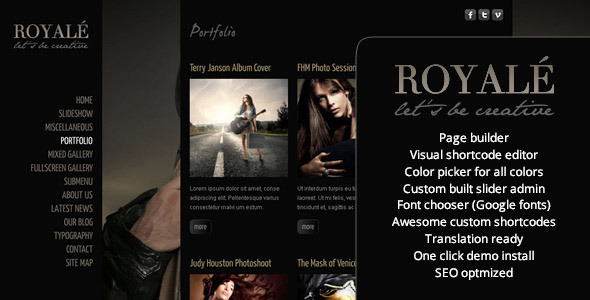
Royale’ is a creative WordPress template designed to showcase photography or video work with a refined set of page templates, balancing design, usability and interactivity. Powered by jQuery and HTML5, Royale’ helps your portfolio stand out with a sleek, elegant presentation.
Features
- Full-Screen Background Images
- Full-Screen Background Slideshow, which can be used as a standalone or together with content
- WordPress made easy – with our custom built admin panel, which makes editing the site a breeze
- Easy install and preview clone – in just under 5 minutes!
- 5 Portfolio Setups
- 20 + shortcodes for video, layout, sliders, galleries, toggles, testimonials, google maps, accordions, tabs
- Custom Built Banner Slideshow
- HTML5 Video with Flash Fallback, with custom built flash player
- Vimeo and YouTube Support
- Thumbnail Slider with Tooltip
- Included Contact Form with Admin
- Social Media Marketing made easy – insert tweet, like or +1 buttons anywhere you like – in the bottom of the post or the top of the page – in homepages or blog posts or pages
- SEO Optimized - as of update 1.2 – choose description & keywords for each post / page to optimize your position on search engines ( also represents the text on the facebook or other social networks share description )
- Custom Built Admin for Sliders (with Drag & Drop uploader ), Contact Form , Fonts and Theme Options
- Visual Shortcodes Editor – see demo
- Portfolio with Custom Posts included
- Page Templates – with / without content
- internationalization / translation ready – .mo and .po files provided
- detailed documentation online – royale docs
What you get in the package
- Royale Theme – for WordPress
- Royale Child Theme for developer customizations
- Documentation – and videos to get you started with your site in no time
- Preview Sample Data – sample data xml and slider configuration like in the preview make cloning the preview ( so you can start editing from there if you want ) a breeze
- PSD Files – to get you started on mockups
- Lifetime Free Updates - Even if the theme will get updated, or it’s value will increase, you will get all updates for free
Updates
- UPDATE 4.00
[ 01/02/2020 ]
[REWORK] responsive rework
[ADD] ajax capability
[ADD] zoomsounds / dzsap support
- UPDATE 3.20
[ 02/14/2014 ]
[FIX] some bugs in chrome
[TWEAK] royale slider replaced with advanced scroller ( includes features like drag & swipe )
- UPDATE 3.10
[ 02/14/2014 ]
[FIX] some bugs
[TWEAK] default scroller now replaced with
DZS Scroller
, complete with generator
[ADD] install Sample Data in one click from Theme Options > Install Sample Data
- UPDATE 3.00
[ 12/10/2013 ]
[FIX] some bugs
[TWEAK] theme portfolio replaced with
ZoomFolio
, complete with generator
[ADD] page builder
- UPDATE 2.00
[ 09/01/2013 ]
[FIX] Chrome bug on background slider
[ADD] multiple databases support for Sliders Admin
[ADD] option for the multi uploader to upload directly in the wp-content/ folder ( default is it uploads in the theme folder, but you could lose the images uploaded via the multiuploader when you delete the theme )
- UPDATE 2.00
[ 09/01/2013 ]
[FIX] Chrome bug on background slider
[ADD] multiple databases support for Sliders Admin
[ADD] option for the multi uploader to upload directly in the wp-content/ folder ( default is it uploads in the theme folder, but you could lose the images uploaded via the multiuploader when you delete the theme )
- UPDATE 1.63
[ 12 / 09/ 2012 ]
fixed some bugs
updated google analytics to match their latest policy
modified some excerpts format
fixed sliders admin – single uploader and multi uploader
- UPDATE 1.52
[ 06 / 06/ 2012 ]
fixed some bugs
added 2 more instruction videos
- UPDATE 1.5
[ 05 / 15/ 2012 ]
fixed some other Background Gallery bugs
- UPDATE 1.4
[ 03 / 17 / 2012 ]
fixed Background Gallery bugs
added iphone / ipad layout select settings in theme options
added enable auto resize via timthumb in theme options
- UPDATE 1.31b
[ 03 / 12 / 2012 ]
fixed sliders admin – blue plus bug
fixed Background Gallery not showing up when the first item is not of CATEGORY type
- UPDATE 1.31
[ 03 / 12 / 2012 ]
fixed sortable portfolio bugs
fixed ie8 bug on the background Background Gallery
- UPDATE 1.3
[ 03 / 06 / 2012 ]
fixed some bugs
added sortable option on the portfolio – check here –
sortable portfolio
- UPDATE 1.2
[ 02 / 21 / 2012 ]
seo description and keywords option added for each page
google analytics tracking code box in the
Theme Options
updated & restructured documentation – link in the
features
section above
added hide menu option
added the wall shortcode & background slider option
added shortcodes – testimonials, tabgroups, toggles, accordions
added tweet, like or +1 buttons in theTheme Options to be setup wherever you wish
logo link bug fixed
- UPDATE 1.1
[ 02 / 15 / 2012 ]
menu bug fixed
other small bug fixes
updated documentation
added hide menu option
added favicon and apple touch icon in the admin
- If you update by deleting the current theme and installing via zip, it will work but you might lose images uploaded via drag & drop.
FAQ
- How can I make social icons open the link in a new window ?
- Modify the code that outputs the social icons to include target="_blank" in the anchor tag. The current snippet updates the sm_icons output so that each link opens in a new tab/window.
- I would like to have the background menu and pages a little transparent. How can I do this?
- Go to Theme Options > Skining – for the backgrounds write rgba(0,0,0,0.5) instead of using the colorpicker.
- What is the shortcode to create a sortable portfolio as shown in the test site?
- [portfolio markup=”portfolio_one_third” sortable=”on” excerptlen=”200” wpqueryargs=”posts_per_page=9”]
- How do I get the images in the three column portfolio layout to open up with light box?
- For gallery portfolio type – edit the portfolio item and use the Big Image option in the DZS Portfolio Settings; any image there will open in a lightbox. For normal portfolio type, refer to the documentation. Each item can include a gallery via a royale slider shortcode like [royaleslider id=”theid”] configured under Appearance > Sliders Admin.
- How do I embed flash video on the page or in the headers sliders?
- Go to the Sliders Admin and configure a slider with Royale Slider as the type, then add a new item, upload a preview image, set the width/height from the left, and paste the path to your .mp4 file in the source folder; a flash fallback will be used for IE.
- How can I remove the thumbs up and music button?
- In Theme Options > Extra CSS, add:
#cj-gallery #cj-share-button { display: none }
#cj-gallery #cj-music-button { display:none }
- How do I create a slideshow on the home page?
- Use the royale Post Options to the Background Slider and choose bg1 or bg1_noinfo or bgcj. You can edit those images or create your own gallery via the Sliders Admin—only galleries with the type fullscreen gallery simple or fullscreen gallery cj will be listed as options.
- What is a WordPress category ID and how do I find it?
- Go to Posts > Categories and the ID appears in the category link URL.
- How can I show the entire blog post without clicking read more?
- Enable Excerpt in Custom Fields, copy content from the content area into the Excerpt, then Update. If you still need the readmore button, you can add {readmore} in the excerpt.
- How can I add social icons with a new window target across the site?
- Modify the icons output so anchor tags open in a new window by adding target="_blank" to the links. The exact change will depend on where the icons are generated in your theme.
- How can I customize fonts beyond the included Google Fonts?
- Use Theme Options > Extra CSS to declare a @font-face, then apply the font-family to your desired selectors, for example:
@font-face { font-family: "yourFontName"; src: url(/location/of/font/FontFileName.eot); font-style: normal; font-weight: normal; }
.tagYouWantToHaveThatFont { font-family: "yourFontName", verdana, helvetica, sans-serif; }
- Is the theme capable of deactivating the “hide navigation sidebar button”?
- Yes, it’s in every post’s options.
- Can I deactivate the "like"/thumb icon and "music" icon in the top right?
- Yes, there is an on/off button for the social icons and the music button does not appear if there are no songs uploaded.
- Can I deactivate the thumbnails on the home page and just have previous/next arrows?
- Yes, you can use the simple FULLSCREEN SLIDESHOW gallery for this on the homepage.
- Can I change the color of the navigation sidebar and the page backgrounds (e.g., About Us)?
- Yes, via Theme Options > Extra CSS.
- Is it possible to have a menu with multiple galleries each with submenus, with homepage-like functionality on other pages?
- Yes. The theme is flexible and supports multiple galleries and pages that can be used as homepages; there is no fixed homepage requirement.
- What about translations and localization?
- The theme is internationalization / translation ready, with .mo and .po files provided.
Credits
Important: Preview images are not included. They can be purchased from fotolia.com
The information on this website is sourced from the
ThemeForest product page
.