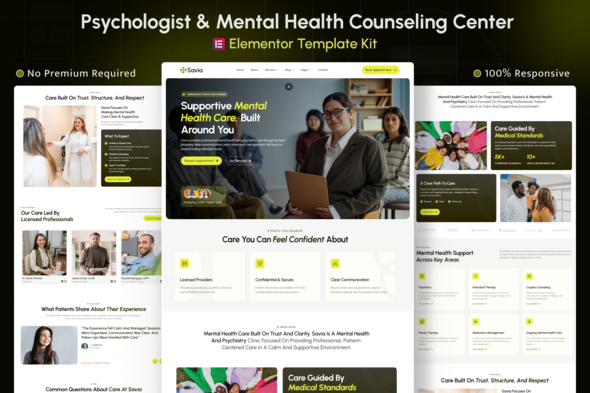
Savia – Mental Health & Psychologist Elementor Template Kit
Savia is a Mental Health & Psychologist Elementor Template Kit designed for therapy clinics, counselors, psychologists, and mental wellness practices seeking a calm, professional, and trustworthy WordPress presence. Built entirely with Elementor, it enables a structured, client-focused website without coding and supports clear service presentation, provider information, and consultation inquiries.
Target users and use cases
- Psychology & Mental Health Clinics
- Counseling & Therapy Practices
- Licensed Psychologists & Therapists
- Psychiatry & Behavioral Health Centers
- Wellness & Mental Care Providers
- In-Person & Telehealth Practices
Core features
- Built with Elementor Free (No Pro required) — usable without a Pro license while retaining full editing capabilities.
- Clean, calm, and professional layout designed for clarity and trust.
- Reusable sections for multiple clients to speed up site builds.
- Global colors and typography settings for consistent branding across pages.
- Optimized for therapy and mental health clinics to support patient confidence and accessibility.
- Easy drag-and-drop editing (No coding required) for rapid customization.
- Clean and structured layout system that streamlines content presentation.
- Fully responsive across all devices for mobile, tablet, and desktop users.
- Clear spacing and readable typography to improve readability and engagement.
- Cross-browser compatibility (Chrome, Firefox, Safari, Opera) for broad accessibility.
Templates Included
- Global Theme Style
- Home
- About
- Services
- Service Details
- Blog Archive
- Single Post
- Appointment
- Providers
- FAQs
- 404 Error
- Contact
- Header
- Footer
- Contact Form
- Appointment Form
- Newsletter
Required Plugins (included)
- Elementor
- Jeg Kit for Elementor
- MetForm
How to Import MetForm Custom Form
- While editing a page where a form should appear, open the Elementor navigator to locate the MetForm widget.
- Click Edit Form in the builder panel.
- Select New, leave blank selected then click the Edit Form button.
- Click Add Template grey folder button.
- Click My Templates tab.
- Choose your imported MetForm template, then click Insert.
- Once the template is loaded, click Update.
Setup Global Header and Footer in Jeg Elementor Kit Template
If you have Elementor Pro, set up headers and footers in Theme Builder. Pages you create with Elementor must have the Page Layout set to Elementor Full width for the global header and footer to appear.
- Go to Jeg Elementor Kit menu item > Header Template
- Click Add New Header
- Add condition > All Site and click Create
- Click the pencil icon to Edit and Elementor will appear
- Click gray folder icon to access My Templates tab
- Insert the header template.
- Customize and Save.
- Repeat for Footer
The information on this website is sourced from the
ThemeForest product page
.