Sovia - IT Solution & Services Elementor Template Kit
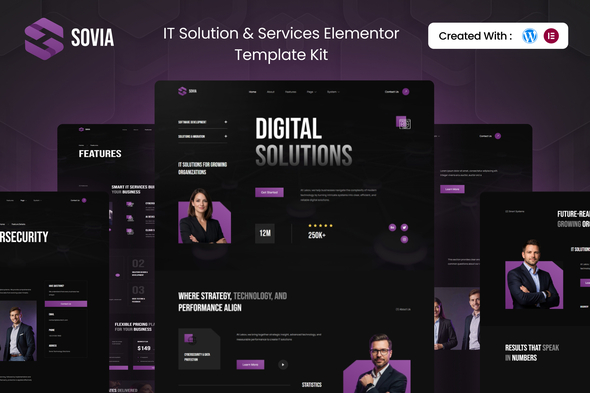
Sovia is a modern IT Solution & Services Elementor Template Kit designed to help technology companies build credible, high-performing websites without coding. Fully responsive and Elementor-based, it includes 16+ templates and a clean design to showcase services, solutions, and company information with clarity and confidence.
Features
- 16+ ready-to-use templates
- Unique & Clean Modern Design
- Modern design based on design system
- Using Free Plugins (Elementor Pro is not required)
- Fully Responsive Layout
- Fully Customizable
Templates Included
- Global Theme Style
- Homepage
- About Us
- Features
- Feature Details
- Project
- Pricing Plans
- Team
- FAQs
- Testimonials
- Contact Us
- Error
- Coming Soon
- Header
- Footer
- Metform Contact
Required Plugin(included):
- Elementor
- Elementskit Lite
- Metform
- Gum Elementor Addon
Detailed Guide
How to Upload/Install Elementor Template Kits from ThemeForest to WordPress
How to Import Metforms
If you have Elementor Pro, skip install of Metform and form blocks.
- Import the metform block templates
- Import the page template where the form appears and right-click to enable the Navigator
- Locate and select the Metform widget and click Edit Form. Choose New, then Edit Form. The builder will appear
- Click ‘Add Template’ grey folder icon.
- Click ‘My Templates’ tab.
- Choose your imported metform template, then click ‘Insert’ (click No for page settings).
- Once the template is loaded, make any desired customizations and click ‘Update & Close’ The form will appear in the template
- Click Update
Setup Global Header and Footer in ElementsKit
If you have Elementor Pro, headers and footers may be customized under Theme Builder.
- Import the header and footer template
- Go to ElementsKit > Header Footer and click Add New (if prompted with a wizard, you may click Next through it without taking any action)
- Title the header, leave Entire Site selected and toggle Activation to On
- Click the gray Edit Content button to load the builder
- Click the gray folder icon and select the header template to import, select your menu in the nav element and click Update.
- Repeat for Footer
How to Import Metforms
Follow these steps to import Metform blocks and templates when necessary:
- Open the page where the Metform block will appear
- Use the Metform widget and choose the imported Metform template
- Insert and customize as needed, then update the page
Important
Important: This Template Kit includes sample images from Envato Elements and Envato AI ImageGen. To use these images on your website, you must purchase a license from Envato Elements, or you can replace them with your own visuals.
Envato Elements collection
The information on this website is sourced from the
ThemeForest product page
.