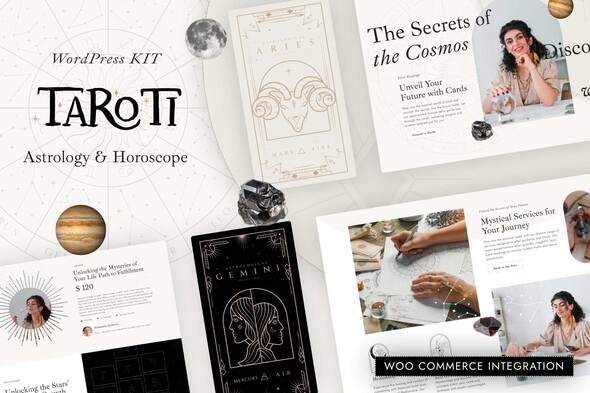
Taroti - Astrology & Horoscope Elementor Pro Template Kit
Taroti is an Elementor Pro Template Kit for quickly and easily creating websites for your business using the Elementor Page Builder plugin for WordPress. This kit is not a WordPress theme and template kits contain page content for Elementor page builder.
Features
- True no-code customization with drag and drop visual builder
- Customize fonts and colors in one place or fine-tune on individual elements
- Modern, professional design
- Fast-loading
- Works with most Elementor themes
Templates included
- Home
- About
- Prices
- Services
- Tarot Reading
- Contact
- Coming Soon
- 404 Page
- Archive
- Single Post
- Archive Products
- Single Product
- Cart
- Checkout
- My Account
- Purchase Summary
- Header
- Footer
- Post Grid
Plugins installed with kit
- Elementor (free)
- WooCommerce (optional, if you want shop functionality)
- Elementor Pro upgrade is required for some templates and features (not included)
How to Use Template Kits
This is not a WordPress Theme. Template kits contain the design data for Elementor only and are installed using the envato Elements plugin for WordPress or directly through Elementor.
Elementor Template Kits use the Envato Elements plugin to install.
Detailed Guide: How to Upload-Install Elementor Template Kits from Themeforest to WordPress
For further support, go to Elementor > Get Help in WordPress menu.
Using Loops
Note: Post content must be created by you in WordPress prior to customizing queries, preferably in at least 2 categories. Do not attempt to edit templates directly from the template library or a loop error might occur!
How to setup Blog Loops
- Go to Templates > Theme Builder and click on Loop Item and click Add New
- Click the green envato leaf to select your kit
- Locate the Post block and click Import
- Customize/ Publish
- Create your page using the desired page template to set the loop OR proceed to customize blog archive in Theme Builder
Setting Loops
- Right Click in the build area to enable the Navigator/ Structure Browser
- Locate the Loop Grid or Loop Carousel widgets and select the desired Loop Template from the Loop Item dropdown
- Set the Query of the Loop Grid or Loop Carousel to display the posts you want and be sure to give the query an ID. We recommend numbering them from 1 and up in the order displayed
Images
This Template Kit uses demo images from Envato Elements. You will need to license these images from Envato Elements to use them on your website, or you can substitute them with your own.
Envato Elements collection Z2VSDEUH3Q
The information on this website is sourced from the
ThemeForest product page
.