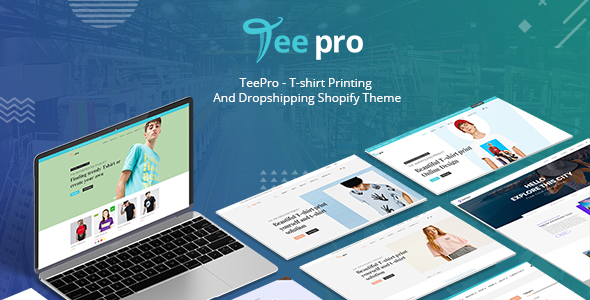
TEEPRO - T-shirt Online Designer Printing And Dropshipping Shopify Theme
TEEPRO – T-shirt Printing And Dropshipping Shopify Theme brings the proven WooCommerce-based design experience to Shopify, delivering a high-UX shopping interface and a powerful core that lets admins customize headers, footers, and layouts without coding.
Product concept and key benefits
- Inheriting the success of TeePro products in WordPress and launching this product under Shopify to better meet user needs.
- Designed with a high-standard UI/UX to deliver a complete shopping experience and fast product discovery for customers.
- Powerful Core theme enables admins to create and customize pages, headers, layouts, and product pages with minimal effort and no coding.
- Two Home page layouts, multiple Headers and Footers, and flexible install/configuration for varied site design.
- Affordable pricing combined with high-quality support from a dedicated team.
How it works for clients
- Step 1: Customers select products or search for items on Mega Menu to begin their shopping.
- Step 2: Customers can add multiple products to a compare list, view their Cart, switch between list or grid views, and share favorites on social networks.
- Step 3: Click Add to cart and proceed to checkout; the experience supports flexible display styles and smooth navigation.
How it works for shop owners
- Step 1: Download the package from ThemeForest and extract a single Teepro.zip file.
- Step 2: In the store management page, go to Online store > Themes.
- Step 3: Use Upload theme in the theme management page; if you see a message about theme limits, delete an existing theme to proceed.
- Step 4: In the Upload theme popup, select the correct Teepro.zip file from your computer.
- Step 5: After uploading, the new theme appears in More themes; publish to use it, noting that the previous theme will revert to Unpublished status.
THE POWERFUL CORE THEME
- Multiple headers: A variety of header types to customize the website layout precisely.
- Multiple Footers: Numerous footer options to suit different design needs.
- Various Google Fonts: Access over 800 fonts, stored on Google servers for fast, reliable display.
- Powerful typography feature: Easy typography and font style control to distinguish your site.
- Unlimited color variations: Dozens of color options via a Custom Color Picker.
- Multi layouts for product category: List or grid display options with customizable content.
- “Menu” layout for product category page: Unique menu-style product category presentation.
- Multi layouts for product detail page: Editable title, sidebar, meta layout, and more to beautify product pages.
- Dozens of Blog category layouts: Rich blog/magazine layouts to stand out.
- Beautiful blog details style and layout: Design your blog pages with multiple styles.
- Printcart Team SimpleModal Login: Friendly login interface.
- Custom Element style: Easy element styling for feature enhancement.
VISUAL COMPOSER
Core capabilities
- Intuitive Drag and Drop Interface: Lightweight, user-friendly page creation without coding.
- Easily Extendable: Third-party plugins can be created and shared for themes.
- Frontend Editor: See changes in real time with a What You See Is What You Get experience.
- Backend Editor: Full content management on the backend with essential options.
- Object Oriented Code: Modern programming patterns for reliable results.
- Multilingual Ready: Includes .po and .mo translation files for many languages.
- Template System and Library: Save, reuse, and publish templates; access free layout templates.
- Responsive Design: Control over responsive behavior and layout, with live previews.
- User Role Manager: Manage permissions for drag & drop, templates, and elements.
- Custom Post Types Support: Works with standard and custom post types.
- Lifetime Update – Free of Charge: Automatic updates at no extra cost.
- Professional Dedicated Support: Access for help from a dedicated team.
- Shortcode Mapper: Reuse third-party shortcodes within VC menus.
Design and SEO
- Design Options: Borders, margins, paddings, radius, backgrounds, and color alpha controls.
- Multi-language Support: Works with qTranslate X, Polylang, and WPML for multilingual sites.
- SEO Friendly: Compatibility with popular SEO plugins like Yoast.
- Full Width and Height Rows: Stretch backgrounds and align content precisely.
- Parallax Background for Rows and Columns: Parallax effects with design options and media.
Other capabilities
- SHOPIFY WISHLIST features: multiple wishlists, wishlist sharing, public wishlist search, add-to-cart from wishlist, and more.
SHOPIFY WISHLIST
- Create multiple wishlists to categorize products.
- Request estimates for wishlist products from administrators.
- Search and manage wishlists publicly or privately.
- Add some or all wishlist items to cart with a single action.
- Display a table of popular wishlist items for targeted offers.
- Provide links to create, manage, and search wishlists from the table.
- Invite unlogged users to register to access wishlist features.
- Send promotional emails related to wishlist items.
- Show the date a product was added to a wishlist.
SHOPIFY QUICK VIEW
- Choose which type of button to display (quick view button or customized icon) and where to place it.
- Browse products within a quick view modal without leaving the page.
- Choose which information to display and the display method (modal or cascading).
- Access the product detail page from quick view via an additional button.
- Share quick views on social media and customize the modal styling.
- Place quick view with shortcodes on any page to show a specific product.
SHOPIFY COMPARE
- Show comparisons on a dedicated page linked in the shop menu.
- Compare elements by category to reduce user doubt.
- Exclude specific categories from comparisons or activate only selected ones.
- Add an image to the comparison table header for branding.
- Always compare complete product information; hide empty fields automatically.
- Share comparisons on social networks.
- Show related products via a slider under the table.
- Customize style and colors to match site layout.
- Customize attributes to appear in the comparison tables.
- Create a table with desired products using a generated short-code.
COLOR SWATCH PLUGIN
- Swatch size or color attributes with color blocks, images, or text variations.
- Support for circular or square swatches and image-based swatches across categories and archives.
- Inbuilt color/value management for attributes with mobile compatibility.
- Direct variation links and hover image updates on category/archive pages.
PRICE MATRIX EXTENSION (Buy separately)
- Enable price matrix extension in Admin panel and customize colors for background, text, delimiters, and more.
- Preview the matrix in the back-end before frontend display.
- Drag and drop attributes to define vertical or horizontal directions and groupings.
- Display the price matrix on product detail pages for buyer clarity.
- Add chosen price details to the cart and proceed to checkout with complete information.
ORDER UPLOAD IMAGE (Buy separately)
- Upload files directly on the product details page; bind images or files to individual products.
- Support multiple file types (jpg, jpeg, png, txt, doc, docx, xls, xlsx, psd, cdr, etc.).
- Ajax-based multi-file uploads without page refresh; delete files during upload with one click.
- Uploaded files generate thumbnails; no login required to upload.
- Uploaded files display on checkout and in the confirmed order email; used as a custom WordPress product field (where applicable).
- Admins configure allowed file types and upload window dimensions.
ONLINE PRODUCT DESIGNER PLUGIN SHOPIFY (Buy separately)
Developing printing technology enhancements for easy, design-driven product customization directly on Shopify. The plugin enables customers to create designs for T-shirts, mugs, posters, and more with an intuitive online designer workflow.
Why use this product – product benefit
- A new powerful design tool that supports multiple printing products, providing a complete printing business solution.
- A responsive design studio with an extensive artwork gallery and flexible options like clipart, Google font, color, style, text, and image personalization.
- Allows customers to add text, numbers, or personalized images; simplifies design-to-print workflow for all customer types.
- Easy installation with a final outcome suitable for printing; supports sharing designs via social channels and admin price management and order handling.
Who should use this WooCommerce Online Designer
- Print Service Providers: screen printing, DTG, or other printing methods with vendor management.
- Print Brokers: online quotes, artwork approvals, and outsourced jobs with vendor collaborations.
- In-plants: department and user management with artwork approval workflows.
- Marketing Organizations: branded storefronts with templates and compliance across the board.
- Trade Printers: storefronts, commissions, and campaigns across regions.
- Sign Printers: ready-made templates for personalization and online file uploads.
How it works for clients
- Go to the product detail page and click Start design to begin.
- Add text, artwork, upload images, and customize color, size, font, effects, and more; use brush tools to draw signatures.
- Preview with zoom, adjust layer order, and finalize design before adding to cart.
- Administrators review the design and notify the customer by email of acceptance or rejection; designers can revise until approved.
Full feature detail for Online Designer (WooCommerce WordPress)
- ADD TEXT AND CURVED TEXT: color, font, size, curvature, shadows, outlines, alignments, backgrounds, and patterns with extensive customization options.
- ADD ART FEATURES: color customization, move/resize/rotate/delete, multi-art support, and layering.
- UPLOADING IMAGES: upload from local, URL, Facebook; multiple sources; temporary save; supports PNG/JPG/GIF with zoom/rotate.
- FREE-HAND DRAWING: brushes for signature creation, geometric shapes, color/opacity control, and rotation.
- ADD QR CODE: generate and add QR codes to designs with movable/zoomable images.
- POWERFUL LAYERS: drag-and-drop layer management, show/hide, reorder, and multi-layer editing.
- POWERFUL HELP TOOL: include extension tools such as next/previous, zoom, alignment, and layer operations.
- EASY PREVIEW WITH ZOOM FUNCTION: full-screen popup and detailed zoom for design review.
- GET PHOTOS FROM DROPBOX, GOOGLE DRIVE: login and import photos from cloud storage for designs.
- ASSIGN A USER AS A DESIGNER: designate contributors to create templates.
- SHARE DESIGN: share completed designs via social networks or email.
- DESIGNER PROFILE TEMPLATES PAGE: designer profiles with templates list.
- SAVE DESIGN FOR LATER: store designs in My designs for future use across products.
- EXPORT DESIGN TO SVG: export editable SVG files for Illustrator/CorelDRAW.
- EXPORT DESIGN TO JPG HIGH RESOLUTION, CMYK MODE AND ICC PROFILE (REQUIRED: PHP IMAGICK API): ready-to-print exports including PDFs.
- ORDER AGAIN THE PREVIOUS ORDER WITH DESIGN FILE: re-order past designs quickly.
- GET DESIGN FROM WISHLIST, CART AND DESIGN STORE: reuse saved designs across carts and stores.
- UPLOAD DESIGN WITHOUT CUSTOM DESIGN: allow simple design uploads without customization.
- UPDATE THE GALLERY PAGE: improved gallery with filters for categories/designers/products and quick view.
Additional features
- Easy to use and WooCommerce-compatible; fully responsive across devices.
- Flexible fonts, product management, and design visibility in cart/order and admin notifications.
- Multi-language and multi-currency support; rapid visual editing and export options.
- Enhanced admin capabilities for viewing customer designs and managing approvals.
OTHER FEATURES
- Multi-language and currencies: translates and handles currency exchange for flexible localization.
- Quick View: improved product previews with short blurbs of key features.
- Responsive: optimized for desktop, tablet, and mobile.
- Slider Revolution: diverse slider collections for various business types.
- SEO Friendly: built with SEO best practices and compatibility with popular SEO plugins.
THEME UPDATES & SUPPORT
- Free updates after purchase; ongoing improvement to remain the best Shopify theme.
- Update guarantee: guidance provided in user guides for newer versions; buyers responsible for upgrades.
- Ticket Support: private ticket system with support policy guidance.
- Support Period: valid support period from ThemeForest; renew if expired.
WORDPRESS TEEPRO THEME USAGES
- Presales questions: post in ThemeForest comments.
- Template User guides: online format with regular updates.
- Live installation guidance on Shopify-ready sites; quick-start installation packages.
- Sample data included as placeholders; installation services available for demo data setup.
SHOPIFY TEEPRO THEME OUTSOURCING
For customization, full-site setup, or ongoing maintenance, contact the team at [email protected].
DISCLAIMERS
- Refund Policy: adheres to ThemeForest policies; refunds not provided for mistaken HTML/WordPress/Magento Teepro purchases.
- Media Images: demo media may be copyrighted and not included; placeholders can be used.
- Commercial WordPress plugins: some plugins are sold separately; buyers must obtain separate licenses and support may be limited for third-party plugins.
Thank you for reading. For questions, please email [email protected].
Changelog
Version 1.1.0 (10 May 2023)
The information on this website is sourced from the
ThemeForest product page
.