Tmart - Minimalist Shopify Theme
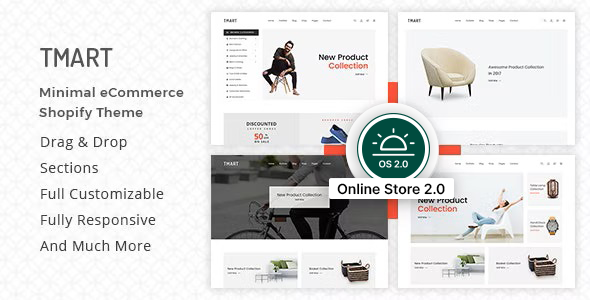
Tmart – Minimalist Shopify Theme is a clean, modern, and flexible Shopify storefront solution designed to deliver a vibrant and elegant shopping experience with a robust feature set and Shopify Online Store 2.0 compatibility.
Key capabilities and feature highlights
- Currency
- Newsletter Popup
- Notification Bar
- Ajax Cart
- Wishlist
- Brand Logo
- Pagination
- Testimonial
- Team Member
- Contact Form
- Contact Map (Google map API)
- Shortcodes
Theme customization and layout capabilities
- Easy Theme Customization Options
- Quick Install
- No coding knowledge required
- All features and functionalities are included in every store
- Every sections can use more times
- Very easily sections moved by drag & drop
- Create website without touching a line of code
- Full cross-browser compatibility
Header and navigation customization
- Header Settings
- Logo Custom Width Options
- Logo Position- Left/Center
- Header Sticky/Non-Sticky
- Header Style- Transparent/Non-Transparent
- Wrapper Style- Full Width/Box
- Dropdown Menu
- Mega Menu
- Mega Menu With Image
- Offset Menu/Sidebar Menu
- Category Menu
- Social Media
- Currency
- Email Newsletter
- Instafeed
Footer and content areas
- Footer Settings
- 5+ Footer Content
- Contact Information
- Menu
- Newsletter
- About Information
- Social Media
- Section Title
- Title
- Sub-title & Content
- Title Alignment
Visual sections and slider configurations
- Slider Settings
- 8+ Slider With Unique Style
- Slider Content Position- Left/Right
- Add Unlimited Slide
- Scroll Fade In Effect Yes/No
Product showcase and layout options
- Featured Product Settings
- Featured Product
- Featured Product With Carousel/Masonry
- Product Style- 6 Styles
- Product Column Options
- Product Column Options for Tablet Device
- Product Limit Options
- View More Button
- Featured Product Settings (continued)
- Scroll Fade In Effect Yes/No
Banner and promotional sections
- Banner Settings
- Single Banner
- Multiple Banner/ Multiple Banner With Masonry
- Discount Banner
- Banner Column Options
- Scroll Fade In Effect Yes/No
Product tab and tabbed content
- Tab With Product Settings
- Tab List Alignment- Left/Right/Center
- Add Unlimited Tab List
- Tab List Margin Bottom
- Product Column Options
- Product Column for Tablet Device
- Product Limit Options
- Product Margin Bottom
- Product Style- 6 Styles
- View More Button
- Scroll Fade In Effect Yes/No
Blog, portfolio, and media settings
- Latest Blog Settings
- Blog Selection
- Blog Column Options
- Blog Limit Options
- Blog Column for Tablet Device
- Scroll Fade In Effect Yes/No
Shop page and collection controls
- Shop Page Settings
- Product Grid and List View
- Product Style- 6 Style
- Product Margin Bottom
- Product Column Options
- Product Column for Tablet Device Options
- Product Limit Options
- Pagination/Loadmore Options
- Pagination Options
- Pagination BG Color
- Pagination/Loadmore Button Margin Top
- Load More Button
- Load More Button Name
- Button Border Color
Collections, filters, and sorting
- Collection SideBar
- Sidebar (show/hide)
- Sidebar Position (Left/Right)
- Categories (show/hide)
- Vendors (show/hide)
- Types (show/hide)
- Color (show/hide)
- Size (show/hide)
- Tags (show/hide)
- Collection Sorting
- Sorting (show/hide)
- Short By (show/hide)
- Filter Button (show/hide)
- Tab Bar (show/hide)
- Filter Menu Margin Bottom
- Scroll Fade In Effect Yes/No
Single product page controls
- Single Product Page Settings
- Product Options
- Product Thumbnail (Left/Bottom)
- Product Short Description
- Product Variants
- Product Share
- Wishlist Button
- Email Button
- Share Button
- Product Tab
- Tab Section (show/hide)
- Tab More Info (show/hide)
- Tab Review (show/hide)
- Tab Comment (show/hide) (Disqus comments / Facebook comments)
- Related Product
- Show/Hide
- Product Style- 6 Styles
- Product Column Options
- Product Column for Tablet Device Options
- Product Limit Options
- Scroll Fade In Effect- Yes/No
Portfolio, blog, and content pages
- Portfolio Page Settings
- Portfolio Style- 2 Styles
- Portfolio Column Options
- Portfolio Post Limit Options
- Pagination/Loadmore Options
- Pagination Options
- Pagination BG Color
- Pagination/Loadmore Button Margin Top
- Scroll Fade In Effect Yes/No
Single portfolio and post settings
- Single Portfolio Page Settings
- Content Position (Left/Right/Bottom)
- Social Share (Show/Hide)
- Related Portfolio
- Column Option
- Column Option for Tablate Device
- Post Limit
Blog and page scaffolding
- Blog Page Settings
- Blog Column Options
- Blog Post Limit Options
- Pagination/Loadmore Options
- Pagination Options
- Pagination BG Color
- Pagination/Loadmore Button Margin Top
- Load More Button
- Load More Button Name
- Button Border Color
Sidebar, search, and post navigation
- Sidebar (Show/Hide)
- Position (Left/Right)
- Search Bar (Show/Hide)
- Recent Posts (Show/Hide)
- Archive (Show/Hide)
- Tags (Show/Hide)
- Scroll Fade In Effect Yes/No
Single blog post controls
- Single Blog Page Settings
- Comment Post Limit
- Sidebar (Show/Hide)
- Position (Left/Right)
- Search Bar (Show/Hide)
- Recent Posts (Show/Hide)
- Archive (Show/Hide)
- Tags (Show/Hide)
- Scroll Fade In Effect Yes/No
About page and team dynamics
- About Page Settings
- About Content Section (Show/Hide)
- About Content
- Title (Show/Hide)
- Image (Show/Hide)
- Text (Show/Hide)
- Choose Us Section (Show/Hide)
- Video URL + Background Image (Show/Hide)
- Icon (Show/Hide)
- Team Section (Show/Hide)
- Team Section Title (Show/Hide)
- Team Section Content (Show/Hide)
- Team Column Option (Show/Hide)
- Add Unlimited Team Member (Show/Hide)
- Team Member Profile URL (Show/Hide)
- Team Member Social URL (Show/Hide)
Testimonials and contact integration
- Testimonial Area (Show/Hide)
- Client Name (Show/Hide)
- Client Image (Show/Hide)
- Client Designation (Show/Hide)
- Client Comment (Show/Hide)
Contact page essentials and analytics
- Contact Page Settings
- Contact Information- Show/Hide
- Map- Show/Hide
- Add Location
- Add Address
- Map Marker Image
- Map Marker Animation Enable/Disable Option
- Contact Form (Show/Hide)
- Google Analytics
- Enable/Disable
- Tracking ID
Notifications, popups, and global settings
- Notification Bar Settings
- Top Notification Bar Show/hide
- Top Notification Text
- Color Options
- Gradient Options
- Overlay Options
- Background Image Options
- Button and it’s Options
Preloader, extras, and typography
- Preloader Settings
- Enable/Disable
- 20+ style
- Color Options
- Included Shortcode
- Product Short Description
- Product Full Description
- Portfolio Video
- Features List
- Valid HTML5, CSS3
- Neat, clean and simple design
- Creative and Modern Design
- Unlimited Color Variation
- Faster drag and drop
- Fully Responsive
- Easy To Customize
- Cross Browser Optimization
- Google Fonts
- Font Awesome Icon
- Well Documented
Included path to updates and version history
- Version: 3.0.3- Date: 09-08-2022 — Added: Predictive Search
- Version: 3.0.2- Date: 17-01-2022 — Migrated to Shopify Online Store 2.0; All sections supported on every page; Drag & Drop on every page; You can add or remove any section as per your requirement; You can create any page using the tmart default sections (no page builder required); Updated: Product page for Online Store 2.0; Drag and drop supported all elements of the product page; FAQ/Accordion added on the product page; Added: Product Unit price (For Germany and Japan Seller); Fixed: Collection Sidebar URL filter issue
- Version: 3.0.1- Date: 30-06-2021 — Updated: Wishlist updated; Updated: jQuery Version; Fixed: Currency Issue
- Version: 3.0.0- Date: 23-05-2021 — Added: Lazyload functionality; Improved: Theme speed
- Version: 2.0.9- Date: 10-09-2020 — Added: New Instagram; Integrated: Theme editor - Shopify API; Modified: Sections JS
- Version: 2.0.8- Date: 01-07-2020 — Modified: Category Menu
- Version: 2.0.7- Date: 05-03-2020 — Modified: Logo Option
- Version: 2.0.6- Date: 13-01-2020 — Modified: Collection Sidebar
- Version: 2.0.5- Date: 12-12-2019 — Added: Product Variant Select Option; Modified: Product Variant
- Version: 2.0.4- Date: 21-08-2019 — Added: Dynamic Checkout Button ('Buy it now'); Modified: Single Product Popup Video
- Version: 2.0.3- Date: 28-04-2019 — Updated: 1. Newsletter; Updated: 2. Discount banner
- Version: 2.0.1- Date: 20-01-2019 — Fixed: Affiliate product issue
- Version: 2.0.0- Date: 27-11-2018 — Added: Custom Content Section; Custom HTML Section; Custom Page Section; Rich Text Section; Video Banner Section
- Version: 1.0.9- Date: 29-10-2018 — Added: Custom menu in collection sidebar and filter
- Version: 1.0.8- Date: 17-10-2018 — Added: Product zoom and product image popup
- Version: 1.0.7- Date: 11-09-2018 — Updated: The product description; Documentation updated
- Version: 1.0.6- Date: 04 August, 2018 — Swatch color variant updated; Add to cart button updated
- Version: 1.0.5- Date: 23 July, 2018 — Video slider section updated
- Version: 1.0.4- Date: 10 May, 2018 — Fixed: Custom logo of Checkout page issue
- Version: 1.0.3- Date: 17 April 2018 — Added: Custom HTML section
- Version: 1.0.2- Date: 04 April 2018 — Added: Video and Image Slider
The information on this website is sourced from the
ThemeForest product page
.