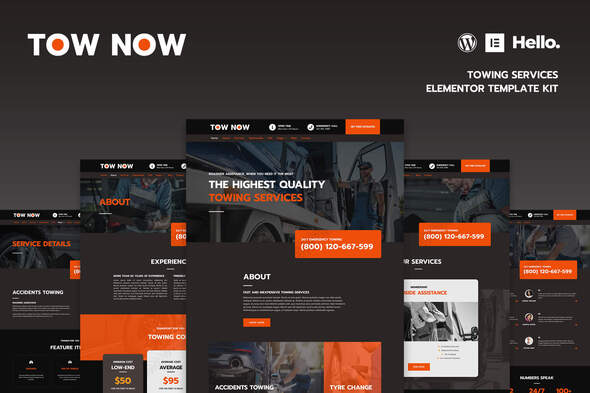
Tow Now - Towing Services Elementor Template Kit
Tow Now is a modern Elementor Template Kit for car services, designed to help you quickly build a responsive website with 29 templates and global kit styles. It operates without Elementor Pro or paid plugins, and includes a header/footer builder and various blocks for flexible, site-wide customization.
Core capabilities and compatibility
- True zero coding: styles and effects are done within the Elementor panel
- Fully compatible with Elementor free version, NO Elementor Pro required
- Total 29 templates, includes full page templates and useful blocks
- Global theme styles for an easy site-wide style change
- Header and footer builder for flexible layout and design
- Mobile-friendly and perfectly compatible with all kinds of mobile devices
- No paid plugins required, saving you budget
- Built with Elementor Page Builder addon so functionality updates are straightforward
Templates included
Pages
- Home
- About
- Services
- Testimonials
- FAQ
- Blog
- Contact
- Service Details
- Single Post
- 404 Page
- Coming Soon
Blocks
- Header
- Footer
- Services Grid
- Services List
- Price Boxes
- Join Membership
- Statistics
- Testimonials
- FAQ
- Logos Slider
- Features
- Contact Info
- Call Box
- Message Box
- Countdown Box
- Contact Form
- Subscribe Form
Required addons installed with the kit
- Essential Addons for Elementor
- Elementor
- MetForm
How to install
- Install and Activate the “Envato Elements” plugin from Plugins > Add New in WordPress
- Do not unzip the kit package after download
- Go to Elements > Installed Kits and click the Upload Template Kit button
- Before importing a template, ensure the Install Requirements button is clicked to activate required plugins
- For best results, do not import more than one template at a time
Detailed guide
For further support, go to Elementor > Get Help in the WordPress menu.
How to import Metforms and content blocks
- Import the metform block templates
- Import the page template where the form appears and right-click to enable the Navigator
- Locate and select the Metform widget and click Edit Form. Choose New, then Edit Form. The builder will appear
- Click Add Template (grey folder icon)
- Click My Templates tab
- Choose your imported metform template, then click Insert (click No for page settings)
- Once the template is loaded, make any desired customizations and click Update & Close; the form will appear in the template
- Click Update
Global header and footer setup
- Import the header and footer template
- Go to Appearance > Header Footer and click Add New
- Give it a title and select Header, display on Entire Site and click Publish
- Click Edit with Elementor
- Click the gray folder icon to access My Templates tab and select the header template to import and Update
- Repeat for the Footer
Support
If you need any help, come HERE and message us directly!
Images and licensing
This Template Kit uses demo images from Envato Elements. You will need to license these images from Envato Elements to use them on your website, or you can substitute them with your own.
- https://elements.envato.com/image-5EM456S
- https://elements.envato.com/image-9WR6HE3
- https://elements.envato.com/image-P9CWJFG
- https://elements.envato.com/image-X8J4QDN
- https://elements.envato.com/image-PGT96JC
- https://elements.envato.com/image-XWN9LTC
- https://elements.envato.com/image-PPNZP4D
- https://elements.envato.com/image-NZGY9DP
- https://elements.envato.com/image-JSNU2YL
- https://elements.envato.com/image-P46CHJA
- https://elements.envato.com/image-64WK7FD
- https://elements.envato.com/image-VQS7YR3
- https://elements.envato.com/image-FDRTHGP
- https://elements.envato.com/image-PE9HH3A
- https://elements.envato.com/image-PH465MQ
- https://elements.envato.com/image-PJG4ZF3
- https://elements.envato.com/image-J69LFXZ
- https://elements.envato.com/image-KW9WRCG
- https://elements.envato.com/image-P5LXZFR
- https://elements.envato.com/image-PX7KWPD
- https://elements.envato.com/image-X8NHAS2
- https://elements.envato.com/image-ZWSVXFB
- https://elements.envato.com/image-VA6END5
- https://elements.envato.com/image-XGP2VJ
- https://elements.envato.com/image-BPVFDX9
- https://elements.envato.com/image-KA3UEHD
- https://elements.envato.com/image-G45VA5F
- https://elements.envato.com/image-6AUNV2Y
- https://elements.envato.com/image-5QUFESD
- https://elements.envato.com/image-WJN8ZGB
- https://elements.envato.com/image-W3FUJGK
The information on this website is sourced from the
ThemeForest product page
.