Translantic - Translation Service Agency Elementor Template Kit

Created: 4 years ago
(0.00 Rating)
79 Sales

Translantic - Translation Service Agency Elementor Template Kit

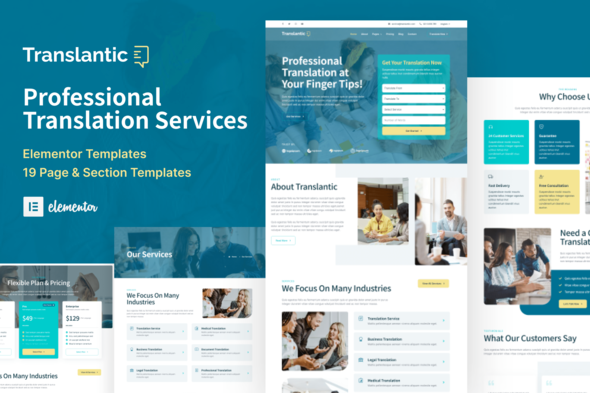
Translantic is an Elementor template kit designed to help translation services or content writing agencies establish an online presence with WordPress and Elementor. It includes 19 pre-defined templates and is optimized for the Hello Elementor theme, with some templates requiring Elementor Pro.

What is Translantic

Translantic is an Elementor template kit to help you create an online presence for your translation service company or agency using WordPress and Elementor. You could also use it for your content writing service.

Kit Contents

Translantic includes 19 pre-defined page & section templates and is optimized for use with the free Hello Elementor theme, but may be used with most themes that support Elementor.

  • 19 pre-defined page & section templates
  • Global Kit Styles
  • Global Header
  • Global Footer
  • Homepage
  • About Us
  • Our Services
  • Service Detail
  • FAQ
  • Pricing Plan
  • Our Team
  • Join Our Team
  • Testimonials
  • Blog
  • Archive
  • Single Post
  • Contact Us
  • Coming Soon
  • 404 Page
  • Popup Banner

Theme & Plugins Compatibility

  • Optimized for the free Hello Elementor theme but may be used with most themes that support Elementor.
  • This kit requires the Elementor Pro upgrade for some templates and features (not included).

Design & Quality

All the pages and sections in Translantic Elementor template kit are professionally crafted and well designed.

How to Install

  1. Install and Activate the “Envato Elements” plugin from Plugins > Add New in WordPress
  2. Do not unzip
  3. Go to Elements > Installed Kits and click the Upload Template Kit button.
  4. Before importing a template, ensure the Install Requirements button is clicked to activate required plugins
  5. For best results, do not import more than one template at a time.
  6. Go to Pages and create a new page and click Edit with Elementor
  7. Click the gear icon at lower-left of the builder to view page settings and choose Elementor Full Width and hide page title
  8. Click the gray folder icon to access My Templates tab and then Import the page you’d like to customize

Detailed Guide & Support

For further support, go to Elementor > Get Help in WordPress menu.

Envato Elements Demo Images

This Template Kit uses demo images from Envato Elements. You will need to license these images from Envato Elements to use them on your website, or you can substitute them with your own.


The information on this website is sourced from the ThemeForest product page .

Customer Reviews

0.0
No reviews yet

No reviews yet

Be the first to review this theme!

No support information available

Please contact the author directly for support inquiries.

Visit Author's Page